
What Is Intelligent Document Processing? Definition, Process, Benefits, and Use Cases
Your team is still keying data from documents by hand — and it’s costing more than you think. Learn the specifics of intelligent document processing, how it differs from OCR, and how it automates the slowest part of document-intensive work.
- Intelligent document processing
July 09, 2026
10 min read
 AI Overview
Intelligent document processing uses OCR, machine learning, and NLP to capture, validate, and route data from invoices, claims, and contracts into business systems, unlike basic OCR, which only reads text. Core stages include classification, extraction, validation, and downstream routing without manual handling. Manual data entry error rates run between 1% and 5%, and processing a single invoice manually can cost over $15 once exceptions are factored in.

A single keystroke error in a manually processed document can cost more than a year of automation would. Studies of manual data entry consistently put human error rates between 1% and 5% — and at enterprise document volumes, a fraction of a percent is still thousands of mistakes a month, each one quietly creating rework, late payments, or compliance gaps.
This is the quiet problem with manual document processing: it doesn’t fail loudly. It fails one miskeyed field, one missed line item, one untracked contract renewal at a time — until the accumulated cost becomes a number nobody wants to put in front of the board.


Organizations are processing more documents than ever, in more formats than ever, and the team handling them isn’t growing at the same rate. Knowledge workers spend a substantial share of their time — by some measures up to half — searching for, handling, and re-entering information that already exists in documents. That’s not a productivity gap. That’s a structural one.
What Is Intelligent Document Processing — and Why It’s Replacing Manual Workflows Faster Than Most Predicted
The global market for intelligent document processing has been growing at double-digit rates, with multiple analyst firms projecting it to expand severalfold within this decade. That growth isn’t driven by hype. It’s driven by a simple math problem: manual document-handling costs are rising, document volumes are rising, and the gap between them is becoming a line item that executives can no longer ignore.
Here’s the intelligent document processing definition that matters. IDP is an AI-powered approach to capturing, classifying, extracting, validating, and routing data from business documents — across any format, structure, or source — so that data flows directly into downstream systems without manual handling.
Put plainly, the intelligent document processing meaning comes down to this: documents contain information businesses need to act on, and IDP turns that information into structured, verified data through intelligent data extraction at the point of ingestion — not at the end of a manual review cycle that introduces delay and error at every step. That tight coupling of reading, understanding, and routing is the foundation of intelligent document automation.
To understand what is intelligent document processing in practice, start with the baseline it replaces. Processing a single invoice manually has been estimated to cost anywhere from a few dollars to over $15 once you account for data entry, verification, exception handling, and approval routing — and to take days when exceptions are involved.
Intelligent document processing combines several technologies — OCR, machine learning, natural language processing, and computer vision — to handle documents the way a skilled analyst would, but faster, at scale, and with a complete audit trail. Unlike rule-based systems, which break down the moment a supplier changes an invoice template, IDP systems learn from the documents they process and improve over time. That’s intelligent document processing explained without the jargon: software that reads a document, understands it, checks it, and acts on it.
If you’re evaluating intelligent document processing services for your own workflows, the distinction between reading and processing matters from day one.
Why Traditional Document Processing Is No Longer Enough
Many companies still process their documents the way they did 15-20 years ago: someone opens the document, reads it, types the relevant fields into a system, and moves on. It works until the volume grows, the team doesn’t, and the error rate becomes a business risk. The problems are structural:
Volume doesn’t scale with headcount.
A team that handles 500 invoices a month can’t handle 5,000 without hiring five times as many people. Manual processing is inherently linear.
Formats are inconsistent.
Suppliers use different invoice templates. Insurers submit claims in different structures. PDFs, scanned images, emails, handwritten forms — a human adapts; a rule-based system breaks.
Errors compound downstream.
A miskeyed account number, a missed line item, a wrong date — these don’t just create rework, they create downstream failures: delayed payments, compliance gaps, incorrect records.
Audit trails are weak.
Who touched which document, when, and what did they change? In a manual process, this is often impossible to answer with confidence.
AI initiatives stall on data quality.
Organizations trying to build analytics, forecasting, or AI-driven workflows quickly discover that their document data is too inconsistent and too unstructured to use. By common industry estimates, around 80% of enterprise data is unstructured — and a large share of it sits locked inside documents. Document processing automation is often the prerequisite for everything else.
Traditional OCR addressed part of the problem — it converted scanned text into machine-readable characters. But character recognition alone can’t understand context, validate data, classify documents, or route information anywhere. Rule-based systems can’t keep up with format variance, whereas machine learning document processing adapts where static rules break. OCR is a reading tool; it is not a processing pipeline.
How Does Intelligent Document Processing Work?
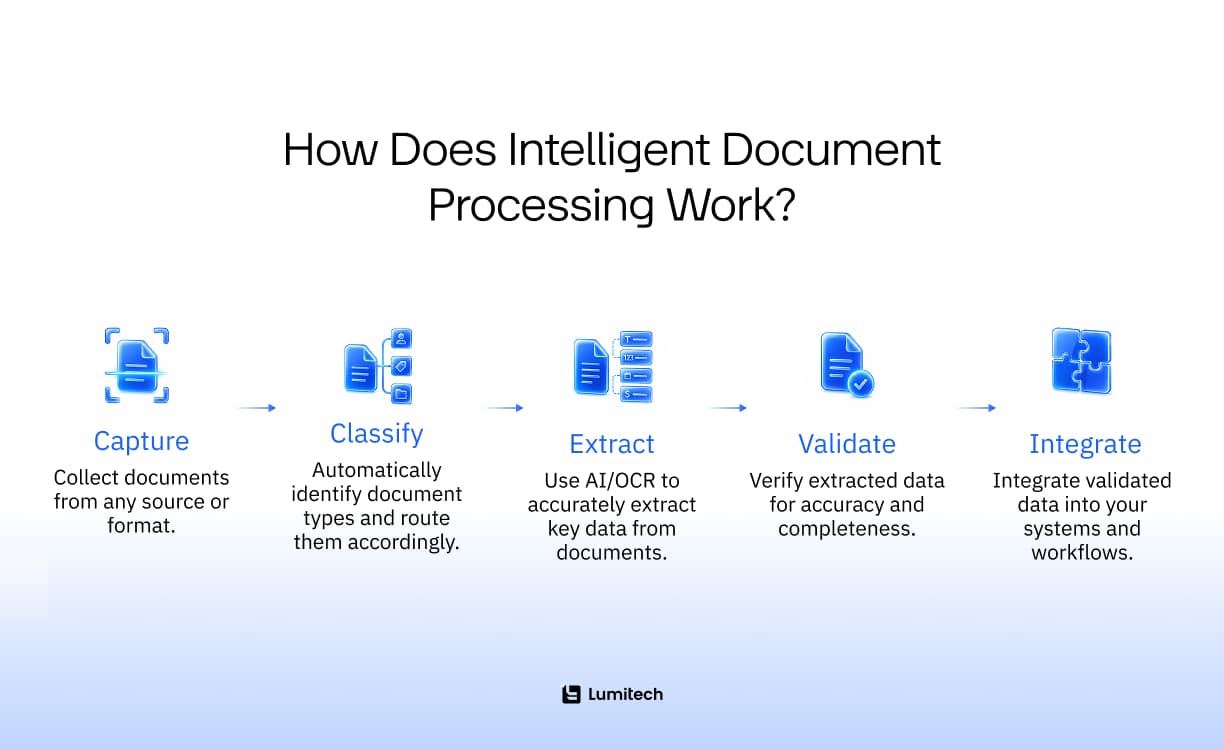
So, how does intelligent document processing work in practice? It follows a consistent, logical sequence regardless of the underlying technology stack. The pipeline begins with document capture and data extraction, then moves through validation and routing — and the whole sequence maps directly to where automation creates value and where human oversight still belongs.
The intelligent document processing process breaks into five stages, and the five intelligent document processing steps below make up the core intelligent document processing workflow. We call this framework the 5-Stage Document Intelligence Workflow.
1. Capture
Documents enter the pipeline from any source: email attachments, scanned PDFs, uploaded files, API feeds, document management systems, or direct integrations with ERP and CRM platforms. The capture layer normalizes these inputs — converting images to processable formats, handling rotation and quality correction, and preparing files for classification.
The key principle at this stage is that the system accepts documents as they arrive, not as they should have arrived. Multi-page PDFs, low-resolution scans, handwritten forms — capture handles the variance before anything else begins.
2. Classify
Before extraction can happen, the system needs to understand what kind of document it’s dealing with. An invoice has different fields from a contract. A claim form has different logic than a purchase order.
Accurate document classification and extraction depend on each other — classification uses machine learning models trained on historical documents to identify document type, sometimes down to a specific template or vendor. Classification accuracy is what separates IDP from generic OCR: a system that misclassifies a credit note as an invoice will extract the wrong fields with high confidence, which is worse than extracting nothing.
3. Extract
With the document classified, the extraction layer identifies and pulls the relevant data fields — line items, dates, totals, parties, reference numbers, clauses, and codes. This is where NLP and computer vision work together: NLP understands the semantic meaning of text (distinguishing “invoice date” from “due date,” for example), while computer vision handles tables, checkboxes, handwriting, and non-standard layouts.
Automated data extraction from documents at this stage goes significantly beyond what OCR alone can provide. The system doesn’t just read text — it understands structure, context, and relationships between fields.
4. Validate
Before anything moves downstream, extracted data is validated against business rules, reference databases, and confidence thresholds. A supplier ID is matched to the vendor master, a total is reconciled against line-item sums, and a date is checked against the expected format and range. This is where extraction becomes trustworthy.
Fields that fall below confidence thresholds, or that fail validation rules, are flagged for human review. This is the human-in-the-loop layer — not a workaround, but a deliberate design choice. The system handles high-confidence cases automatically and routes exceptions to a reviewer with the context needed to resolve them quickly.
5. Integrate
After being validated, the data goes to where it will be used — ERP, accounting platform, claims system, CRM, data warehouse, or any downstream workflow. Integration runs in real time or in batches, with a full audit log that tracks everything extracted, validated, flagged, and changed.
The document isn’t just processed — it automatically triggers the next step in the business process. Taken together, that is how does intelligent document processing work end-to-end: capture, classify, extract, validate, and integrate.
Intelligent Document Processing Technologies
Intelligent document processing technology isn’t a single tool — it’s a stack of complementary capabilities, each solving a different part of the document understanding problem. Each layer of intelligent document processing technology addresses a limitation that the layer below it can’t.
OCR
Optical character recognition converts scanned images and PDFs into machine-readable text. It’s the foundation layer — everything else depends on having readable text to work with. Modern OCR has improved significantly and can handle cursive, mixed fonts, and degraded document quality, but it still produces raw text without structure or meaning.
Machine Learning
ML models are trained on labeled document datasets to classify document types, identify field locations, learn vendor-specific layouts, and improve extraction accuracy over time. Unlike rule-based systems, ML-based extraction adapts — when a supplier changes their invoice template, the model updates rather than breaking. This is the same family of techniques behind Lumitech’s broader AI and ML services and data science services, applied specifically to documents.
Natural Language Processing
NLP gives the system language understanding. It identifies entities (names, dates, amounts, addresses), understands context (“net 30” means payment terms, not a quantity), and can extract meaning from dense, unstructured text — contract clauses, medical notes, policy descriptions. Unstructured document processing is only possible because of NLP.
Computer Vision
Computer vision handles the visual structure of documents: tables, form fields, checkboxes, signatures, stamps, and spatial relationships between elements. It understands that a number in a specific position on a specific document type is likely a VAT number — even if the label is missing or in a different language.
Validation Rules and Confidence Scoring
Every extracted field is assigned a confidence score. Below a defined threshold, the field is routed for human review. Validation rules add business logic on top: cross-field checks, database lookups, format validation, and range constraints — closely related to how AI anomaly detection flags values that fall outside expected patterns. Clear confidence scoring is also what enables transparency in AI: every automated decision can be traced and explained.
Human-in-the-Loop Review
Humans don’t disappear from the pipeline — they focus where they add value. A reviewer sees only the flagged exceptions, presented side by side with the original document and the extracted data, and confirms or corrects the field. Every correction feeds back into the model, improving future accuracy.
Integrations and APIs
An intelligent document processing system connects to existing enterprise infrastructure via APIs, native connectors, or middleware platforms. The data goes where it needs to go — without someone manually copying it there.
Intelligent Document Processing vs OCR: What’s the Difference?
OCR and IDP are frequently conflated, but they operate at different levels and solve different problems. Intelligent document processing uses OCR as one component — the difference is everything built on top of it.
Feautures | OCR | Intelligent Document Processing |
|---|---|---|
What it does | Converts images to text | Understands, extracts, validates, and routes data |
Output | Raw text | Structured, validated data fields |
Ducument types | Typed, consistent formats | Any format - structured, semi-structured, unstructured |
Layout variance | Breaks with new templates | Adapts via ML |
Valiation | None | Business rules + confidence scoring |
Integration | Manual export | Direct system integration |
Audit trail | None | Complete, field-level |
Improvement over time | No | Yes - learns from corrections |
The simplest way to put it: OCR reads documents. IDP processes them.
A scanned invoice run through OCR produces a block of text. The same invoice, through an IDP pipeline, produces a validated set of fields — supplier, amount, line items, due date, PO reference — that land directly in the accounts payable system, with a confidence flag for anything that needs human confirmation. That’s the practical intelligent document processing meaning: not better reading, but everything that happens after the text is read.
That’s intelligent document processing explained, contrasted with its closest cousin — OCR is a feature; IDP is a pipeline.
What Types of Documents Can Intelligent Document Processing Handle?
IDP classifies documents into three categories based on structural consistency, and each requires a different processing approach.
Structured Documents
Structured documents follow a fixed, predictable format — the same fields appear in the same positions every time. Tax forms, standardized application forms, and fixed-template reports fall into this category.
These are the easiest to process: rule-based extraction works well, accuracy is high, and volume throughput is fast. The main challenge is maintaining extraction rules as formats evolve.
Semi-Structured Documents
Semi-structured documents contain consistent field types but variable layouts. Invoices are the canonical example: every invoice has a date, total, and line items — but different suppliers format them differently, use different labels, and arrange fields in different positions.
This is where ML-based extraction and layout understanding become essential. The system needs to find the invoice total even when it appears at the bottom of the page under “Total Due” for one supplier and “Amount Payable” for another.
Most high-volume document-processing automation targets semi-structured documents — invoices, purchase orders, delivery notes, claims forms, and remittance advice.
Unstructured Documents
Unstructured documents have no consistent layout or predictable field structure. Contracts, emails, medical records, legal filings, and research reports fall into this category.
Data extraction from unstructured documents requires NLP to understand meaning in context: identifying parties in a contract, extracting key terms and obligations, and finding relevant clinical data in a physician’s note. This is the hardest category to process — and the one where the gap between OCR and IDP is largest.
Customer Stories
Explore What We've Built
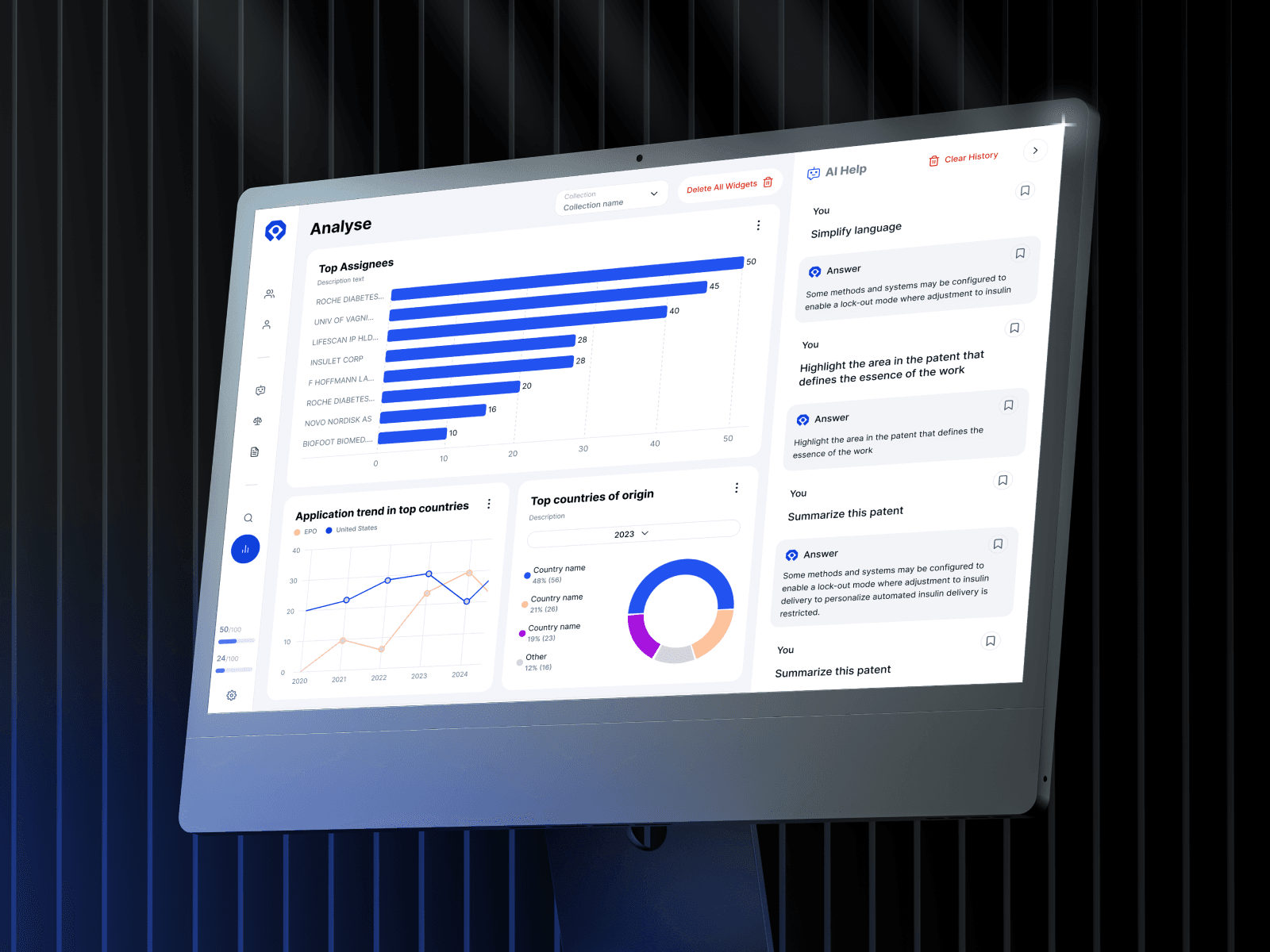
AI-Powered Patent Analysis in Minutes, Not Months
How we helped an ambitious patent intelligence team build a platform that replaces spreadsheet chaos and email chains with smart automation, fast results, and clean visual logic.

Orlando
Aug '23 — Now

Legal AI Assistant for a Regional Fintech Institution
Discover how Lumitech designed an AI‑powered legal knowledge assistant that makes internal policies safe to use for a highly-regulated fintech organization.

Dubai
May '25 — Dec '25
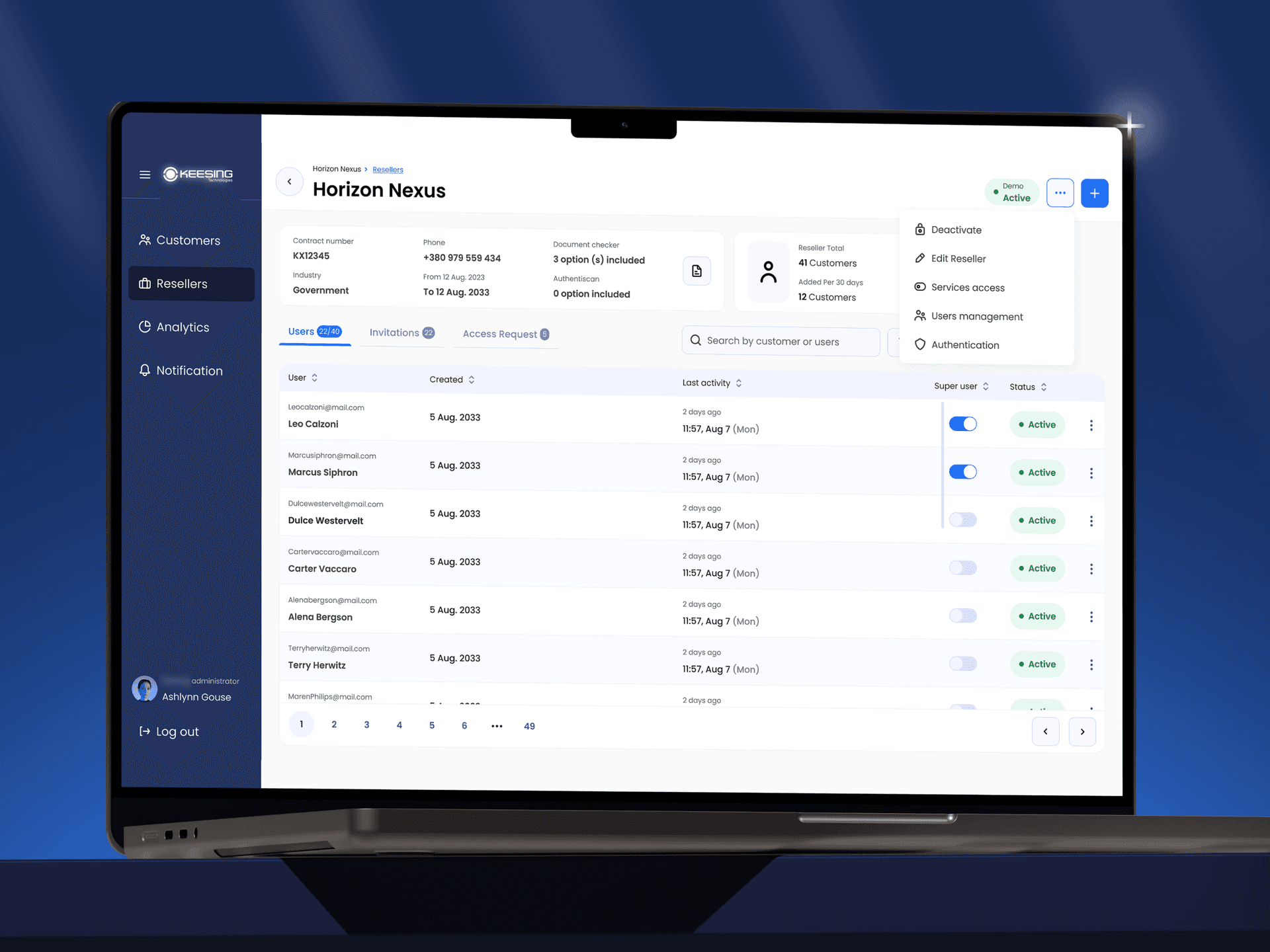
How We Rebuilt an Identity Verification Platform
Explore how we helped a compliance-focused company replace its slow, manual ID verification process with a scalable, automated solution.

Amsterdam
Jul '23 — Feb '24
AI-Powered Investment Intelligence Platform
Building a RAG-based investment intelligence platform for a Panama fintech startup — from multi-broker data aggregation to AI-driven portfolio analytics that explain market events in real time.

Panama
Aug '25 – Feb '26
LegalTech
AI-Powered Patent Analysis in Minutes, Not Months
How we helped an ambitious patent intelligence team build a platform that replaces spreadsheet chaos and email chains with smart automation, fast results, and clean visual logic.
Client Location
Orlando
Duration
Aug '23 — Now
Platform
Web
Legal AI Assistant for a Regional Fintech Institution
Discover how Lumitech designed an AI‑powered legal knowledge assistant that makes internal policies safe to use for a highly-regulated fintech organization.
Dubai
May '25 — Dec '25
How We Rebuilt an Identity Verification Platform
Explore how we helped a compliance-focused company replace its slow, manual ID verification process with a scalable, automated solution.
Amsterdam
Jul '23 — Feb '24
AI-Powered Investment Intelligence Platform
Building a RAG-based investment intelligence platform for a Panama fintech startup — from multi-broker data aggregation to AI-driven portfolio analytics that explain market events in real time.
Panama
Aug '25 – Feb '26
Benefits of Intelligent Document Processing
The intelligent document processing benefits below compound as volume grows — the larger your document load, the larger the return.
Faster Document Processing
Manual document handling introduces lag at every step — the document queue, reviewers are unavailable, and data entry takes time. IDP processes documents in seconds from ingestion to system entry. Invoice cycle times that run days or weeks manually compress to hours or minutes.
Lower Manual Workload
The volume of manual data entry that disappears when IDP is implemented is typically significant. The document processing automation benefits are easiest to see here: teams that spent the majority of their time on document handling shift to exception review and higher-value work. For finance teams processing thousands of invoices a month, this is measured in FTEs.
Better Data Accuracy
As we’ve already mentioned above, human error rates in manual data entry typically range from 1% to 5%. At high volumes, that translates to thousands of errors per month — each one creating downstream rework. IDP accuracy on well-trained models runs above 95% for semi-structured documents, with exceptions routed for human review rather than allowed through unchecked.
Scalability
Document volume spikes — month-end, tax season, new client onboarding — don’t require proportional increases in headcount when processing is automated. The pipeline scales with volume.
Better Compliance and Auditability
Every document processed through an IDP pipeline produces a complete audit trail: what was captured, what was extracted, what confidence score was assigned, what validation rules were applied, what was flagged, who reviewed it, and what was changed. For regulated industries — finance, healthcare, insurance, legal — this audit trail is often a compliance requirement.
Workflow Automation
Processing a document doesn’t end with data extraction — it triggers the next step. An approved invoice creates a payment entry. A validated claim advances the claim workflow. A completed KYC document updates the customer record. The document is the input; the business outcome is the output.
AI-Ready Operations
Organizations that want to build analytics and forecasting models or AI-driven decision tools need clean, structured data. Manual processing produces data that’s inconsistent, incomplete, and hard to aggregate. IDP creates a structured data layer that makes downstream use cases viable — feeding a real-time forecasting system, supporting decision intelligence, and turning document data into an asset rather than a liability. Of all the intelligent document processing benefits, this is the most strategic: it’s what makes every other AI initiative possible.
Is your document processing ready for automation?
Start with a document-processing audit to identify where manual handling is creating the most cost, delays, and risk in your current workflow.

Intelligent Document Processing Use Cases and Examples
The intelligent document processing use cases below span every document-heavy industry, but they share a pattern: high volume, variable formats, and a downstream process waiting on the data. These intelligent document processing examples show where the ROI is clearest.
Invoice Processing
Accounts payable is the most common IDP use case — and the one with the clearest ROI. Invoices arrive from hundreds of suppliers in different formats, need to be matched against purchase orders and receipts, validated, approved, and posted to the accounting system.
IDP extracts header and line-item data, then matches it three ways against POs and GRNs, flags discrepancies for review, and posts clean invoices automatically. The payoff is concrete: processing time drops from days to hours, early-payment discounts become capturable, and month-end closes speed up.
Organizations that have integrated automation commonly report per-invoice cost reductions of 60–80% and touchless rates well past 50% once the model matures.
Insurance Claims Processing
Claims arrive in multiple formats — forms, medical reports, repair estimates, supporting photos. Each one needs to be classified, relevant fields extracted, and the claim advanced through the workflow.
IDP handles first-notice-of-loss documents, damage assessments, and supporting evidence — routing complete claims for automated processing and flagging incomplete or questionable claims for adjuster review. Straight-through processing rates improve significantly, and claim cycle times compress.
Contract Processing
Contracts contain critical obligations, dates, parties, clauses, and terms — buried in dense, unstructured text that’s expensive to review manually. IDP can extract key contract metadata, flag non-standard clauses, identify renewal dates, and populate contract management systems.
For legal and procurement teams managing hundreds of active contracts, this eliminates the risk of missed renewal windows and substantially reduces contract review time.
Healthcare Document Processing
Referrals, discharge summaries, prior authorizations, lab reports, and insurance forms — healthcare generates massive volumes of documents with serious consequences for errors. Intelligent document extraction extracts clinical data, insurance information, and patient identifiers from mixed-format documents, routes them to the correct system, and maintains the audit trail required for compliance.
KYC and Customer Onboarding
Identity documents, proof of address, and company registration certificates — KYC processes require extracting, validating, and verifying data from diverse document types in accordance with regulatory requirements.
Document data extraction for KYC covers passport and ID extraction, address verification, company structure documentation, and beneficial ownership records — with validation against watchlists and sanctions databases built into the pipeline.
Finance Document Processing
Beyond invoices, finance teams handle bank statements, remittances, expense reports, tax documents, and financial filings. Each document type requires different extraction logic and different validation rules.
IDP creates a single pipeline that handles the full document mix — with routing logic that sends each document type to the right downstream process and maintains the reconciliation trail finance teams need for period-end reporting.
Logistics and Industrial Document Processing
Bills of lading, customs declarations, delivery notes, proof of delivery, freight invoices — logistics involves a dense volume of documents at every handoff. Delays in document processing translate to delays in freight release, customs clearance, and payment settlement. We can see such patterns also in the industrial sector, where document automation sits alongside broader AI in manufacturing initiatives.
IDP processes shipping documents in real time, extracts cargo details and reference numbers, validates against booking records, and updates tracking systems — compressing the document cycle that sits between physical movement and administrative closure.
Want to identify the highest-ROI automation use case for your document workflows? Book a discovery call to map your current document volume, format mix, and error patterns against IDP capabilities.

When Does a Business Need an Intelligent Document Processing Solution?
Not every organization is at the point where IDP investment is justified. These are the signals that indicate the threshold has been reached:
Document volume has outgrown the team. When processing backlogs grow consistently, or when document volume spikes create visible operational strain, manual processing becomes the bottleneck.
Error rates are creating downstream problems. Incorrect data in an ERP, mismatched payments, compliance exceptions — if document errors are generating significant rework or risk, the cost of automation is likely lower than the cost of the problem.
The same data is being entered in multiple systems. If the same invoice or claim data gets typed into two or three different systems, that’s a signal that an integration layer with automated extraction would eliminate significant manual effort.
Processing speed affects business outcomes. Late payments, slow claim settlements, and delayed onboarding — when document processing cycle time is a competitive or contractual issue, speed of automation creates direct business value.
Compliance requires complete audit trails. Manual processes rarely produce audit trails that meet regulatory requirements. If document-level traceability is a compliance obligation, IDP provides it in a structured way.
AI or analytics initiatives are blocked by data quality. If the team wants to build dashboards, forecasting models, or process analytics, but the underlying data is too inconsistent to use, automated document processing can create the structured data layer these initiatives need.
How to Choose an Intelligent Document Processing Solution
Choosing an intelligent document processing solution requires matching capabilities to your specific document mix, volume, and integration requirements. Generic evaluation criteria not always surface the decisions that matter. The strongest implementations begin with a discovery phase that maps your document types, volumes, and error patterns before any technology is selected.
Start with your document types. The right fit for an organization processing primarily semi-structured invoices differs from that for one processing unstructured contracts or mixed healthcare records. So, evaluate extraction accuracy on your actual documents.
Evaluate accuracy on your formats. Request a proof of concept on a sample of your real documents — ideally, a mix that includes your most problematic cases. A short AI prototyping engagement on your own data surfaces accuracy gaps that polished demos hide. Extraction accuracy varies significantly across document types and quality levels; a system that performs well on clean PDFs may struggle on scanned, low-resolution, or handwritten documents.
Understand the validation and exception-handling model. How does the solution flag low-confidence extractions? How does the human review interface work? What happens to corrections — do they improve the model? Validation and exception handling are where the difference between a workable solution and a frustrating one is determined in practice.
Assess integration depth. Does the solution have native connectors to your ERP or accounting platform? Or will integration require custom development? The complexity of integration is often underestimated, driving high implementation costs.
Consider the training and improvement model. Solutions that improve through active learning — incorporating human corrections back into the model — perform better over time than static systems. For high-volume use cases, ongoing improvement is a significant long-term differentiator.
Evaluate compliance and security posture. For regulated industries, data residency, encryption, access controls, and audit log completeness are requirements. Verify these before shortlisting.
Build vs. buy vs. partner. Organizations with unique document types, complex validation logic, or tight integration requirements often find that a custom or configured implementation — built on a foundation model but tuned to their workflows — outperforms generic software. The right choice depends on document complexity, integration requirements, and internal engineering capacity.
Not sure which IDP approach fits your use case? Let’s assess your document workflow and get a realistic implementation recommendation.

Conclusion
Understanding what is intelligent document processing changes how you see your own operations: every queue of unprocessed documents becomes a measurable cost, and every manual handoff becomes a candidate for automation.
The intelligent document processing process — capture, classify, extract, validate, integrate — isn’t complicated to understand. What makes it valuable is that those five intelligent document processing steps replace the slowest, most error-prone part of document-dependent work with something fast, accurate, and auditable.
For the organizations that have adopted it, intelligent document processing isn’t described as a technology project. It’s described as the thing that finally made their document-dependent processes reliable: invoices that don’t queue, claims that move, contracts that get tracked, data that lands in the right system without someone in the middle. At that point, the formal intelligent document processing definition matters less than the operational question — where the cost of manual handling is highest, and whether automating it justifies the investment.
The starting point is an honest audit of your current document workflows: what you’re processing, in what volumes, with what error rates, and at what cost. That audit usually makes the priority clear.


