
Construction Project Management Software for Small Business: Features, Costs, and How to Choose
The spreadsheet was fine — right up until it wasn’t. One job became six, the WhatsApp threads multiplied, change orders were misfiled, and a subcontractor swears nobody told him about the schedule change.
- Software Development
- Digital Transformation
July 08, 2026
 AI Overview
Construction management software for small business centralizes scheduling, job costing, document storage, and subcontractor coordination in one system, replacing the spreadsheets and text threads that cause missed deadlines and unbilled change orders. Core components include real-time project tracking, mobile field updates, and cost visibility linking office and job site. Four core features, projects, costs, documents, and field updates, solve 90% of daily small-business construction problems.

This is where you realized the tools that built your business are now quietly costing you money.
If that sounds familiar, you’re exactly who construction software for small business owners is built for. Most of what’s available off the shelf covers the basics well, but if your workflow is unusual enough that nothing quite fits, software development services for construction industry needs exist specifically to build the missing piece rather than make you bend your business around someone else’s software.
This guide breaks down what the software actually does, what it should cost, and how to choose a tool your crew will use instead of quietly abandoning it after week two.
What Is Construction Management Software for Small Business?
Construction management software for small businesses is an all-in-one digital tool that helps small contractors plan projects, schedule crews, prepare estimates, track job costs, store documents, and coordinate with subcontractors from one place. Instead of juggling spreadsheets, email, and text messages, a small team manages the entire project lifecycle — from bid to closeout — in a single, real-time-updating system.
In practice, small-business construction management software replaces the patchwork that most growing contractors rely on. The good versions are built around how small teams actually work: quick to set up, light on training, and priced for a company running a handful of jobs at once rather than hundreds. Good software focuses on the daily essentials — who’s doing what, where the money is going, and what’s due next — rather than burying you in enterprise features built for a 500-person general contractor.
Why Small Construction Companies Need Construction Project Management Software for Small Business
Small construction companies need dedicated software because the hidden cost of disorganization is brutal: missed deadlines, unbilled change orders, blown budgets, and crews standing around waiting for information. This is what digital transformation in construction actually looks like at the small-business level — not a buzzword, just fewer ways for information to get lost between the office and the job site. Dedicated software centralizes schedules, costs, and communication, enabling a small team to run more jobs accurately without adding overhead. It turns scattered information into a single source of truth everyone can see.
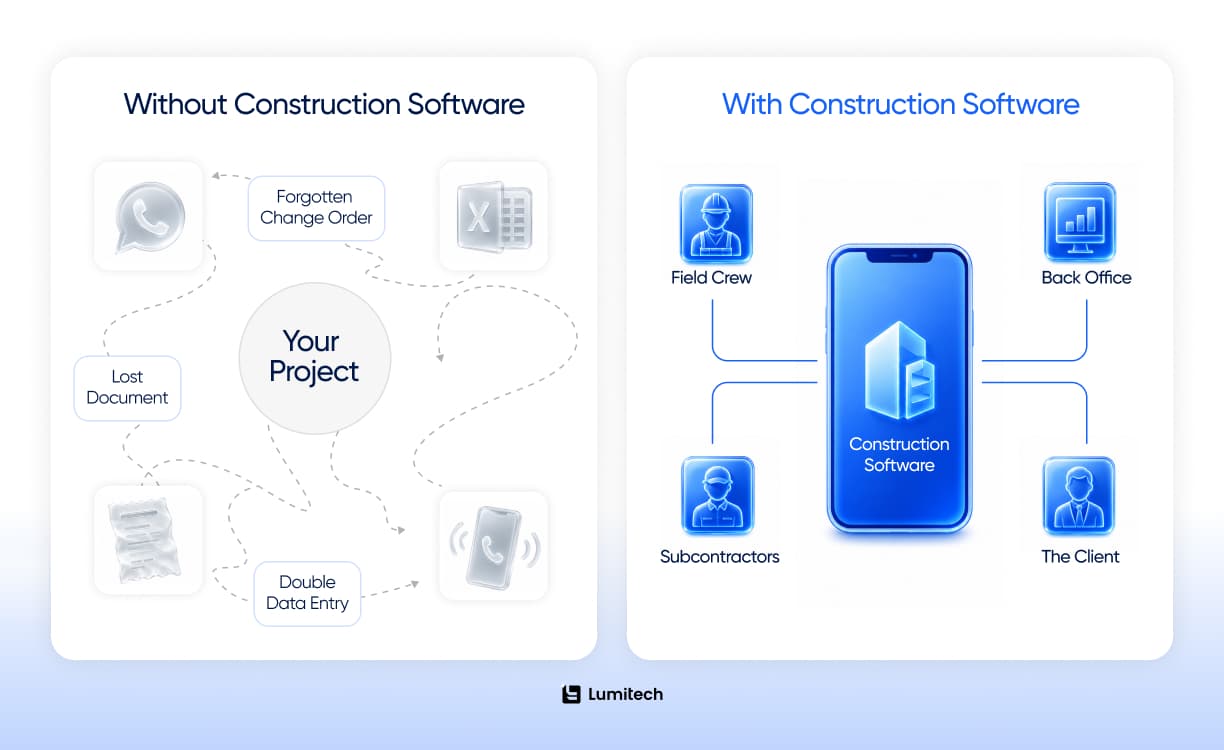
Here’s what “we’ll just keep using spreadsheets” actually costs. Every estimate re-typed into an invoice is a chance to drop a digit. Every schedule change shared by text is a subcontractor who didn’t get the memo. Every receipt photo buried in someone’s phone is a job cost you’ll never accurately recover. None of these failures is dramatic on its own, but across a dozen active jobs, they add up to the difference between a profitable year and a confusing one.
The best construction management software for small business can solve three problems at once. It closes the gap between the office and the field, so the person on site and the person doing the books are looking at the same numbers. It creates a record, so “I never approved that” conversations end with a timestamp instead of an argument. And it makes your margins visible while you can still do something about them, not three months after the job closes. For trade-heavy operations in particular, construction management software for small contractors turns the daily scramble of who’s where and what they’re doing into something a single person can actually oversee.
Contractors often claim they are too busy running jobs to set up software. But you have to ask yourself: are you actually too busy, or are you just stuck in a loop of administrative chaos? Upgrading your toolkit isn’t about looking fancy. The real reason is to give yourself back your weekends and develop the ability to run a successful company without being on-site every single day.



Consider a typical week. A client approves an extra $4,000 in tile work on a Tuesday, mentioned in passing to whoever’s on-site. By Friday the tile’s installed, but the approval lives only in someone’s memory — and when the invoice goes out three weeks later, the client doesn’t recognize the charge. Multiply that by every verbal change, every “I’ll remember it” material run, and every crew member logging hours on a different scrap of paper, and you can see how a busy, growing company starts leaking profit it never even notices. A shared system makes the work visible, the first step toward making it profitable.
That’s the real argument for small business construction software: it’s a small but real act of digital transformation that converts the chaos of growth into something you can manage. Most contractors don’t adopt it because they want more technology. They adopt it because the alternative — running a bigger company on tools built for a smaller one — quietly stops working.
The Best Construction Software for Small Businesses, by Type
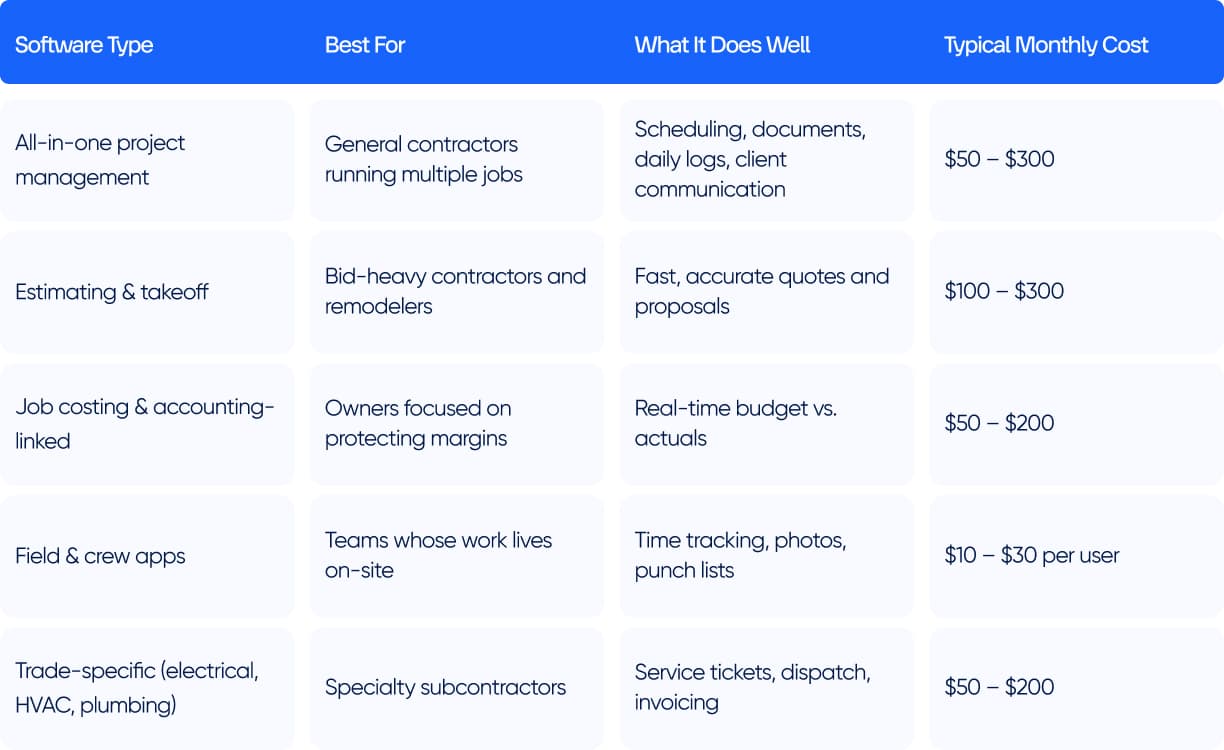
There’s no single winner here. The best construction project management software for small businesses depends on what you build and how your team works. Rather than ranking ten products whose prices change monthly, it’s more useful to match software types to business needs — all-in-one platforms, estimating-first tools, and field-focused apps. Choosing the right category matters far more than any individual brand name.
Below is a quick map of the main categories of construction software for small business teams to choose from, and the kind of company each one fits best.
Key Features Small Construction Businesses Should Look For
Small construction businesses should prioritize six core features: project scheduling, estimating, job costing, document storage, subcontractor coordination, and mobile field access. Everything else is a nice-to-have. The goal isn’t the longest feature list — it’s covering the full job lifecycle without gaps that force your team back into spreadsheets. If a tool nails these six and stays easy to use, it will outperform a bloated platform every time.
Here’s what each of those actually means when you’re the one signing the checks.
Estimating and proposals. Good construction estimating software for small business turns a takeoff into a polished, profitable quote in minutes, not evenings. Look for reusable templates and the ability to convert an approved estimate straight into a budget — no re-typing.
Job costing and budgets. This is where margins live or die. Strong construction budgeting software for small business shows planned versus actual spend in real time, so you catch an overrun while the job’s still open, not at tax time.
Scheduling. Good construction scheduling software gives you drag-and-drop calendars the whole crew can see, with changes that notify the people affected. A schedule nobody can find is just a wish.
Document management. Plans, permits, contracts, change orders, and photos in one searchable place — not scattered across email, trucks, and three different phones.
Subcontractor and client coordination. A shared place to assign work, collect updates, and keep clients informed without a daily phone call.
Mobile field access. If the crew can’t use it from a job site, it doesn’t matter how good it looks on a laptop.
One feature worth weighing carefully is how the tool integrates with your accounting system. A platform that syncs estimates, invoices, and job costs with the bookkeeping system you already use — rather than forcing you to re-enter everything — quietly saves hours every month and keeps your financials honest. The same goes for the apps you live in: calendars, file storage, payment processors. You don’t need a tool that does everything itself; you need one that plays nicely with the handful of things you already rely on. Closed systems that trap your data are a headache you’ll feel most the day you decide to leave.
For most small teams, construction management software for small businesses earns its keep the moment estimating, costing, and scheduling stop living in three different files that never quite agree.
Customer Stories
Explore What We've Built
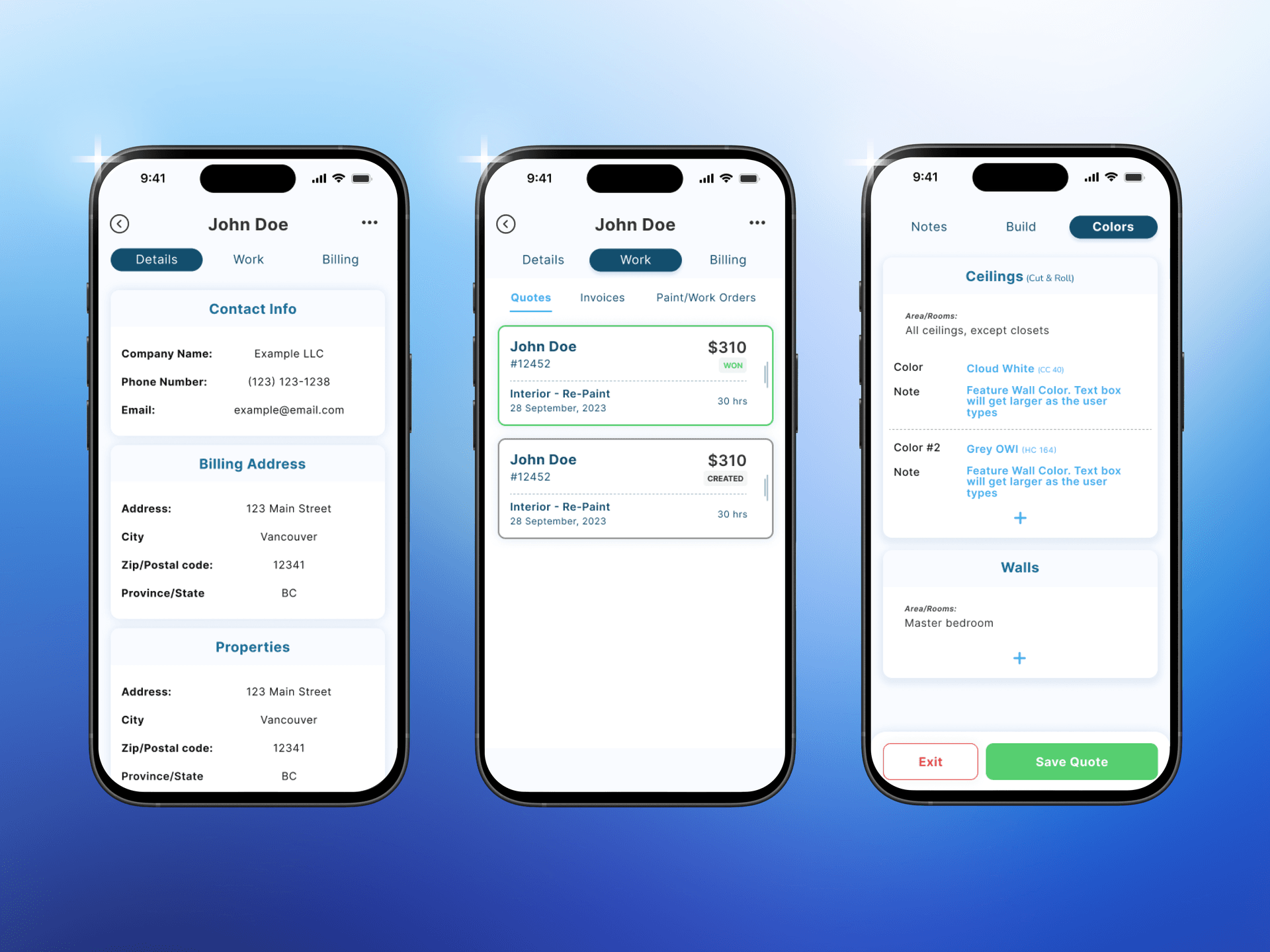
Offline‑First Estimating App for a Growing Painting Business
Helping a Vancouver painting company move from guesswork and spreadsheets to fast, standardized on‑site estimates – in a mobile app that works even when there is no signal at all.

Vancouver
Dec '23 — Now
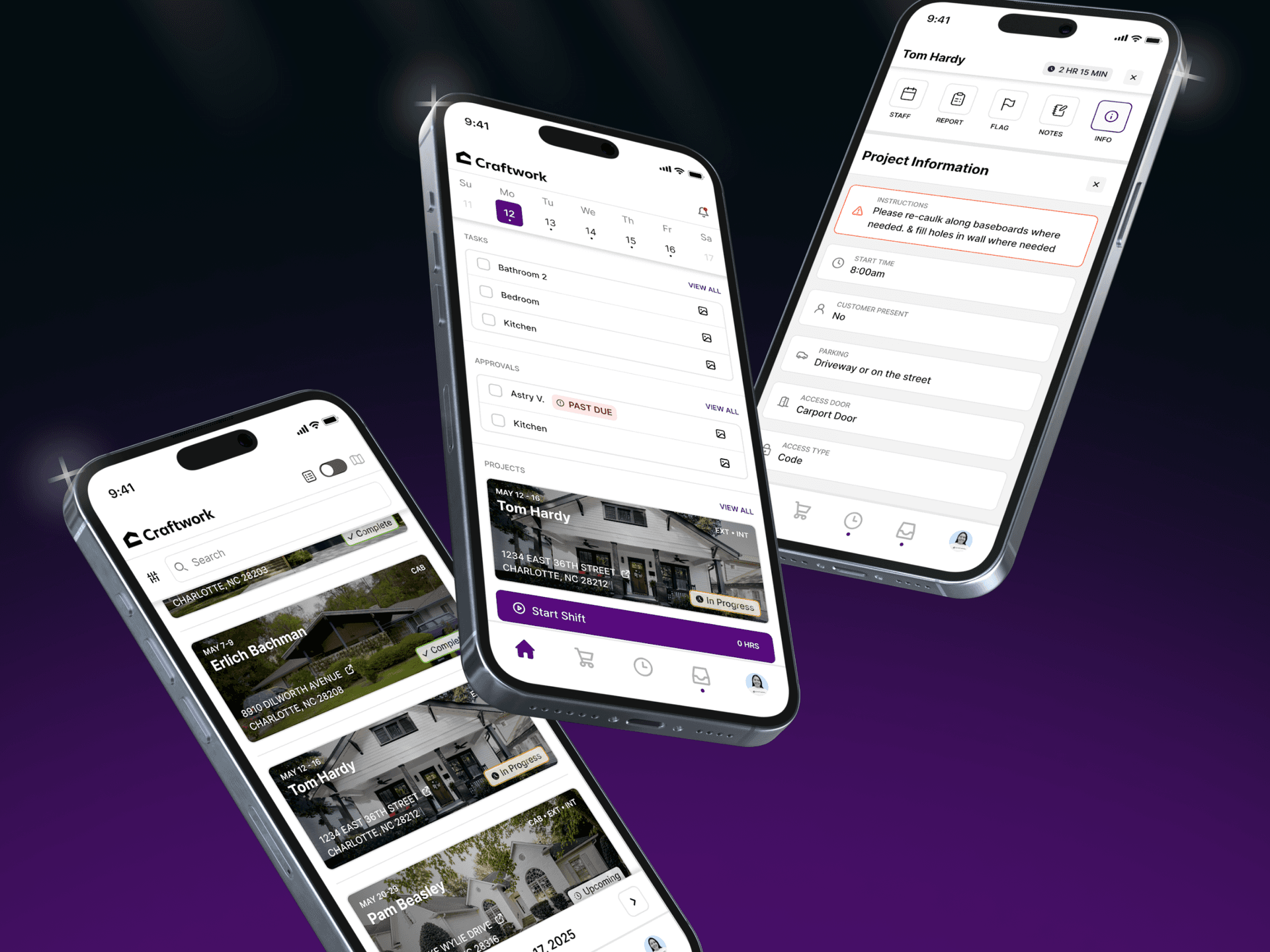
Mobile‑First Operations App for a Digital‑Native Painting Startup
Transforming a modern home painting startup into a software‑driven operation where every job, shift, and estimate runs through a single mobile app.

Charlotte
Aug '25 — Now
Painting
Offline‑First Estimating App for a Growing Painting Business
Helping a Vancouver painting company move from guesswork and spreadsheets to fast, standardized on‑site estimates – in a mobile app that works even when there is no signal at all.
Client Location
Vancouver
Duration
Dec '23 — Now
Platform
Mobile
Affordable vs Low-Cost Construction Management Software
Affordable and cheap aren’t the same thing. When you factor in all the extra workarounds, purchasing paid features from other sources, and finally having a whole team that will never use the software, the least expensive software could end up being the highest total cost. Affordable software is measured by total value — time saved, errors avoided, jobs won — not by the sticker price. The right question isn’t “what does it cost?” but “what does it save?”
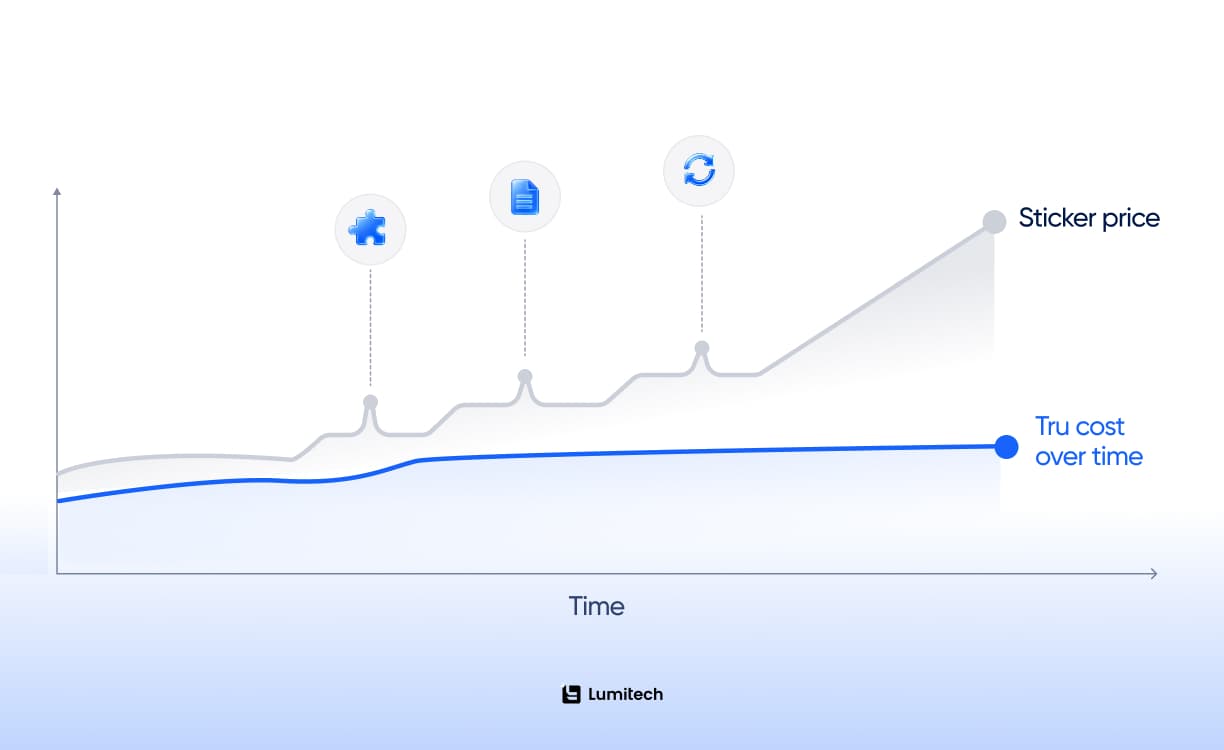
It’s tempting, when money’s tight, to pick the low-cost construction management software with the friendliest monthly price and move on. Sometimes that works. Often it doesn’t — because a low price tag frequently hides a high total cost.
Here’s how cheap turns expensive. A bargain tool that doesn’t do job costing means you’re still tracking margins in a spreadsheet, which means double entry, which means errors and wasted evenings. A tool your crew finds clunky gets abandoned, and abandoned software you’re still paying for is the worst deal in business. A tool missing one critical feature sends you shopping for a second subscription to patch the gap — and now your “cheap” solution costs more than the all-in-one you skipped.
That’s the difference between affordable construction management software and merely inexpensive one. Affordable means the price is low relative to what it returns. A $200-a-month platform that prevents one botched change order a quarter has already paid for itself. A $40-a-month tool nobody uses costs you $480 a year plus the chaos it failed to fix.
Run the math on a real scenario. Say you’re choosing between a $39-a-month tool that handles scheduling but not job costing, and a $189-a-month platform that does both. The cheaper option looks like an $1,800-a-year saving — until you count the eight hours a month someone spends reconciling costs in a spreadsheet, the occasional mis-billed job, and the change orders that slip through unbilled. One missed change order can wipe out a year of that “saving” in a single afternoon. The pricier tool isn’t an expense; it’s insurance against mistakes that quietly cost far more than the subscription fee.
The sweet spot for most growing contractors is affordable construction software for small business budgets that still covers the core four — projects, costs, documents, and field updates — in one place. Genuinely good project management software is priced to scale gently: predictable per-user costs, no surprise tiers, and no penalty for the crime of growing. If none of the off-the-shelf options fit and you’re considering something custom, SaaS development services built specifically around your workflow can sometimes cost less in the long term than years of paying for unused enterprise features. When you compare options, total the real cost over a year of actual use, including the workarounds. The cheapest line item rarely wins that math.

Construction Software by Business Type
The right tool depends on what kind of construction business you run. A remodeler living on accurate bids needs estimating power; a specialty subcontractor needs scheduling and dispatch; a small general contractor needs a bit of everything. Matching software to your business type is the fastest way to avoid paying for features you’ll never touch and missing the ones you need daily.
Construction Software for Small Contractors and Specialty Trades
The best construction management software for small contractors is mobile-first, letting crews log hours, snap progress photos, and update task status on-site without paperwork piling up for someone to enter later. Look for software that handles daily logs, time tracking, and subcontractor assignments in a few taps. For trade-focused teams — electrical, HVAC, plumbing — construction software often doubles as service-and-dispatch software, turning a completed job into an invoice before the truck leaves the driveway. We’ve seen this play out concretely: building a mobile app for a digital-native painting startup that ran entirely on phones, with no office software at all, because that’s simply how the founders’ generation of contractors expects to work.
Projects like that get built against the same internal engineering standard at Lumitech we apply to enterprise clients — the size of the company changes, the discipline doesn’t.
Home Builders, Remodelers, and Service Businesses
Custom builders and remodelers tend to win or lose on the estimate, so they lean toward tools with strong takeoff and proposal features and tight links between the quote and the budget. Service and maintenance outfits — anyone running recurring jobs and dispatching technicians — get the most from contractor management software for a small business that combines scheduling, work orders, and invoicing in one flow. The common thread across all types is restraint: the right contractor software does the handful of things your business depends on extremely well, rather than doing everything adequately. Buy for your actual workflow, not for the org chart you imagine having in five years.
Small General Contractors Running Mixed Jobs
General contractors juggling several projects at different stages have the broadest needs — a bit of estimating, a bit of scheduling, document storage, and enough job costing to know which projects are actually making money. For them, an all-in-one platform usually beats stitching together three specialized tools because the real cost isn’t any single subscription; it’s the time and errors that arise when those tools don’t talk to each other. The priority for contractor software for small business is a single dashboard that answers the only question that matters on a Monday morning: across everything we’ve got running right now, where do we stand on time and money?
Cloud-Based and Mobile Construction Software for Small Businesses
For a small construction company, cloud-based and mobile access isn’t a luxury feature — it’s the whole point. Cloud software keeps the office and the field viewing the same live data, while mobile apps let crews update jobs on-site. Together, they close the information gap that costs small contractors time and money. Skip desktop-only tools; your business doesn’t happen at a desk.
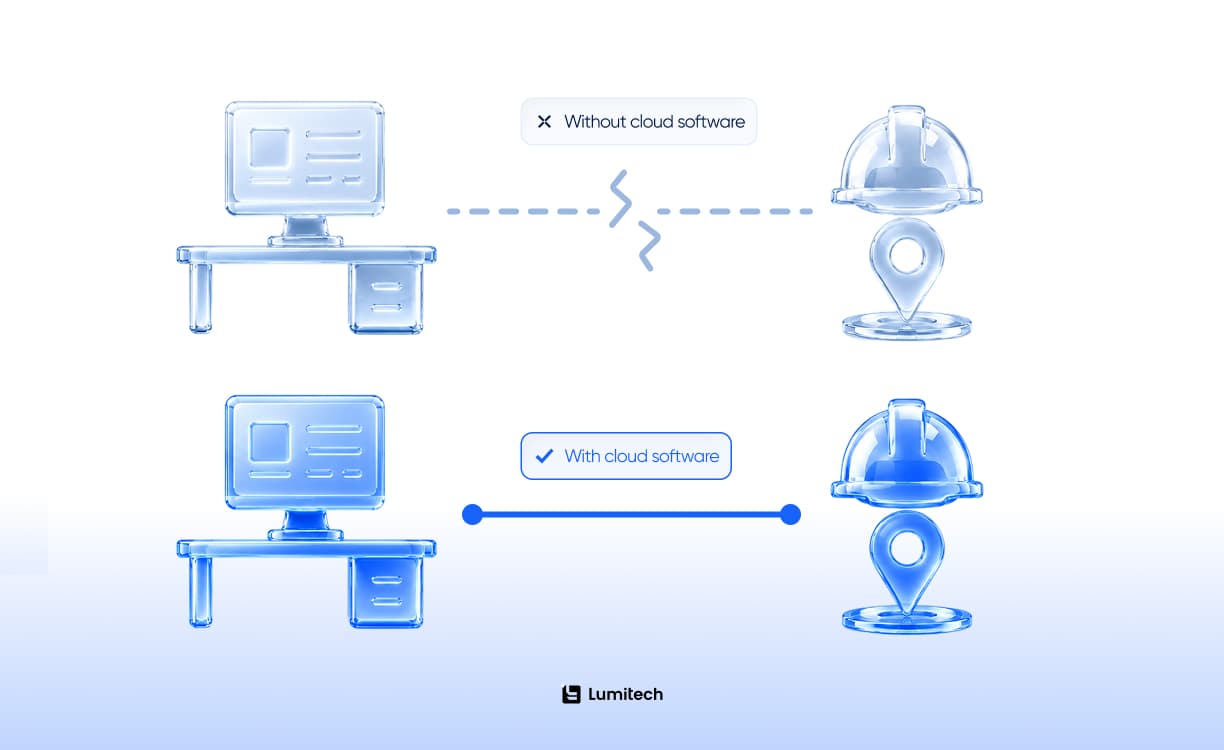
The shift to the cloud quietly solved the oldest problem in small-contractor operations: the office and the field never had the same information at the same time. Plans changed on site, but the estimate didn’t. Hours got logged on paper that reached the bookkeeper a week late. The cloud collapses that delay — when the foreman updates a task or uploads a photo, the owner sees it instantly, wherever they are.
That’s why nearly all modern construction software for small businesses is cloud-based by default. There’s no server to maintain, updates happen automatically, and your data is backed up without you having to think about it. For a team without an IT department, that alone is worth the subscription.
There’s a security upside too, which surprises people who assume the cloud is riskier. Reputable providers encrypt your data, back it up across multiple locations, and patch vulnerabilities automatically — protections a small firm could never afford to build itself. The laptop that holds your only copy of a project file is far more likely to be lost, stolen, or dropped in a puddle than a professionally managed data center is to fail. For most small teams, moving to the cloud isn’t a risk; it’s the first time their business data has ever been genuinely safe.
Mobile matters just as much. Good construction software for small contractors works as a cross-platform app, so it runs the same whether your crew carries iPhones or Androids, meaning time tracking, daily logs, punch lists, and photo documentation all happen in the moment, on-site, instead of being reconstructed from memory at the end of the week. The practical test is simple: download the mobile app before you buy, hand it to your least tech-savvy crew member, and watch. If they can log a day’s work in under a minute with gloves on, you’ve found your tool. If they give up, no amount of desktop polish will save it.
Where AI Is Starting to Show Up in Small Construction Software
Most small contractors don’t need to think about AI in construction yet — the core four (projects, costs, documents, field updates) still solve 90% of the daily problem. But it’s worth knowing what’s coming, because some of it will be standard within a few years rather than a novelty.
A handful of platforms are experimenting with digital twins in construction — live digital models of a project that update as work progresses, useful mainly for larger or more complex builds rather than a typical small-contractor job.
More immediately relevant is AI for workplace safety: tools that flag missing PPE in site photos or spot hazardous conditions before they become incidents. For small crews without a dedicated safety officer, that kind of automated check can quietly close a real gap.
Broader digital transformation is also changing how subcontractors get paid, how permits get filed, and how clients expect to communicate — fewer phone calls, more dashboards. None of this means you need the most advanced platform on the market. It means the gap between “basic spreadsheet” and “modern small-business tool” will keep widening, which is one more reason to make the switch sooner rather than later. Even something as simple as AI chatbots handling routine client questions about project status can free up an hour of phone calls a day.
How to Choose the Right Construction Management Software
Choose small business construction management software by matching it to your real workflow, your budget, and your team’s tolerance for new tools — in that order. Start by listing the problems you need solved, set a realistic monthly budget including per-user costs, then trial two or three options with your actual crew on a real job. The right tool is the one your team adopts without a fight, not the one with the most features.
Run through this checklist before you commit:
Does it cover your core four? Projects, job costs, documents, and field updates — in one place, not three subscriptions.
Will your crew actually use it? Trial it on a live job with your least tech-savvy team member before you buy.
Is the pricing honest? Total the real annual cost including every user and add-on, not the headline number.
Does it work on a phone, offline? Job sites have bad signal. Your software should survive it.
Can it grow with you? Adding a few jobs or users shouldn’t require a painful migration or a pricing tier jump.
What’s the setup cost in time? If it needs a consultant to configure, factor that in.
Is support real? A human who answers when a feature breaks mid-job is worth paying for.
If your needs are unusual enough that none of this quite fits off the shelf, you can explore AI engineer model approaches we use when scoping custom builds — though for most small contractors, an existing platform from this checklist will get the job done.
When you run the trial, resist the urge to test it on a quiet, simple job — that’s the equivalent of test-driving a truck in an empty parking lot. Pick a messy, representative project with real subcontractors, real change orders, and a real deadline. Give it two weeks, involve the people who’ll actually use it daily, and pay attention to the friction points: where someone sighs, gives up, or reaches for a spreadsheet instead? Those moments tell you more than any feature list.
If a tool clears that list, you’ve likely found construction project management software for small business that fits without overbuying. Most owners overthink the feature comparison and underthink adoption, but the most powerful construction management software is worthless if it sits unused while your crew quietly goes back to texting photos and scribbling on printouts.
None of this quite matches how your business actually runs?
Lumitech builds custom software for contractors whose workflow doesn’t fit neatly into an off-the-shelf platform.

Common Mistakes Small Contractors Make When Choosing Software
The most common mistakes are buying for features rather than adoption, choosing the cheapest option without accounting for hidden costs, and picking enterprise-grade software that a small team will never fully use. Small contractors also tend to delay too long, white-knuckling spreadsheets until a job goes sideways. The fix is the same in every case: match small contractor management software to how your team actually works, and switch before the chaos forces your hand.
A few specific traps catch small contractors again and again:
Buying the most powerful platform you can find. Enterprise tools are built for problems you don’t have yet. You’ll pay for complexity, drown your crew in options, and use 20% of what you bought.
Optimizing for price alone. The cheapest subscription that creates manual work isn’t a saving — it’s a slow leak.
Skipping the crew trial. Software chosen by the owner alone and handed down to the field is software headed for abandonment. The people using it daily should test it first.
Waiting for the “right time.” There isn’t one. Plenty of contractors treat this like a legacy modernization project they’ll get to eventually — but the right time was the job that nearly went sideways last quarter; the second-best time is now.
Ignoring mobile and offline. A beautiful desktop tool that your crew can’t use on-site solves the wrong half of the problem.
The throughline: the best construction management software for small business is the one that fits your team, your jobs, and your budget — not the one that wins a feature-by-feature spec sheet. Pick for the company you run today, and choose something that won’t punish you for growing into the company you’re building.
The Bottom Line for Small Construction Businesses
You outgrew the spreadsheet because your business grew and became more demanding — that’s a good problem, but it’s still a problem. The best construction project management software for small business doesn’t turn a small contractor into an enterprise; it just stops growth from quietly eroding your margins, your schedule, and your sanity.
Don’t chase the most powerful platform or the cheapest one. Chase the tool that covers your core four — projects, costs, documents, and the field — in one place, that your crew will actually open on a Monday morning, and whose price makes sense for the handful of jobs you’re running right now. Trial two or three with a real job and a real team, total the honest annual cost, and pick the one that disappears into your workflow instead of fighting it.
The goal was never software for its own sake. It’s a calmer office, a clearer field, and a year that ends in profit instead of a question mark.


