UI/UX Branding in the Legal Industry: Designing Digital Experiences That Build Trust
A company’s image in today’s dynamic legal market is no longer based only on what people say about it. More and more, the first impression is formed online, through pictures, layout, and design choices made long before a client talks to a lawyer.
- LegalTech
May 26, 2026
 AI Overview
UI/UX branding helps law firms and LegalTech platforms build trust before users speak to an expert. Clear, accessible, secure, and consistent design simplifies legal workflows, reduces uncertainty, protects privacy, and makes products feel reliable and professional.


The first thing that may come to mind when you think about branding is colors, images, or logos. However, branding goes beyond that. It demonstrates your competence, credibility, and level of trustworthiness. User interfaces (UI) and user experiences (UX) for law firms involve translating abstract concepts, such as trust and expertise, into clear design signals that clients can easily understand. LegalTech companies need to develop credibility directly through the screen more than ever, as they lack well-known names to rely on.
Strong branding does more than just make things look good; it also changes the way people appreciate proficiency, authority, and empathy. Design principles, such as clarity, transparency, security cues, and consistency, transform digital platforms into experiences that people can rely on. An interface that is well thought out gives users peace of mind that their private information is safe, their workflows are efficient, and the specialists who developed the product are knowledgeable about the relevant laws.
The visual tone also determines the positioning. A tool for solo practitioners shouldn’t resemble a solution designed for enterprise law departments. Small changes in typography, spacing, or icons may demonstrate who the product is for and why it should be noticed.

Why UI/UX In The Legal Industry Matters?
In the legal field, you can gain or lose credibility in seconds. Before a client pays attention to your credentials or signs an engagement letter, they already get the idea of your current market position based on their online presence and their perception. That is why UI/UX is the key aspect when it comes to establishing a digital reputation. An up-to-date, easy-to-use design is instrumental in conveying competence. An outdated website may give a false impression.
User interfaces (UI) and user experiences (UX) for LegalTech function as key points of interaction. That’s why many firms combine UI/UX improvements with legal software development services, ensuring platforms remain secure and client-friendly. Every design choice has a significant impact on users’ perception of the website, including its reliability, security, and ability to meet their needs.
According to Forrester Research, a well-designed UI can raise conversion rates by up to 200%, and an eye-catching design can yield conversion rates of up to 400%. That means UI/UX design for law firms results in more client queries, greater professional authority, and increased engagement for both law firms and legal platforms.
Key Reasons Why UI/UX in the Legal Industry Matters:
First impression sparks trust — users generally estimate in a matter of seconds whether a company or platform seems trustworthy.
Clarity creates confidence — easy-to-use navigation, straightforward typography, and streamlined layouts give users peace of mind, making it easier for them to find what they need and making them feel like they're in good hands.
Security reassures users — trust badges, SSL indicators, and clear data policies indicate that you care about privacy, protecting their private and legal information. Similar to our warning system for real-time threat detection, LegalTech platforms must clearly signal their commitment to safety and confidentiality to gain user confidence.
Authority comes from consistency — unified branding makes it easier for people to recognize your brand. This provides users with a seamless experience that feels familiar, credible, and consistent.
Accessibility expands reach — ensures inclusivity and reliability, giving all users equal access while signaling transparency, responsibility, and fairness.
In the legal industry, trust is often created before a conversation starts. The way a digital product looks, guides, protects, and responds to users shapes whether they feel confident enough to continue. For LegalTech businesses, strong UX/UI design is one of the most practical ways to increase adoption and strengthen long-term client relationships.

UX/UI Design Principles in LegalTech
The key principles of LegalTech UX/UI design are clarity, security, accessibility, error prevention, progressive disclosure, and consistent branding. Together, these principles help legal platforms ease complex workflows, reduce user uncertainty, and create digital experiences that feel trustworthy, efficient, and easy to navigate.
Progressive Disclosure
It presents users with only the most essential information at first and then provides them with additional details as they delve deeper. This keeps interfaces clean and helps lawyers stay focused on the subject at hand without being distracted. Similar methods are frequently used across industries — for example, UX best practices for the transportation industry also emphasize progressive disclosure to simplify complex workflows.
Visualize Data Relationships
There is a connection between cases, witnesses, and documentation. Users can better understand the context and make more informed judgments when these links are converted into timelines, charts, or diagrams. According to the Law of Uniform Connectedness, it is evident that when elements are visually connected, people perceive them as related.
Design for Flow
Every action should feel like a natural one. Users always know what to do next because of clear paths, contextual prompts, and microinteractions. This allows them to focus intensely and accomplish tasks.
Prevent Errors
A minor mistake in legal work might cost a fortune. In LegalTech UX, this could mean integrating solutions like real-time document authentication, which both reduces risk and increases user confidence. That’s why legaltech UX/UI design should act as the first line of defense. Smart alerts, verification prompts, and recovery options cut down on risk and enhance consumer confidence in their actions.
Inclusive Design
Following ADA/WCAG standards implies creating platforms that are transparent, accessible, and advanced. UX/UI design principles in LegalTech are not just about compliance with ADA/WCAG guidelines; they’re about reinforcing values and making the brand trustworthy and human-centered.
Reduce Cognitive Load
When digital tools introduce unnecessary complexity, they drain the mental energy reserved for critical legal work. That’s where UX/UI design for law firms plays a significant role. It minimizes cognitive load and makes every interaction fast, intuitive, and frictionless. As a result, higher efficiency, fewer errors, and less fatigue are achieved by preventing burnout from tech overload and keeping users focused.
Consistent Branding in Legal Services
A unified brand identity, whether on websites, portals, or mobile applications, builds authority and confidence. Strong positioning in the market differentiates your company from competitors. LegalTech interface design is a strategic trust signal, demonstrating that the team behind the product is disciplined and detail-oriented.

Practical Examples of LegalTech UX/UI Design
Strong UI/UX in the legal industry becomes most valuable when it turns complex legal tasks into clear, secure, and user-friendly digital experiences. Below are practical examples of how thoughtful interface design can improve trust, reduce uncertainty, and help users complete important legal actions with confidence.
Client Portals
A well-designed client portal gives users one secure place to access legal documents, case updates, messages, invoices, and payments. Instead of switching between emails, file-sharing tools, and payment systems, clients can find everything they need in a structured dashboard. Clear navigation, secure login flows, visible privacy cues, and organized document sections help users feel that their information is protected and easy to manage. This is where the difference between UX personalization vs. customization matters: portals can automatically show relevant case updates by role while still allowing users to adjust preferences such as notifications, dashboard views, or document sorting.
Document Upload and Review Flows
Uploading confidential legal documents can be stressful, especially when users are unsure whether files were submitted correctly. LegalTech UI/UX design can reduce this anxiety with progress bars, file validation, confirmation messages, and visible security indicators. Features such as accepted file format notices, upload status updates, encryption cues, and final confirmation screens help users understand what is happening at each step and feel confident that private information has been handled in a safe manner.
Case Dashboards
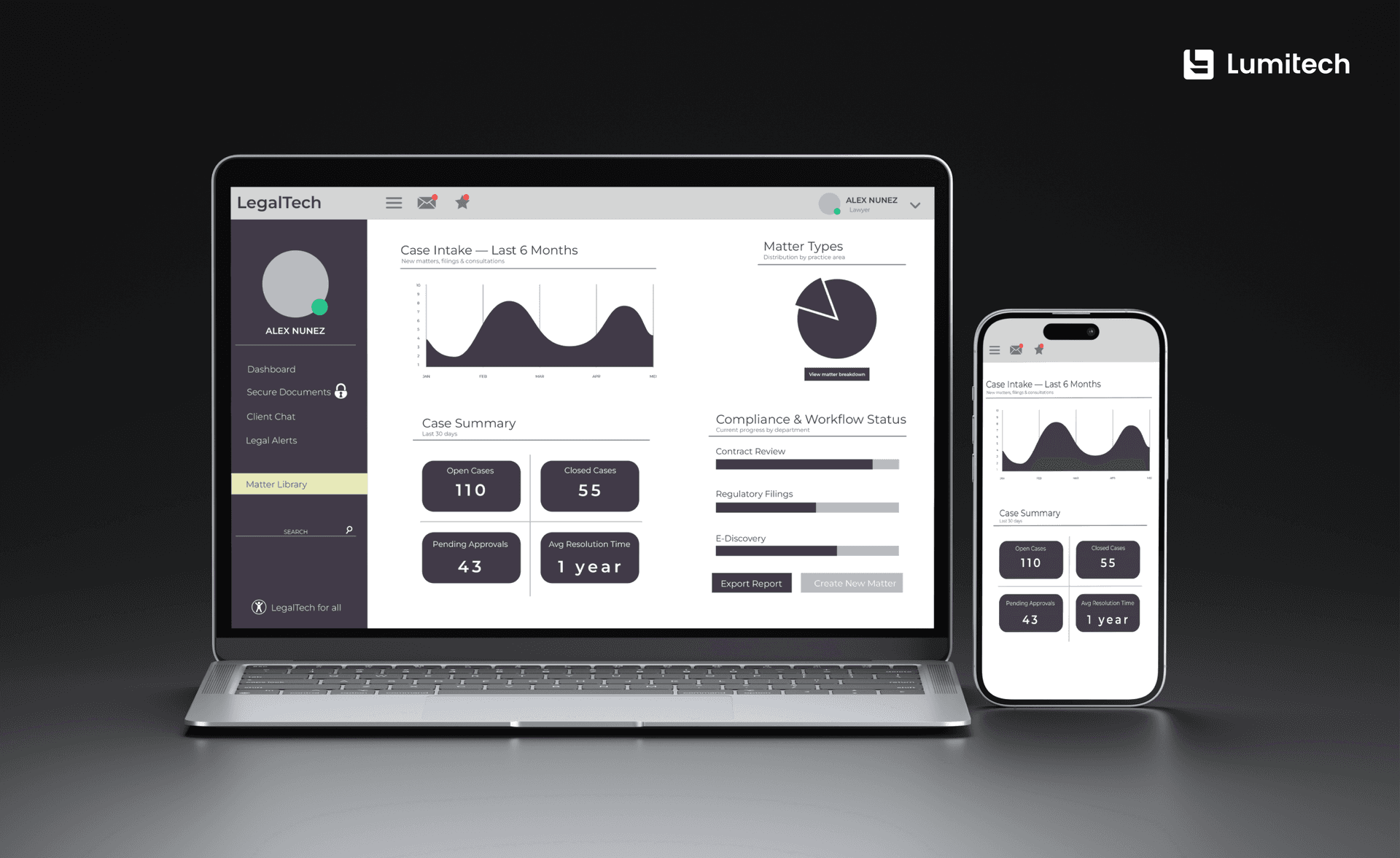
Legal cases often involve multiple documents, deadlines, tasks, participants, and decisions. A strong LegalTech interface design transforms this complexity into a clear dashboard with timelines, priorities, upcoming deadlines, recent activity, and recommended following steps. By visually and logically displaying information, case dashboards help lawyers and clients quickly understand progress, identify urgent actions, and stay focused on what matters most. In more advanced products, AI chat interfaces in enterprise decision platforms can support this experience by helping users interpret case data, surface next steps, and navigate complex legal information faster.
E-Signature and Approval Flows
E-signatures and approvals often involve legally binding actions, so the interface must make every step feel safe and understandable. Clear calls to action, a visible audit trail, document previews, consent checkboxes, and confirmation screens help users know exactly what they approve or sign. A well-designed flow reduces hesitation, prevents mistakes, and supports the platform’s legal reliability.
Balancing Functionality and Clarity in Legaltech Interface Design
Design for LegalTech combines functionality and clarity by giving users access to powerful legal tools without overloading them. The most effective method is to prioritize core actions, organize advanced features into logical steps, and use a clear visual hierarchy to help lawyers and clients complete complex tasks with confidence.
Smart UX/UI design principles turn complex legal platforms into reliable, essential, and usable products. Effective branding and user interface design for legal services organizes capabilities into clear steps.
UI and UX for law firms focus on results by utilizing progressive transparency, logical organization, clear visual structure, and AI integration to ease the collaboration process. For instance, our AI patent management system demonstrates how automation and design collaborate to simplify complex processes while maintaining an intuitive interface. This balance demonstrates that the product was designed to simplify tasks and foster trust.
Practical Ways to Strike a Balance:
Focus on features. Display the core tools at the top and the less important ones in the secondary menus.
Advanced reveal. Show complex options only when necessary, so that the interface remains clean and uncluttered.
Consistent layout. To make it easier to find things, keep similar features in the same places on all screens.
Visual emphasis. Leverage font weight, sizing, and color contrasts to draw emphasis to essential actions.
Task clustering. Combine related functions to create workflows that are easier to use and perform more efficiently.
Minimalist signals. Eliminate icons or visuals that are unnecessary and do not add value to usability.
Accurate feedback. Provide alerts, confirmations, and status indicators to avoid errors and boost user confidence.
Giving people clarity doesn’t imply giving up control. When UX/UI design ideas are applied intentionally in LegalTech, systems become both valuable and user-friendly. This method enables lawyers to complete tasks more efficiently, with fewer errors, and have confidence in the product’s ability to support their work.
Best Practices for UI/UX in Legal Tech
Best practices for UI/UX in legal tech focus on building digital products that feel secure, clear, and easy to use from the first interaction. For law firms and LegalTech platforms, every interface detail should reduce uncertainty, support trust, and help users complete important legal tasks without confusion.
LegalTech UX/UI Branding Checklist
A trustworthy legal product should include:
Clear navigation that helps users quickly find documents, case updates, messages, payments, and support.
Consistent branding across websites, portals, mobile apps, emails, and dashboards.
Visible security cues, such as secure login, encryption indicators, privacy notices, confirmation messages, and identity verification patterns, help teams design secure ID systems for sensitive legal workflows.
Accessible design with readable typography, strong contrast, keyboard navigation, and WCAG-friendly interface patterns.
Transparent workflows that show users where they are, what step comes next, and what action is required.
Simple language that avoids unnecessary legal or technical jargon.
Error prevention features, including file validation, review screens, smart alerts, and undo or recovery options.
Clear calls to action for high-stakes tasks such as uploading documents, approving requests, making payments, or signing agreements.
Mobile-friendly layouts that allow clients and legal professionals to complete key actions on any device.
Trust-building feedback, such as status updates, success messages, audit trail visibility, and next-step confirmations.
Common LegalTech UX/UI Design Mistakes to Avoid
Even powerful legal platforms can lose user confidence if the interface feels confusing, outdated, or unsafe. Common mistakes of UI/UX in the legal industry include:
Overloading dashboards with too much information makes it difficult for users to identify priorities, deadlines, and next steps.
Hiding key actions such as document upload, payment, messaging, or e-signature behind unclear menus.
Using inconsistent branding, typography, colors, or button styles across different parts of the product.
Relying on complicated legal language where simple, user-friendly explanations would reduce uncertainty.
Neglecting accessibility, which limits usability and may make the product feel less inclusive or reliable.
Providing weak feedback after important actions, such as no confirmation after document uploads, approvals, or payments.
Making security invisible, leaving users unsure whether confidential information is protected.
Designing only for desktop users, even though clients often need to review updates, send files, or approve actions from mobile devices.
Adding too many features without a clear structure increases cognitive load and slows task completion.
Ignoring user testing, especially with lawyers, support teams, and clients who interact with legal workflows differently.
Together, these best practices help transform a LegalTech product from a functional tool into a trusted digital experience. Once the foundation is clear, secure, and easy to use, founders and marketing managers can take practical steps to turn strong UX/UI branding into measurable business value.
Actionable Steps for Founders and Marketing Managers
Founders and marketing managers can improve UX/UI branding in the legal industry by researching user pain points, mapping the client journey, building brand consistency into MVPs, testing trust signals early, and working with design experts who understand legal workflows. These steps help transform a functional product into a credible, user-friendly legal platform.
Dive deep into clients’ insights — kick off with a detailed, structured research into client expectations, relevant pain points, and behavioral patterns. Predictive UX research can also help identify where users may hesitate, drop off, or need reassurance in legal workflows. Consider more than just technical issues: make inquiries about what emotional triggers make the client feel confident or hesitant when dealing with digital legal services.
Visualize the client journey — map out each step. Identify trust checkpoints — times when careful branding and user interface design for legal services have a direct impact on how safe and understood a user feels.
Design MVPs with branding baked in — don’t neglect legal industry digital branding. Use the same fonts, colors, and messages in all of your early prototypes so that clients see a unified, professional image from the very beginning.
Validate and refine early signals — test the way users respond to your legal tech branding solutions. Do they find your service secure, professional, accessible, and trustworthy? Before full-scale deployment, use feedback cycles to enhance design choices. Collaborate with LegalTech design experts — strong, consistent branding across apps, websites, and platforms, build authority and trust. Our UX/UI design services elevate your digital experience. We deliver UX/UI design services that are continually optimized for responsiveness across devices. Our tailored designs enhance usability and engagement, helping clients achieve seamless experiences and stronger results.
How Lumitech Helps Build Trustworthy LegalTech Products
Lumitech helps law firms, LegalTech startups, and enterprise legal teams create digital products where trust is built into every interaction. Our team combines UX research, interface design, branding, and custom legal software development to simplify complex workflows and create consistent digital experiences across websites, portals, and applications.
From client portals and document automation tools to case dashboards, e-signature flows, and secure approval systems, we design LegalTech products that feel professional, reliable, and easy to use from the first click. With a focus on clarity, security, accessibility, and scalable product architecture, Lumitech helps legal businesses turn complicated ideas into trustworthy digital solutions that support users and strengthen brand credibility.