
Designing Secure ID Systems in LegalTech: ID Verification UX Best Practices + Backend Requirements
LegalTech products used to be mostly about documents. Today, almost every serious platform starts with identity verification. KYC/AML checks, fraud prevention, and secure onboarding identity flow all depend on getting ID right.
- LegalTech
January 07, 2026
 AI Overview
Secure ID verification UX in LegalTech guides users through identity checks like KYC and AML without triggering anxiety or abandonment, since a hostile flow causes drop-off before onboarding completes. Key components include inline validation, guided mobile capture, transparent data-use explanations, and simple error recovery paths. Balanced design increases both conversion and compliance trust, without weakening fraud defenses.


The tension is clear. On one side are regulators, auditors, and security teams. On the other side is that first-time user trying to sign up on a small mobile screen, somewhere between meetings, not fully sure if they can trust your product yet. Push security too hard and people drop off. Make things too easy and you open doors to fraud and compliance risk.
This article looks at that middle ground. How to build secure ID verification UX that feels guided rather than hostile. How secure ID system design and backend architecture support that experience instead of fighting it. And how UX, branding, and infrastructure together form something users will actually finish — and auditors can trust.
You’ll find:
UX principles for high-stakes verification journeys.
Architecture patterns for secure, scalable ID systems.
Trust signals and a practical checklist you can reuse in your own LegalTech, finance, or even digital identity platform design work.
Why User Experience for ID Verification Is the Make-Or-Break Factor in LegalTech
It is tempting to treat verification screens as a necessary evil — something users just “have to get through”. In practice, user experience for ID verification decides whether people become customers at all. Here is why.
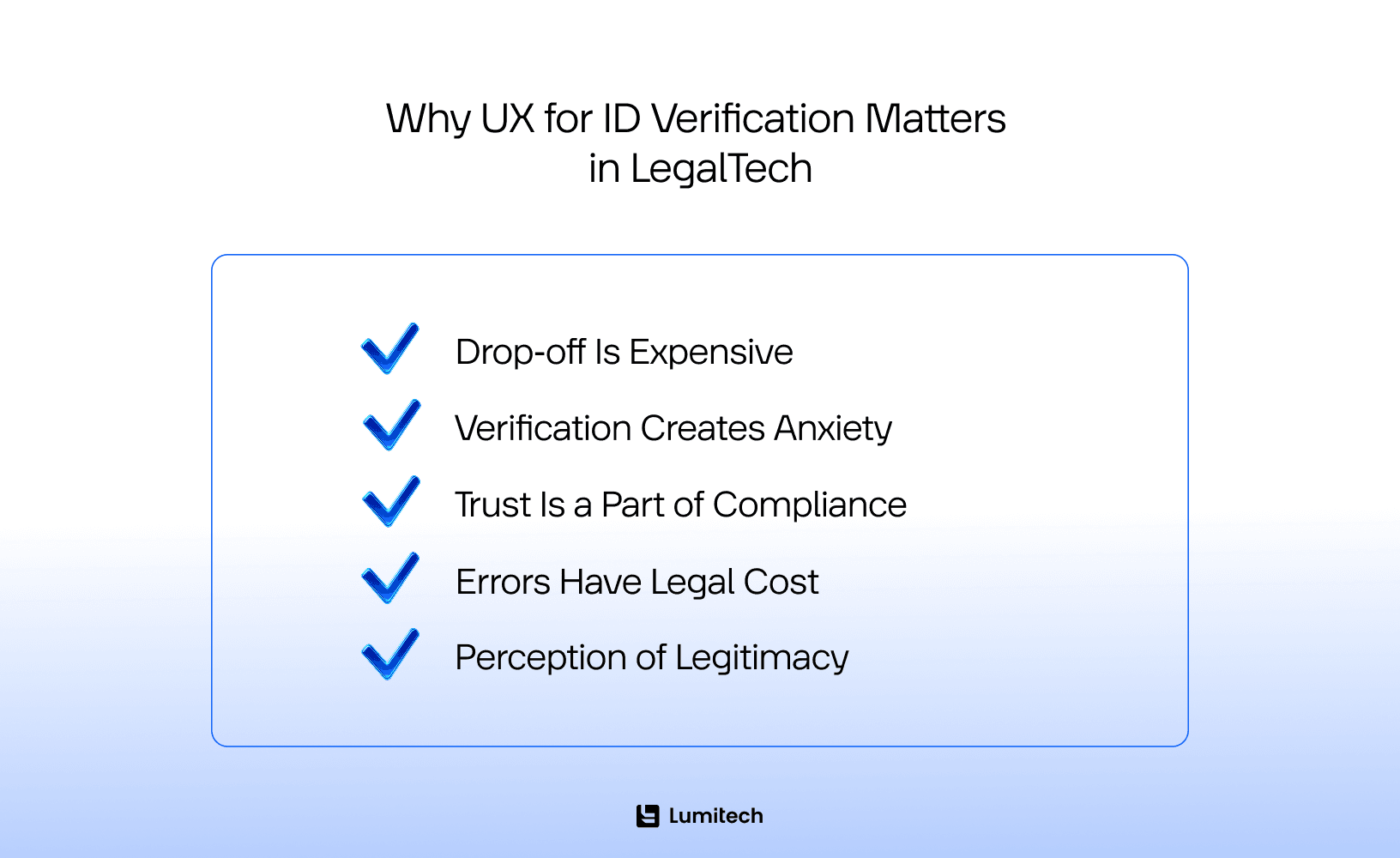
Drop‑off Is Expensive
ID checks are often the first big friction wall in onboarding. Users start exploring a product, feel curious, and then suddenly hit a request for passport photos, selfies, and extra data. If this moment is handled poorly, abandonment rates jump.
For LegalTech tools that sell to individuals or SMEs, every rage quit here is not just a UX statistic — it is lost qualified revenue, wasted acquisition spend, and one more person who might not come back.
Verification Creates Anxiety
Identity checks are not neutral. People feel judged. They worry about “failing” the process, making a mistake, or being rejected for unclear reasons. If the interface is cold or confusing, this anxiety only intensifies.
Good identity verification user experience acknowledges the stress and guides people step by step. It speaks like a human, not a legal form. It reassures them about what is happening and what comes next.
Trust Is a Part of Compliance
Compliance does not live only in your policy docs. If users do not trust what you collect and why, they hesitate, fake fields, or abandon halfway. That hurts both conversion and integrity.
Clear explanations, visible security cues, and transparent flows are part of secure customer identity UX. They make people more willing to share the right data, which in turn makes your KYC process actually useful and in the future, this opens the door to more effective service offerings and UX personalization.
Errors Have Legal Cost
When someone uploads the wrong document or misses an important detail, you don’t just get a small UX glitch. Support teams must step in. Manual checks increase cost and introduce delay. Worse, if errors pass unnoticed, they can lead to compliance exposure.
Thoughtful ID verification UX best practices reduce these mistakes upfront — through inline validation, clear instructions, and simple recovery paths — lowering both operational noise and legal risk.
Perception of Legitimacy
Law firms and LegalTech platforms live and die on credibility. A clumsy interface, clipped copy, or broken mobile capture instantly undermines that legitimacy. Users might not know the specific regulation you follow, but they feel if the experience is solid.
Here, LegalTech UX design and UX/UI branding in the LegalTech matter as much as your underlying policy. UI becomes a proxy for “Can I trust this product with my passport and face?”.
Well-designed verification is not necessarily “short”. It is “guided” — one clear step at a time, with enough information and reassurance to keep users moving.
How to Design User-Friendly ID Verification Flows Without Sacrificing Compliance
Designing humane, compliant verification is not an art project. It’s a set of practical decisions across copy, layout, sequence, and error states.
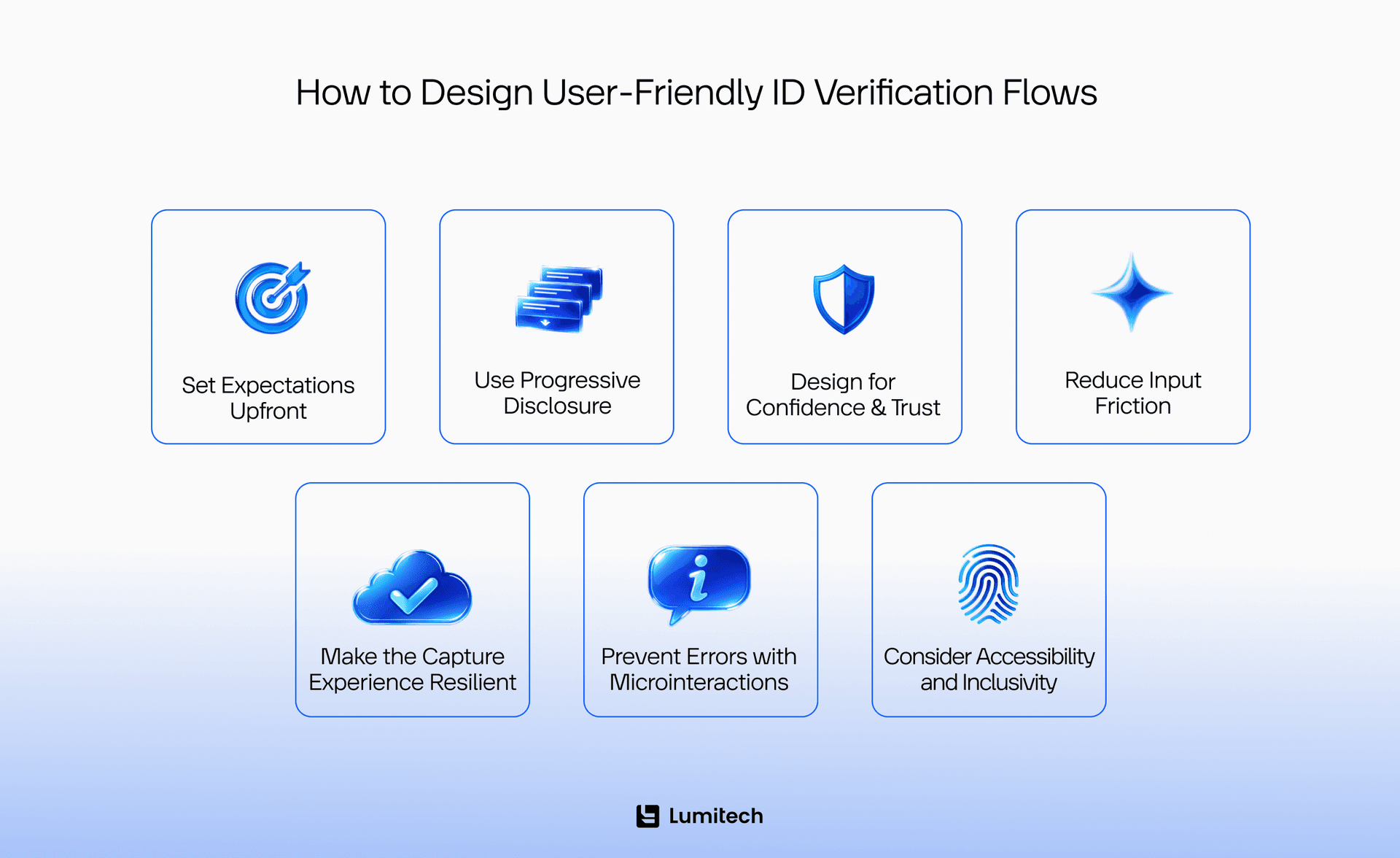
Set Expectations Upfront (Reduce Surprise and Rage Quits)
Many UX mistakes in identity verification apps come from surprise. Users click “Sign up”, expecting a simple form, and suddenly face a camera and a list of documents.
A better pattern:
Tell people before they start what they will need: passport or ID card, selfie, maybe proof of address.
Provide an estimated time, even if rough (“1–3 minutes”).
Add a short privacy summary: what you store, for how long, and why. Mention user privacy in ID systems in plain language, not just in a link to your policy.
This helps people decide consciously: “I can do this now” instead of “I didn’t sign up for this”.
Use Progressive Disclosure (Show What Matters Now)
Verification flows often cram everything into one screen — legal text, instructions, inputs, exceptions. This creates overload.
Progressive disclosure does the opposite:
Break the journey into small steps, each with a clear purpose.
Hide edge-case legal text behind “Learn more” so it’s accessible but not overwhelming.
Translate compliance into normal language through microcopy, not just references to articles and clauses.
This approach is not only good identity check UX — it also aligns with accessibility, since screen readers and keyboard navigation work better on simpler screens.
Design for “Confidence”, Not Just Completion
Completion is not the only outcome that matters. How users feel about the journey will affect how they talk about your product and whether they trust using it for serious matters later.
Design for confidence by:
Showing where they are (e.g., 3 simple steps: Document → Selfie → Review).
Using clear success states (“We’ve received your document. Next, we’ll verify your selfie”).
Giving failure states with recovery: what went wrong, what to try differently, and how many retries are allowed.
These are small pieces of trust-building UX for verification, but together they turn a tense process into something manageable.
Reduce Input Friction (The “Minimum Viable Data” Rule)
Ask only for data you truly need at this moment. The more fields, the more errors and suspicion.
Use sensible defaults and autofill where appropriate.
Offer format hints (for dates, ID numbers).
Avoid multi-page forms embedded inside the verification step unless mandated.
This minimization principle should match your backend policy as well. It supports compliance-driven ID systems that store less and protect more.
Make the Capture Experience Resilient (Mobile Reality)
Most verification now happens on mobile, increasing the demand for security-first mobile app development services. People are in kitchens, cars (hopefully parked), or offices with uneven light. If your capture flow assumes perfect conditions, it will fail them.
A resilient capture UX includes:
Real-time tips on lighting, framing, and glare.
Auto-capture when the document is stable and within frame.
Ability to switch cameras, and, where allowed, upload pre-existing photos as a fallback.
Doing this right not only helps completion — it’s also part of improving conversion with better verification UX on small screens.
Prevent Errors with Microinteractions
Don’t wait until the final “Submit” to tell users that a document is expired or a field is wrong. Instead:
Validate inputs inline.
Show warnings like “This document looks expired — please check the date.”
Ask for confirmation before irreversible actions, such as final submission or discarding images.
Microinteractions are the detail layer of ID verification UX best practices, preventing small mistakes from turning into big frustrations.
Accessibility and Inclusivity as a Risk Reducer
Verification flows that assume perfect vision, hearing, or motor control are exclusionary — and risky in regulated spaces. That’s why it is always important to:
Respect contrast and font size.
Support keyboard and assistive technologies.
Avoid color-only cues for status and errors.
Good accessibility in ID verification is not just compliance. It also expands your reachable user base and reduces support overhead.
Secure ID Verification UX: Trust Signals That Increase Completion Rates
Even a beautiful flow can fail if people don’t feel safe. Trust signals need to be inside the journey, not buried in the footer.
Some practical elements:
Why we ask — short lines like “We verify identity to protect your account and follow KYC rules” anchor the process.
Data handling clarity — say “Stored for X days, encrypted, never sold” in plain text near upload and review screens.
Security cues — subtle “Encrypted connection” notes, lock icons, recognizable compliance badges (only if genuinely earned).
Then there’s human fallback. A small “Need help?” link to chat, or a note that “Manual review is available if automated checks fail”, reassures people that they’re not trapped in an opaque machine.
All of this should sit on top of consistent branding and professional user interface, making UI and UX branding in LegalTech is part of security. If the interface feels sloppy, users will question everything behind it — including how you handle their identity.
Backend Evolution: Architecture Patterns for Secure, Scalable ID Verification
The best front-end journey cannot compensate for a fragile backend. A strong ID system architecture supports both security and the experience you just designed.
Secure Identity Verification Design: Authentication vs. Authorization
First, separate two concepts clearly:
Authentication — proving who a user is (passwords, tokens, MFA).
Authorization — defining what they can do once authenticated.
In LegalTech, confusing these leads to over-privileged accounts and potential leaks. A good secure identity verification design applies least privilege, audits roles regularly, and treats every change in permissions as a high-risk action.
Secure ID System Design: Capture SDKs and Liveness Checks
Relying on users manually attaching images through generic upload fields is increasingly risky. Modern secure ID system design uses dedicated verification SDKs that:
Control capture conditions (resolution, tamper checks).
Provide active or passive liveness detection to fight spoofing.
Generate logs and metadata for future audits.
This is where your backend and your digital identity verification UX meet — the SDK must feel smooth inside the app while enforcing strong security behind the scenes.
Asynchronous Verification Pipelines
Verifying ID can take seconds — or longer, especially with external providers or manual review. Keeping users staring at a spinner is a recipe for frustration.
Instead:
Accept data and mark status as “pending”.
Process verification asynchronously with background jobs.
Use webhooks to update your system when the result is ready.
Notify users with clear messages when they can continue.
This pattern supports both high-availability ID systems and smoother UX, avoiding timeouts and double submissions.
Data Security Model for PII
Personal data in ID flows is sensitive. Your architecture should minimize blast radius:
Encrypt everything in transit and at rest.
Store only what you must, and purge on a schedule.
Segregate PII storage from general app data when possible.
Maintain audit logs for all access to identity records.
For teams with experience in data governance in banking, these principles will feel familiar — LegalTech simply applies them in a different domain.
Global Scale and Data Residency
If you operate across regions, your ID systems must respect local rules.
Use region-aware storage and processing (GDPR, national ID laws).
Balance latency and compliance by choosing where verification runs.
Document data flows so legal and technical teams talk about the same reality.
Good global digital identity experience depends on matching user expectations in each jurisdiction — not pretending one policy fits all.
Fraud Evolves — Your Backend Must Evolve Too
Synthetic identities, deepfakes, document forgeries — attackers change tactics constantly. Your ID system cannot stay static.
Plan for:
Regular updates to models and providers.
A configurable decision engine (pass, fail, manual review).
A manual review queue with proper tools for staff.
Monitoring signals that detect unusual patterns early.
This is where reducing fraud through intelligent UX design meets backend evolution. UX can guide users to correct behavior; infrastructure handles the rest.
If you’d like these design and backend approaches to become a living part of your product, reach out to Lumitech — the team can help you turn them into a secure, well‑designed ID verification flow!

UX Mistakes in Identity Verification Apps That Quietly Kill Conversion and Increase Risk
Some patterns appear again and again across products — and they’re avoidable.
Surprise verification — starting a flow as if it were a simple sign-up, then suddenly blocking progress with a full ID check, is one of the fastest ways to lose users.
Over-collecting data early — asking for everything “just in case” increases form abandonment and makes compliance harder.
Unhelpful failure states — errors like “Upload failed” or “Verification error” without any advice leave users stuck.
No recovery path — no retry option, no alternative verification method, no “Contact us” for manual review.
Mobile-hostile capture — no coaching about lighting, strict rules without explanation, tiny tap targets.
Hidden policies — storage duration, document validity rules, or appeal options buried in dense legal paragraphs.
Many of these break points show up as spikes in drop-off analytics. Addressing them becomes a concrete, measurable way of improving conversion with better verification UX.
Security Checklist for LegalTech ID Systems (Practical Implementation Guide)
To make this more actionable, here is a condensed checklist you can adapt. The checklist is universal and can be applied to diverse industries, from financial services to custom software solutions for restaurants, wherever identity and access sit at the core of the experience.
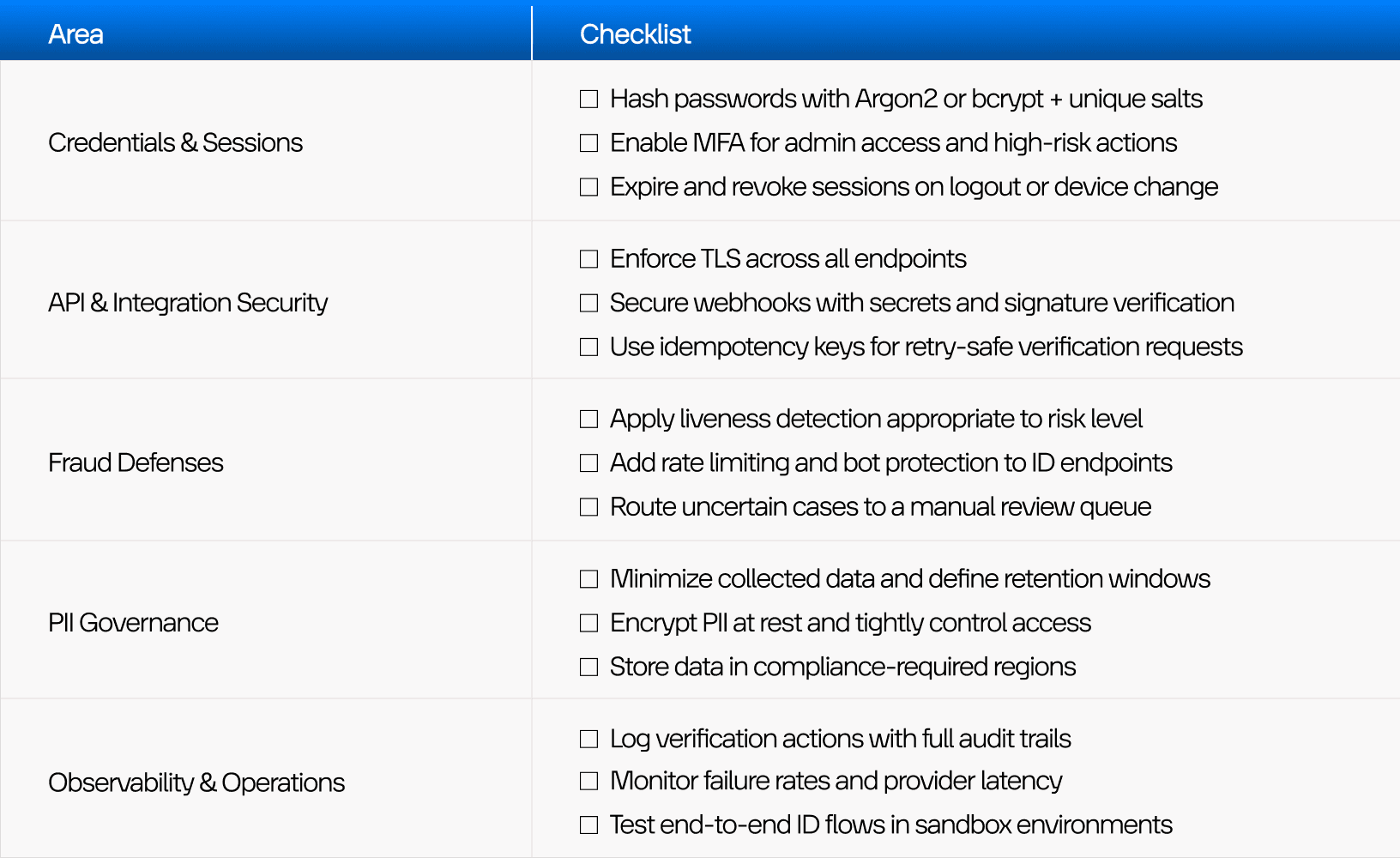
Credentials & Sessions
Hash passwords with strong algorithms (Argon2, bcrypt) and unique salts.
Enable MFA for sensitive actions and admin accounts.
Implement session expiration and revocation on logout or device change.
API & Integration Security
Enforce TLS everywhere.
Authenticate webhooks with secrets and signature verification.
Use idempotency keys for verification requests to avoid duplicates on retries.
Fraud Defenses
Use liveness detection suited to your risk profile.
Apply rate limiting and bot protection on verification endpoints.
Maintain a manual review queue for ambiguous or high-risk results.
PII Governance
Practice data minimization and clear retention policies.
Encrypt PII at rest and restrict access tightly.
Respect region-based storage rules in line with your compliance-driven ID systems strategy.
Observability & Operations
Log who verified what, when, and through which method.
Monitor verification failure spikes and provider latency.
Maintain a sandbox environment to test complete ID verification user flow across staging and dev apps.
This list is not exhaustive, but it turns complex security concerns into something your team can systematically check.
The Future Direction: Decentralized Digital Identity and Selective Disclosure
Centralized identity stores have a structural problem — they become high-value targets. One breach can expose millions of people. Decentralized digital identity, in turn, concepts offer another path. Instead of keeping all credentials in one place, they use:
Wallets controlled by users.
Verifiable credentials issued by trusted authorities.
Selective disclosure: sharing only the necessary attributes instead of full documents.
In practice, most organizations won’t move fully to decentralized identity overnight. Hybrid models will dominate for years: traditional KYC for some use cases, decentralized credentials for others.
From a UX angle, this means explaining new concepts carefully. From backend and LegalTech angles, it means planning for systems that can talk to both worlds — and keep evolving.
Conclusion
Secure ID systems sit at the crossing of law, infrastructure, and design. If any of these three are weak, the whole product suffers.
Good secure ID verification UX helps users understand what is happening, stay calm, and finish the process with confidence. Strong backend and secure ID system design ensure that the data they share is handled safely, that decisions are defendable, and that fraud has a much harder time getting through.
The best digital identity verification flows are not the ones with the fewest screens. They are the ones people complete, remember as “fair and clear”, and that regulators can audit without surprises.
These lessons apply across LegalTech, UX design for finance industry, and even operational fields like UX best practices in the transportation industry where identity and access control increasingly matter.
If you are building a LegalTech or finance product that needs serious identity verification — or reworking a legacy flow that scares users away — Lumitech can step in as a practical partner. From mapping your ID verification user flow and designing trust-first UI, to integrating providers and hardening architecture, the team knows how to balance security with humane UX.
Lumitech combines product thinking, UI/UX design services, and engineering expertise across web and mobile platforms to help you design, prototype, and ship ID systems that real users can live with — and regulators can rely on.


