
UX Personalization vs. Customization: When to Automate and When to Let Users Decide
Here’s the problem: every product wants to feel “made for you”… until it feels like it’s spying on you. Users do want relevance. They also want autonomy. And occasionally, they want the app to stop “helping” and let them click the thing they came for.
- UI/UX Design
December 24, 2025
 AI Overview
UX customization lets users manually configure settings, layouts, and preferences, while personalization uses behavioral data to adapt content automatically. Customization suits power users needing predictable control; personalization suits content discovery and reduced friction. Poor implementation causes choice overload or a "creepy" loss of trust, while 71% of consumers now expect personalized interactions, per McKinsey research.

That tension is why “personalization” and “customization” keep getting lumped together — despite solving different problems in different ways.
Meanwhile, the business stakes are real. Research from McKinsey reports that 71% of consumers expect personalized interactions, and 76% get frustrated when it doesn’t happen. So yes, tailoring matters. But so does not blowing up trust, accessibility, or usability while doing it.
This article breaks down:
What customization and personalization actually mean in UX
When to use one, the other, or a hybrid
Common failure modes (including the “we built a settings page the size of a novella” trap)
Which product categories benefit most from each approach
An implementation playbook that doesn’t overwhelm users
Practical insights we’ve learned the hard way, but you don’t have to.
Difference Between Personalized and Customized UX: Definitions That Don’t Require a Bingo Card
Customization
Customization is user-controlled tailoring. The user explicitly chooses settings, layout, options, filters, preferences, themes, notification rules, dashboard widgets, etc.
Key feature: agency. The user is the driver.
UX upside: control, transparency, and predictable outcomes. UX risk: cognitive load, choice overload, complexity, and “why do I have to set this up myself?”
Nielsen Norman Group’s research on customization features highlights that usability can drop when customization creates hard-to-navigate flows and findability problems; product customization tasks in particular had lower completion and higher difficulty than non-customization or interface-customization experiences.
Personalization
Personalization is system-controlled tailoring. The product adapts content, UI, offers, or flows based on user data (behavioral signals, stated preferences, context like location/device/time, etc.).
Key feature: relevance at scale. The system does the work.
UX upside: speed, reduced effort, better discovery, fewer irrelevant screens. UX risk: creepiness, loss of control, filter bubbles, incorrect assumptions, and “why is it showing me this?”
While standard analytics tell you what happened, predictive UX research allows teams to anticipate what will happen, forming the backbone of any sophisticated personalization engine.
Here’s the simplest test. If the user says:
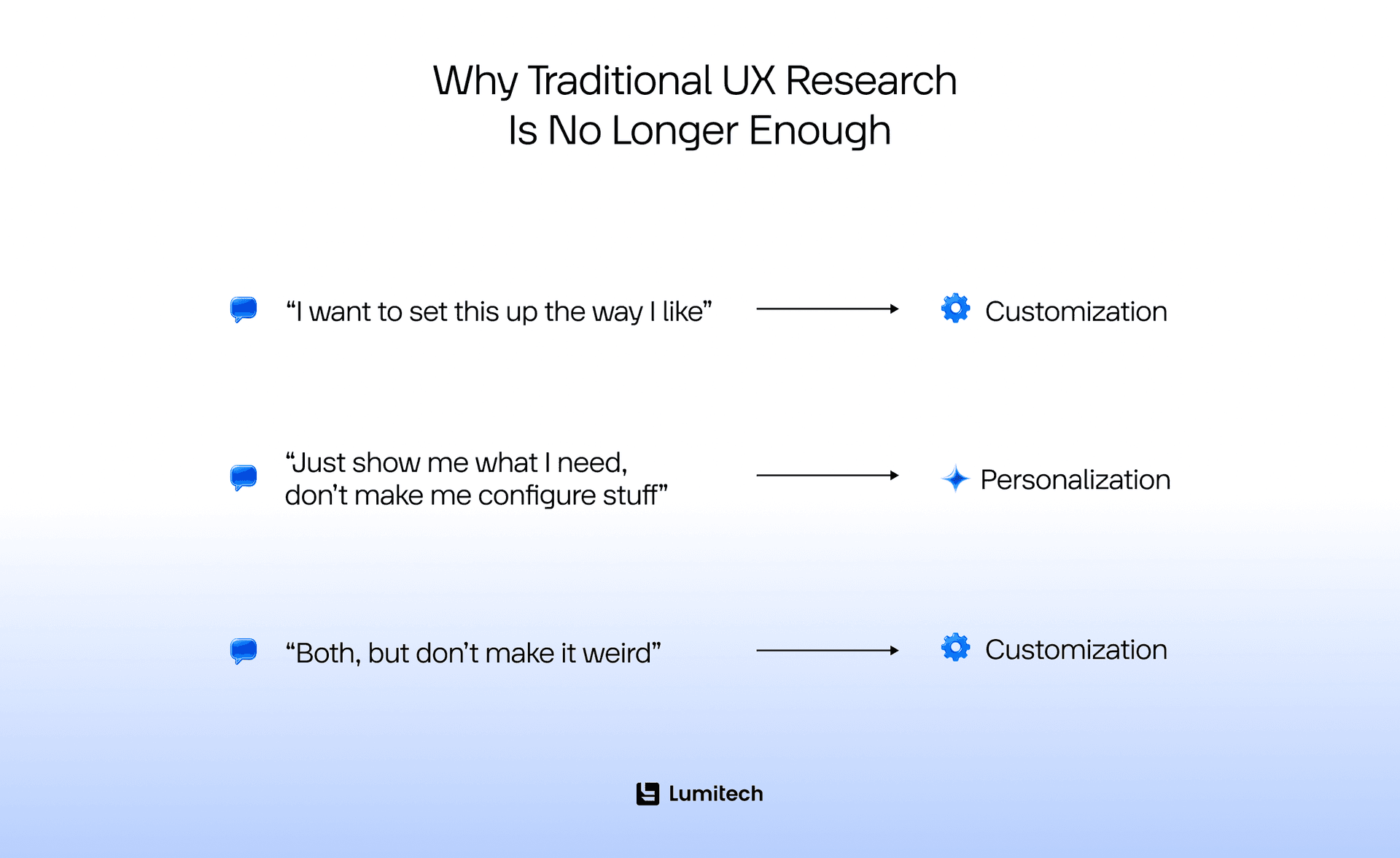
Customization and personalization aren’t opposites — they’re two different levers. Customization optimizes for the agency (user intent is explicit). Personalization optimizes for convenience (user intent is inferred). Your UX challenge is choosing the right lever for the moment, because both can fail spectacularly.
Customized vs. Personalized: When to Use Which? (The Strategic Tug-of-War)
Choosing between these two isn’t a coin flip. It’s a strategic decision based on your user’s “Job to be Done.”
Enable customized user experience when:
Users are Power Users: If you are building a B2B SaaS tool (like Adobe Photoshop or Salesforce), your users have specific workflows. They need to move the "layers" panel to the left because that’s how their brain works. Don’t try to guess for them; give them the tools to build their own cockpit.
Privacy is Paramount: Customization is transparent. The user knows exactly why the interface looks the way it does — because they changed it. This builds trust.
The Task is High-Variability: If your tool serves five different personas (e.g., a project manager vs. a developer), a “standard” layout will frustrate everyone.
Use UX personalization when:
Content Discovery is Key: If you have a library of 10,000 items (Spotify, Medium, TikTok), the “Paradox of Choice” will paralyze the user. Personalization acts as a concierge, narrowing the world down to what matters.
You Want to Reduce Friction: If a user always orders a “Large Iced Latte” at 8:00 AM, the app should probably have that ready on the home screen as a one-tap option.
Mobile-First Experiences: On small screens, every pixel is real estate. You can’t afford to show irrelevant content.
Product Profiles: Who Benefits Most?
Not every product needs a “Recommended for You” section, and not every app needs a "Custom CSS" editor. The difference between personalized and customized features also provides different benefits for different domains. Here are some examples of industries that gain the most from these strategies:
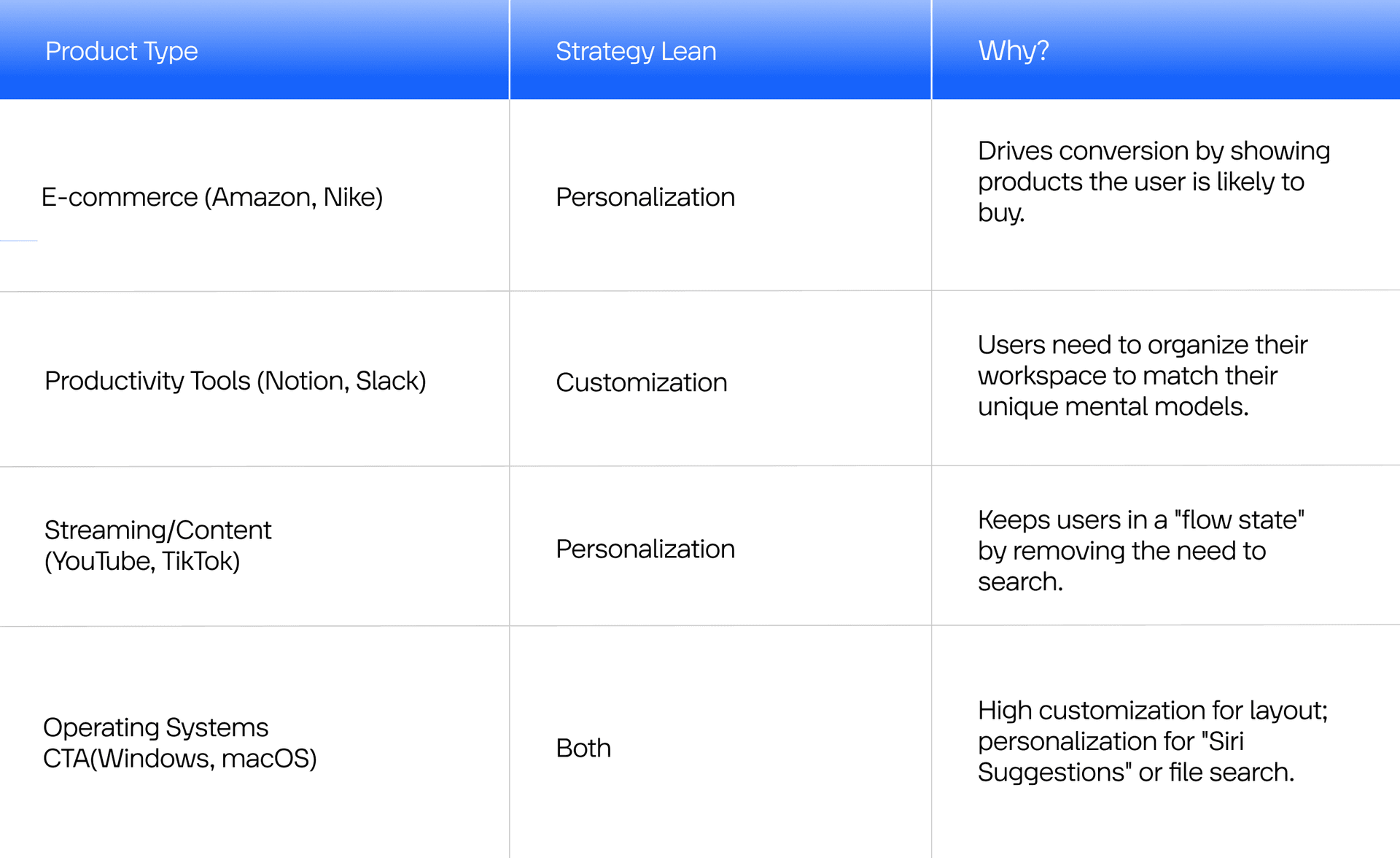
The choice between customization vs. personalization varies based on the “intent” of the user in that specific ecosystem. Let’s look at some examples in more detail:
E-Commerce
In retail, the goal is to shorten the path to purchase. High-performing e-commerce sites use “Collaborative Filtering.” If User A and User B both bought a camera, and User A bought a tripod, the system suggests the tripod to User B. This is the Amazon model. It reduces the friction of searching and creates serendipity.
Fintech and Banking
In UX design for fintech, personalization is used for fraud detection and financial advice (e.g., “You spent 20% more on coffee this month”). Customization is used for security and accessibility (e.g., setting daily transfer limits or adjusting text size for older users).
Healthcare & MedTech
In healthcare, personalization isn't just “nice to have”; it can be life-saving. Apps like MyFitnessPal or glucose monitoring software use Implicit Personalization. They track your biometrics and adjust their alerts automatically. The user doesn't want to “customize” their insulin warnings; they want the system to know when they are in danger based on their data.
Still, remember that personalization can feel seamless until a security wall is hit. This is why knowing how to design user-friendly ID verification flows is critical; you need to verify the person without destroying the bespoke feel of the experience.
EdTech & Learning Management Systems (LMS)
Education is shifting from the “Industrial Age” (one-to-many) to the “Digital Age” (one-to-one). Platforms like Duolingo or Khan Academy use Predictive Personalization. If you keep getting “Past Tense” verbs wrong, the algorithm doesn't wait for you to ask for help; it injects more “Past Tense” exercises into your next session.
Mobility and Logistics
In the world of urban mobility and logistics, the tension between automation and control is at its peak. When we examine UX best practices in transportation industry, we see that personalization is the primary tool for managing 'chaos.' For example, a ride-sharing app personalizes the experience by predicting your destination based on the time of day. However, it must allow for deep customization when it comes to safety features, vehicle types, or route preferences (like avoiding tolls). In this sector, the UX must be 'glanceable' — users are often on the move, meaning the system must make the right choice for the user 90% of the time, while keeping the manual 'override' button easily accessible.
Professional software & B2B SaaS
In tools like Salesforce, Jira, or Adobe Creative Cloud, the user is a “Craftsman.” Power users hate things moving around without their permission. If Photoshop “personalized” its toolbar by hiding tools it thought I didn't use, I would switch to a competitor tomorrow. In B2B, Personalization is often limited to “Onboarding” (guiding you to features relevant to your job title), while customization features in SaaS are the core product (letting you build the dashboard that runs your business).
In high-stakes environments, UI and UX branding in legaltech must balance extreme customization (case file management) with a sober, trustworthy brand identity that doesn't distract the user from complex tasks.
Want a real example of customization improving UX without dumping a wall of settings on users? Read our e-commerce case study and see what we changed, why it worked, and what you can apply to your product.

Common Mistakes in UX Personalization and Customization
Mistake 1: Treating customization as a dumping ground for unresolved UX decisions
If your product has a confusing flow, and you add “Advanced settings” so users can fix it themselves… that’s not empowerment. That’s outsourcing product thinking.
Better: use customization for meaningful preferences, not to patch unclear defaults.
Mistake 2: “Personalization” that’s actually just segmentation cosplay
If everyone in “Segment A” sees the same thing, that’s not personalization — it’s targeted content. Which is fine, but label it honestly in your internal strategy. Otherwise, you’ll build the wrong tech and measure the wrong outcomes.
Mistake 3: User experience personalization that causes choice overload
Customization can create a maze of knobs and toggles. NNG’s customization usability findings show that findability and task support issues are major causes of failure in customization flows.
Better: progressive disclosure. Start with 3–5 meaningful options, hide advanced options behind a clear structure, and provide templates/presets (“Minimal,” “Power user,” “Manager view”).
Mistake 4: Personalization that feels creepy or manipulative
Personalization UX crosses the line when it surprises users with how much you know, or when it steers them without consent.
Dark patterns research describes deceptive design practices that manipulate users into choices they wouldn’t otherwise make, and that may cause harm. Personalization can become a delivery mechanism for manipulation if it’s optimized only for clicks and not for user benefit.
Better:
use privacy-first defaults
explain data use in context
offer opt-out and “reset my recommendations”
avoid sensitive inference unless necessary and consented
Mistake 5: “Adaptive UI thrash”
If your interface keeps changing, users can’t build a mental model. This is especially toxic in the tools people use for work.
Better: stabilize the frame, personalize inside it. Keep navigation consistent, personalize content modules, not core structure, use gentle adaptation (suggestions), not forced rearrangement.
Mistake 6: Filter bubbles and feedback loops
Recommendation systems can narrow exposure. Academic discussions of UX personalization note feedback loops and moving targets in user modeling as recurring issues.
Better: design for exploration:
“Because you watched X” + “Something different” rails
diversity injection
user controls (“show less like this,” “more variety”)
transparent tuning
Mistake 7: Forgetting the consent and compliance surface
If personalization relies on tracking, profiling, or sensitive data processing, consent must be meaningful, reversible, and not coerced. Also consider profiling guidance, such as the UK ICO’s resources on automated decision-making and profiling.
The “Privacy Paradox” and Global Regulations
We are currently living through a fundamental shift in how the internet works. For a decade, personalization was a “black box” — companies scraped data from every corner of the web using third-party cookies, and users were magically presented with ads for products they had only thought about in the shower.
Then came the “Privacy Awakening.” Between GDPR in Europe, CCPA in California, and Apple’s App Tracking Transparency (ATT), the “black box” was smashed, and the whole idea of customized vs. personalized UX changed.
What is the Privacy Paradox?
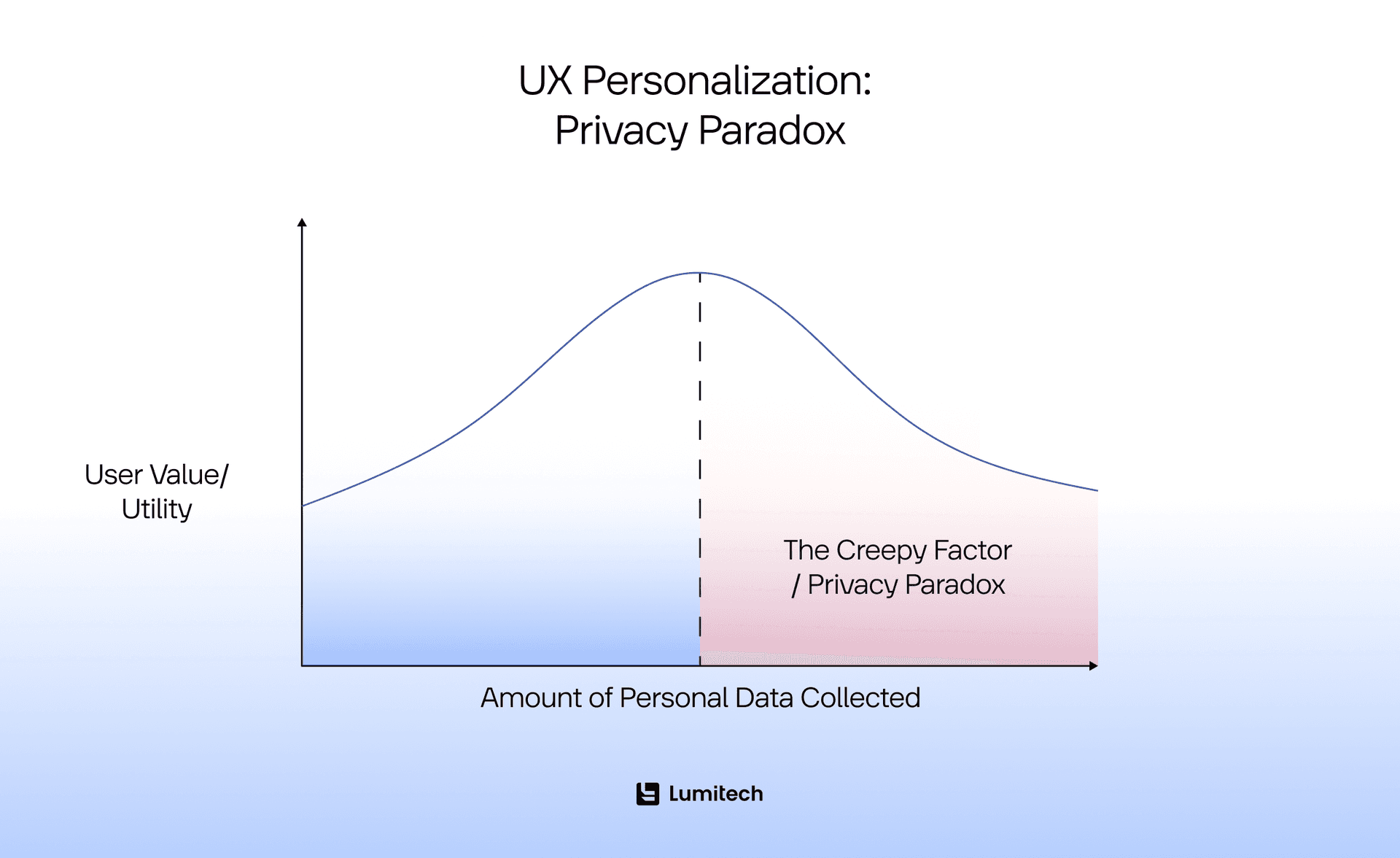
The Privacy Paradox is a psychological phenomenon where users say they value their privacy more than anything, yet their behavior tells a different story: they will happily trade their email address, location, and browsing history for a 10% discount code or a slightly better music recommendation.
As a UX writer or designer, this is your minefield. If you ask for too much data upfront, you kill user experience personalization. If you don't ask at all, you kill relevance.
The death of the “stalker” cookie
Historically, personalization relied on Third-Party Data (data collected by one company and sold to another). This is dying. Google is phasing out third-party cookies, and Apple has made it so users have to “opt in” to being tracked.
This has forced a shift toward Zero-Party Data and First-Party Data:
First-Party Data: Data you collect directly (e.g., “The user clicked on a red dress on our site”).
Zero-Party Data: Data the user voluntarily gives you to improve their experience (e.g., “I am a size Medium and I like Bohemian style”).
Designing for consent: the UX of trust
The “Privacy Paradox” means your UX personalization strategy is now a Trust Strategy.
Just-In-Time Requests: Don't ask for a user's location the second they open the app. Wait until they click “Find a store near me.” This is the intersection of Customization (the user acts) and Personalization (the app responds with local data).
The “Why” Behind the “What”: Instead of a generic “Allow tracking” pop-up, explain the value. “Allow us to see your interests so we can stop showing you irrelevant ads.”
The Data Nutrition Label: Apple’s privacy labels are a great example of “Customization of Privacy.” It allows users to see exactly what is being tracked and toggle it off.
Personalization under GDPR: the “right to be forgotten”
In the IT world, we often forget that personalization creates a Profile. Under GDPR, a user has the right to access that profile or delete it.
The Customization Fix: Give users a “Privacy Dashboard.” Let them see the “tags” the algorithm has assigned to them (e.g., “Interested in: Sci-Fi, Vegan Cooking, Marathon Running”).
The Result: When you let a user “customize” their “personalization profile,” you turn a creepy algorithm into a transparent partnership.
How to Implement Personalization and Customization Without Melting Your UX
Start with the problem, not the buzzword
Don’t start with “We need personalization.” That’s like saying “We need vegetables.” Which vegetables? Why? Are we trying to be healthier, or are we just trying to look like someone who owns a blender? The same goes for personalized user experience. Start with the job your user is trying to do and the friction you’re trying to remove. If you can’t describe the pain in plain English, you’re about to build a feature that looks smart in a roadmap deck and feels confusing in real life.
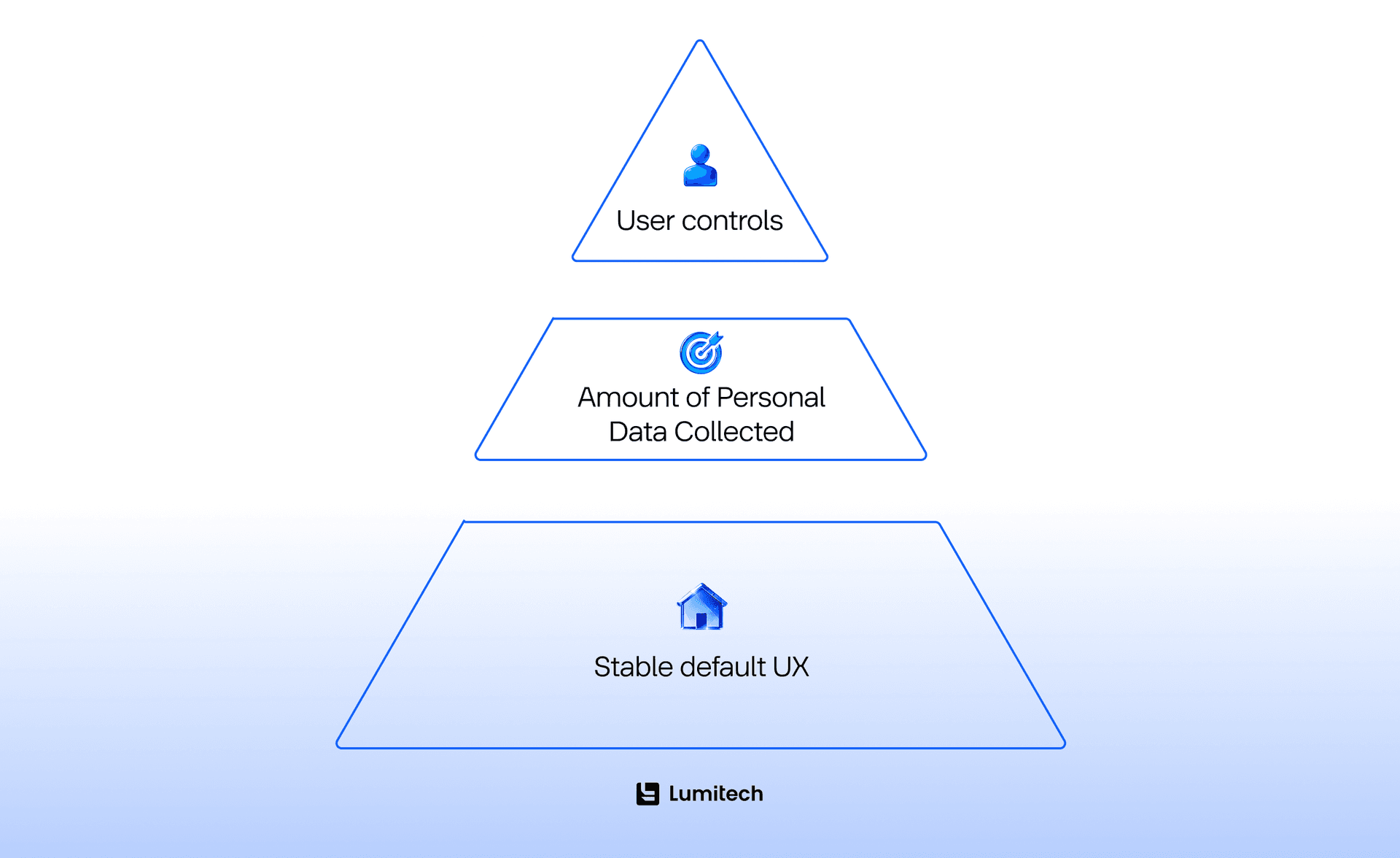
Keep the frame stable, personalize inside it
Pick a safe default and commit to it. Personalization is at its best when it quietly helps inside a stable frame, not when it rearranges the furniture every time someone walks into the room. People build patterns and muscle memory. If your navigation or core layout keeps shape-shifting because “the algorithm thought it would be better,” users won’t feel cared for — they’ll feel punished. Keep the skeleton consistent and personalize the parts that are meant to flex: content suggestions, shortcuts, ordering inside a module, the “continue where you left off” stuff. Helpful. A disappearing menu is not.
Make it understandable (and not weird)
If you’re personalizing, users should never be left wondering whether the product is broken, biased, or secretly judging them. Give simple explanations in context — “Because you watched X,” “Based on your recent activity” — not a dissertation, just enough to make the system feel like it has reasons, not moods. And include an escape hatch. People want a steering wheel even if they don’t plan to touch it. A reset, a “show me less of this,” or a “turn off personalization” option is the UX equivalent of a fire exit: you hope nobody needs it, but everyone relaxes knowing it’s there.
Don’t turn customization into homework
When teams add UX customization, there’s a temptation to proudly present a giant wall of toggles like it’s a gift. It’s not a gift. It’s homework. The trick is to start with a few high-impact controls and let deeper options reveal themselves over time, once users actually understand what the product can do. You don’t hand someone a cockpit manual before they’ve found the door handle.
Measure outcomes, not just clicks
Clicks are not the truth. People click because they’re delighted, but they also click because they’re lost, irritated, or trapped in a maze you accidentally designed. If you want to know whether personalization and customization are helping, look at whether users succeed faster, come back more, feel more in control, and complain less. And if you run recommendations, watch out for the “narrowing” effect — personalization should feel like opening doors, not slowly bricking them up behind the user.
Treat privacy like UX, not a side quest
The quickest way to make personalization feel creepy is to collect more than you need, explain it poorly, and make opting out feel like a punishment. If you’re going to personalize, be clear about what you’re using and why, and make “no, thanks” a real option. And please — no consent flows that feel like an escape room. If the user needs three screens and a minor in interface archaeology to say “no,” you’ve already lost trust, even if you gained a metric.
The goal: quiet usefulness
Do this well, and personalization vs. customization stops being a shiny feature and becomes what it should’ve been all along: a quiet advantage that makes the product feel easier, kinder, and a little more human.
The Hidden Cost Curve: Why Personalization is Rarely “Just a Feature”
Customization can be expensive, but personalization has a special talent: it looks deceptively simple at kickoff and turns into a full-time job by launch.
At a minimum, a personalized user experience requires a reliable way to collect signals, interpret them, and act on them consistently. Then you need to measure whether it’s working, detect when it’s drifting, and prevent it from accidentally optimizing for the wrong thing. And once you personalize, you’ve also created an expectation: users will assume the product “knows them” everywhere, not just in the one surface area you shipped. That expectation spreads fast.
Customization and personalization regulations
Then there’s the legal and governance side. If personalization relies on consent-based data processing, users must be able to withdraw consent, and EU guidance emphasizes that it should be as easy to withdraw as to give consent. In other words: if opting in is one tap, opting out can’t be a 12-step pilgrimage through settings, FAQs, and a mysteriously broken link.
The moment personalization starts meaningfully shaping someone’s experience — especially in sensitive contexts like finance, insurance, hiring, eligibility, or anything with “significant effects” — you also brush up against profiling and automated decision-making concerns. The UK ICO’s guidance highlights restrictions and risks around solely automated decisions with legal or similarly significant effects, and it’s a good reminder that “it’s just UX” is not always a safe assumption.
So yes, customized vs. personalized UX can be resource-intensive. But the bigger point is this: if you aren’t prepared to maintain it, you shouldn’t ship it. Half-baked personalization doesn’t feel “early”; it feels broken. And broken, that’s also creepy is the worst kind of broken.
A lot of this complexity ramps up fast once AI in SaaS enters the picture, because now your UX depends on a system that learns, shifts, and occasionally gets creative at the worst possible time.
If you want a pragmatic compromise, build personalization where the value is obvious, and the downside is low, and use customization (or explicit user choices) to handle anything where users need predictability, accountability, or clarity.
Design Patterns that Make User Experience Personalization Feel Human
The fastest way to make personalization feel better is to give users tiny moments of control that don’t require them to become system administrators.
Spotify is a good example of this direction: it’s still heavily personalized, but it increasingly adds controls that let users steer the machine — like “snoozing” tracks, tuning Discover Weekly by genre, and switching off certain automated behaviors. Whether or not you love any particular streaming algorithm, this is an important UX move: it turns personalization from a black box into a collaboration.
This “collaborative personalization” approach works in many domains because it matches how people actually behave. Users don’t want a customized user experience that will make them design everything from scratch. They want the product to do 80% of the work — and then they want a simple way to correct the remaining 20% without drama.
A helpful pattern here is to think in three layers: first, the product gives a sensible default experience, then it offers personalized recommendations or shortcuts, and finally, it offers user controls that are proportional to the stakes. Low-stakes controls can be lightweight (“show me less of this”), while higher-stakes personalization needs clearer confirmation, settings, or even an audit trail.
Explanations matter too, but only the right kind. Users don’t want a paragraph about embedding vectors; they want a sentence that answers “why this?” without insulting their intelligence. The goal isn’t to prove your system is sophisticated — it’s to make the outcome feel justified.
And please, don’t forget the “reset” button. A reset is an apology in UI form. It says, “We know we might have gotten this wrong, and you shouldn’t have to pay forever for one weird click you made at 2 a.m.” That one affordance can save a user experience personalization system from turning into a long-term grudge match between the user and the algorithm.
Conclusion: Don't Be a Robot, Be a Companion
There’s a clear difference between personalization and customization, but both of them share the common idea. Whether you choose to give your users the “Legos” to build their own experience or use “Magic” to build it for them, remember that the goal is always the same: empathy. Personalization should feel like a gift, not a surveillance report. Customization should feel like empowerment, not a chore. Balance the two, and you’ll create a product that users don’t just use — they inhabit. If you’re trying to balance relevance with control (without creating a settings labyrinth), professional UI and UX design services can help you ship tailoring that actually feels good to use.


