
Data Migration Strategy: The Ultimate 2026 Enterprise Guide
Technically speaking, data migration is what happens when a business decides it’s time to grow up. Maybe you’re moving from an aging on-prem database to the cloud. Maybe you’re consolidating systems after a merger.
- DevOps & Cloud
- Big Data & Analytics
March 05, 2026
 AI Overview
Data migration projects often become more complicated than expected due to legacy systems, infrastructure dependencies, and security risks. This guide breaks down the migration process, challenges, and the strategies companies use to move data without disrupting operations.

Maybe your ERP implementation is finally happening, and all those spreadsheets you swore were “temporary” have become a permanent lifestyle choice.
No matter the trigger, data migration is simple in theory: move data from one place to another. In practice, it’s a high-stakes operation where your systems, processes, reporting, and sometimes your sanity are all on the line. It’s not just copying tables. It’s translating meanings, reconciling “truth,” preserving audit trails, handling edge cases, and making sure the destination doesn’t become a polished new home for old problems.
This data migration guide explains data migration end-to-end—what it is, how it works, the major types, what to include in a migration plan, what impacts timelines, and what to do after a successful migration. It’s written for people who don’t want fluffy definitions and don’t want to learn the hard way that “we’ll fix the data later” is a curse, not a strategy.
What Is Data Migration?
Here’s a data migration definition: it is the process of transferring data from a source system to a target system while ensuring the data remains accurate, complete, consistent, secure, and usable in the new environment.
The “source” can be almost anything: a legacy database, an ERP, a CRM, flat files, spreadsheets, data lakes, document stores, or a Frankenstein combo of all of the above. The “target” might be a new database, a new SaaS product, a cloud data warehouse, a new ERP, or a redesigned application.
A proper migration often includes more than transport. It can involve:
Cleansing (removing duplicates, fixing formats, standardizing reference values),
Transformation (mapping old structures to new structures),
Validation (proving the migrated data is correct and usable),
Cutover (switching the business from the old system to the new one),
Stabilization (fixing what inevitably appears once real users hit production).
Data migration is often a sub-project inside a bigger initiative — ERP implementation, cloud modernization, system consolidation, or analytics transformation. And it tends to become the project’s heartbeat: if the data isn’t right, nothing is right.
Why Organizations Do Data Migration
Some migrations are elective (“we want better analytics”), and some are forced (“vendor is ending support, help”). Common reasons include:
Modernization and cloud adoption. Moving from on-prem databases to cloud platforms for scalability, cost, availability, and managed operations. For many companies, migration is the unglamorous engine behind digital transformation in logistics, because you can’t optimize routing, inventory, or delivery SLAs if your operational data lives in five disconnected systems
Application replacement or ERP rollout. New ERP/CRM/HCM systems require data to be migrated from legacy systems, often with different data models and business rules. To build a next-gen group transportation platform, you need clean operational truth. Migrating messy data just gives you a shiny app powered by the same old chaos.
Mergers, acquisitions, or restructuring. Consolidating multiple systems into one, standardizing master data, and aligning reporting.
Performance and reliability. Legacy systems may be slow, unstable, or fragile—especially under growth.
Compliance and governance. Better auditability, retention policies, data lineage, security, and access controls.
Cost reduction. Retiring old systems, licenses, and maintenance overhead (although “cost reduction” after migration tends to arrive later than planned).
Data Migration Techniques: How Does the Process Work
At a high level, most data migrations follow the same lifecycle, even if the tooling and complexity vary.
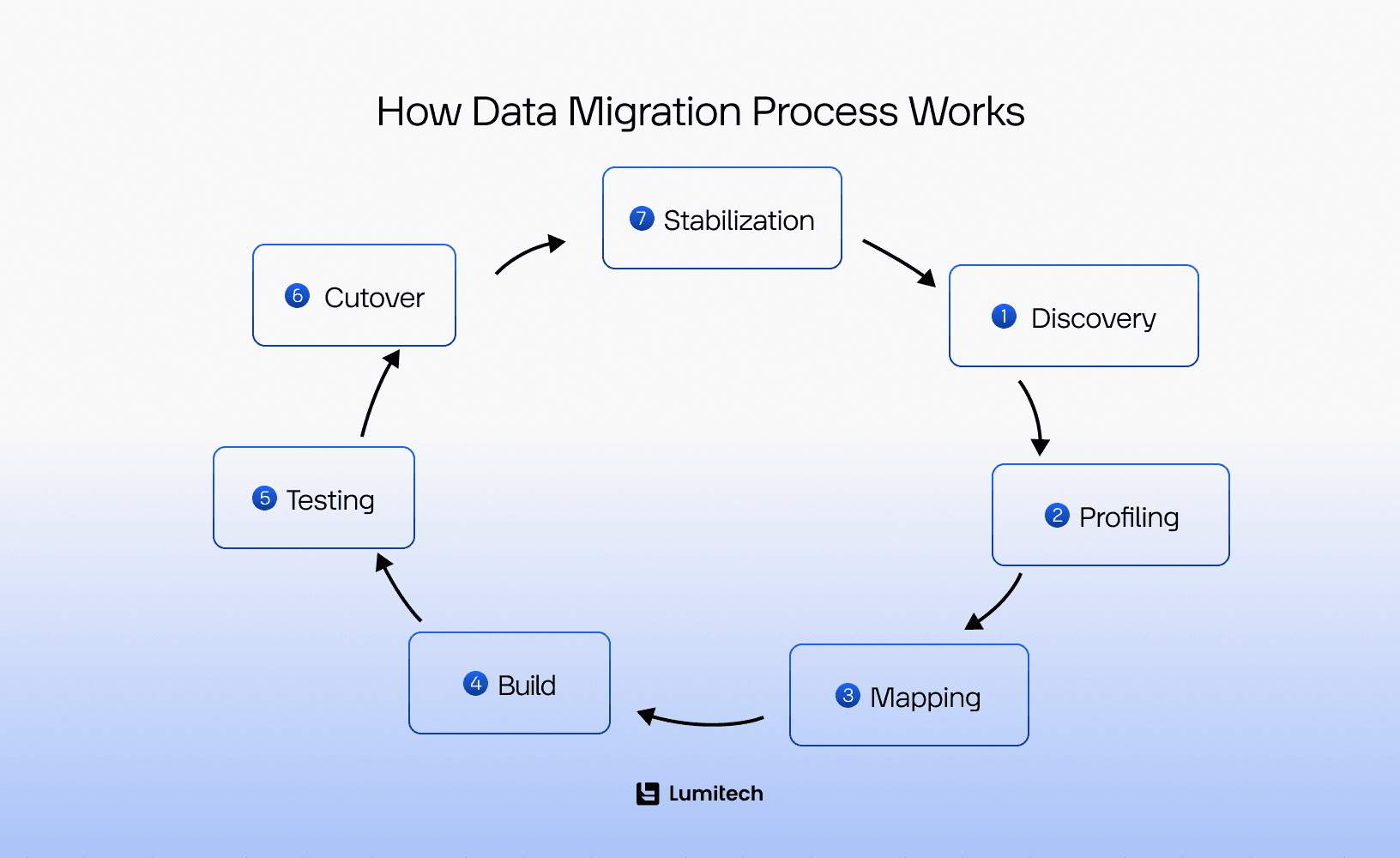
1) Discovery and scoping: define what “done” means
This is where data migration strategy starts: you figure out what you’re moving, why you’re moving it, and what the destination expects.
You’ll typically identify:
which systems are in scope
which data domains matter (customers, vendors, items, transactions, HR, etc.)
how much history needs to be moved
how the business will validate success
who owns the data (business owners, not just IT).
This is also the phase where you discover the truth: your data may not be as clean as everyone hoped. That’s normal. It’s not shameful. It’s just expensive if discovered late.
2) Profiling and quality assessment: measure the mess
You assess the source data for missing required values, duplicates, inconsistent formats, conflicting reference lists (e.g., country codes, unit of measure, product categories), invalid dates, orphan records (foreign keys pointing to nowhere), outliers, and anomalies. If your future includes ML, be careful: migration can accidentally become migrating bias in AI at scale — cleaner pipelines, same unfair patterns.
Profiling tells you what needs cleansing and what risks exist. This data migration step also helps estimate effort.
3) Mapping and transformation design: translate meaning, not just fields
“Field-to-field mapping” is the minimum. Real mapping considers:
how entities relate in the target model
how codes and statuses change (e.g., “A” in the old system might not mean “Active” anymore)
how you’ll handle merged entities (two customer records becoming one)
how you’ll preserve history and audit trails
what the target system requires for referential integrity.
This is where data migration process becomes a business conversation, not a database conversation. If you want to build an AI-driven research platform, treat migration as the moment to formalize data contracts and definitions, because AI pipelines amplify whatever ambiguity you leave behind.
4) Build the migration pipeline: extract, transform, load
Most data migration approaches use some version of ETL or ELT:
Extract: pull data from source (queries, exports, APIs, replication tools).
Transform: cleanse, map, standardize, dedupe, generate keys, apply rules.
Load: insert into target using bulk loads, API calls, or database scripts.
Tools range from custom scripts (Python/SQL), to ETL platforms to vendor migration utilities to cloud-native services. In large programs, migration pipelines often become a formal enterprise software development effort: versioned scripts, automated validations, CI/CD, and proper audit logging, not a one-off export.
5) Testing: the phase everyone underestimates
Testing is where you prove the migration works for real use cases, not just “data moved.”
Typical testing layers include:
Technical validation: record counts, checksums, schema constraints.
Business validation: sample-based checks, reconciliations, reports.
Process validation: can the business run key workflows using migrated data?
Performance testing: can loads run in the available cutover window?
Security validation: access, permissions, sensitive data handling.
If testing is rushed, the business will test for you in production. They are very thorough when angry.
6) Cutover: switching from old to new
Cutover defines when users stop using the old system and start using the new one. That usually involves a freeze window (no changes, or limited changes), final extraction and delta loads, validation checks, go-live decision gates, and rollback plans (even if you pray not to use them).
Cutover strategy matters a lot; we’ll cover it later.
7) Post-migration stabilization: reality arrives
After go-live data migration process is not finished. You monitor:
data issues not caught in testing
performance bottlenecks
integration failures
user adoption friction
reconciliation mismatches.
This phase is where you protect business continuity and build confidence.
Want a realistic migration timeline and effort estimate? We’ll run a quick readiness check on your data, risks, and cutover constraints.

Different Types of Data Migration
“Data migration” is an umbrella term. The type of migration depends on what you’re moving, why, and how much changes.
1) Storage migration
Moving data from one storage system to another without changing the application much — think SAN to cloud storage, or old file servers to modern storage.
This process typically doen’t require complex data migration techniques, as the data structure usually stays similar. The main concerns are performance, security, access controls, and downtime.
2) Database migration
Moving data between databases, often with some schema changes:
MySQL to PostgreSQL
Oracle to SQL Server
On-prem SQL to cloud-managed SQL
Self-hosted to managed services
Database migrations introduce concerns like differences in data types and functions, indexing and performance behavior, collation and encoding, stored procedures and triggers, and transaction handling and locking.
Done right, legacy system modernization services don’t just move data — they reduce dependency on old workarounds and make future changes cheaper.
3) Application migration
Moving data from one application to another, usually with a new data model and new business rules:
legacy CRM to Salesforce
old ERP to new ERP
custom HR tool to HCM suite
Migration frequently pairs with mobile app modernization services, because modern apps need reliable APIs and clean backend data, not legacy schemas held together by hope.
Application migrations are less about tables and more about meaning:
“What is a customer?”
“What’s the definition of ‘active’?”
“Where does this workflow live now?”
4) Cloud migration
Moving data (and often applications) into cloud environments:
on-prem to AWS/Azure/GCP
cloud A to cloud B
hybrid architectures
Cloud migration introduces security, network, identity, and operational changes. Data might move into cloud databases, object storage, warehouses, or SaaS.
5) Data warehouse/analytics migration
Moving analytical data pipelines and historical datasets:
legacy DWH → modern cloud DWH (Snowflake/BigQuery/Redshift/Databricks)
BI model refactoring
semantic layer changes
This type requires careful reconciliation because business teams compare KPIs before and after, and they notice when numbers shift by 0.7% (especially if it affects bonuses).
Analytics migrations are often the gateway to modern data platform architecture — separating ingestion, storage, transformation, governance, and semantic layers so reporting isn’t hardwired into one fragile system.
6) Master data migration (MDM-driven)
Migrating and standardizing core entities like customers, vendors, items, chart of accounts, employees. This often includes deduplication, hierarchy design, and governance.
Master data migrations are critical because they influence everything downstream. If you mess up the item master, you can have a perfect migration of transactions into a system that’s still wrong.
7) “Lift-and-shift” vs. “transformational” migration
This is more of a data migration approach distinction:
Lift-and-shift: move data with minimal transformation; faster, but may carry legacy issues into the new environment.
Transformational migration: restructure and cleanse heavily; slower, but can deliver a cleaner, more future-proof dataset.
Most real projects are a hybrid: lift-and-shift for some domains, transformation for others.
Data Migration Strategy: Big Bang, Phased, Parallel, and Incremental
How you migrate is as important as what you migrate.
Big bang data migration strategy
All data moves at once, and the business switches over in one moment.
Pros: cleaner cutover, faster overall timeline, fewer integration overlaps. Cons: higher risk, larger downtime window, intense go-live pressure.
Big bang can work for smaller systems with manageable data volumes and simple integrations. In industrial software development, migration planning has to respect production reality: downtime windows are tight, and a ‘small data issue’ can quickly become a stop-the-line incident.
Phased data migration approach
Data migration phases assume you migrate by module, business unit, geography, or data domain over time.
Pros: reduces risk, easier change management, lessons learned carry forward. Cons: complicated integration across old/new systems during transition, more governance required.
Phased approaches are common in ERP and enterprise migrations.
Parallel run
Data migration workflow that assumes old and new systems operate simultaneously for a period; results are compared.
Pros: higher confidence, safer for critical financial operations. Cons: expensive, operationally heavy, can confuse users, requires strict process discipline.
Parallel runs are common when accuracy is critical and mistakes are costly.
Incremental / delta migration
Initial bulk load plus continuous syncing of changes until cutover.
Pros: reduces downtime at go-live, supports near-zero downtime. Cons: more complex architecture, needs robust change tracking and conflict handling.
Incremental strategies are common in cloud database migrations and large-scale systems.
The “Blueprint”: What Should Be Included in a Data Migration Plan?
If you start a migration by clicking “Export,” you’ve already lost. A professional data migration plan is a 50-page document that keeps the CTO from having a heart attack. It must include:
Objectives and success criteria for your data migration plan
The first step of data migration process flow is to define what success looks like:
acceptable data quality thresholds
reconciliation targets (e.g., totals match within tolerance)
performance requirements (load within cutover window)
business acceptance criteria (key workflows validated).
If you can’t define success, you can’t prove you achieved it.
Data Scoping and Auditing
You cannot move what you don't understand.
Volume: How many Terabytes?
Quality: How much of this data is “ROT” (Redundant, Obsolete, or Trivial)?
Sensitivity: Is there PII (Personally Identifiable Information)? If you're in the UAE, does it comply with the Data Protection Law?
You need to clarify:
source systems in scope
target systems and environments
data domains (master data, transactions, logs, attachments)
history requirements (e.g., 2 years vs. 7 years)
what will not be migrated (and how it will be archived).
This is also where you prevent “scope creep by nostalgia,” where someone insists you migrate a 2009 dataset “just in case.”
Data ownership and decision rights
One of data migration best practices is to assign business owners for each domain:
Finance owns chart of accounts, journals, AR/AP rules.
Sales owns customer definitions and pipeline stages.
HR owns employee fields and statuses.
Operations owns item codes, BOMs, warehouse rules.
IT can move data, but the business must define meaning.
The Mapping Logic (Source to Target)
This is the “Rosetta Stone” of your project.
Field A in the old system = Field B in the new system.
Example: “Cust_Name” becomes “Client_Full_Name.”
Document mapping:
field mappings
code translations
defaulting rules
deduplication logic
record merge/split rules
key generation
referential integrity handling.
Keep it readable. If mapping docs are too complex, they become decorative.
Data quality and cleansing strategy
Define how you’ll handle duplicates, missing mandatory fields, inconsistent formats, invalid references, and obsolete records.
Decide what gets cleansed in source vs. in pipeline vs. in target. And decide who does it. (Hint: the business must participate, because “cleaning customer names” is not an IT-only sport.)
Migration architecture and tooling
Include:
extraction approach (queries, APIs, replication)
transformation layer (ETL tool, scripts, staging database)
loading approach (bulk loads, APIs, batch jobs)
environments (dev/test/prod)
logging and audit approach
security controls.
Tooling choices often come down to low code vs. traditional development: low-code accelerates basic ETL and workflows, while traditional code wins when transformations are complex or performance is tight.
Testing plan and validation methodology
This should cover:
automated technical checks (counts, constraints)
business sampling strategy (what samples, how many, who checks)
reconciliation (financial totals, inventory balances, HR counts)
performance tests (dry runs with realistic volumes)
sign-off process.
If you don’t plan validation, validation doesn’t happen. It just becomes “looks fine.”
The Rollback Strategy
The “Eject” button. If the migration fails at 3 AM on a Sunday, how do you put everything back the way it was so the business can open on Monday? If you don't have a documented rollback plan, you don't have a data migration plan — you have a gamble.
Security & Governance
Who is moving the data? Is the connection encrypted? Where are the logs? Don’t forget to include all of that to your data migration checklist. In the UAE, data residency is king. You need to ensure your “Target” doesn't accidentally end up in a jurisdiction that violates local regulations.
Post-migration plan
Don’t stop at go-live. Include:
monitoring and stabilization period
issue triage process
user support model
optimization backlog
decommissioning plan for legacy systems.
This part prevents “we migrated” from turning into “we moved problems to a new address.”
Need a migration plan with clear scope, validation, and rollback steps? We’ll help you design a predictable, testable approach.
Duration: How Long Does It Actually Take?
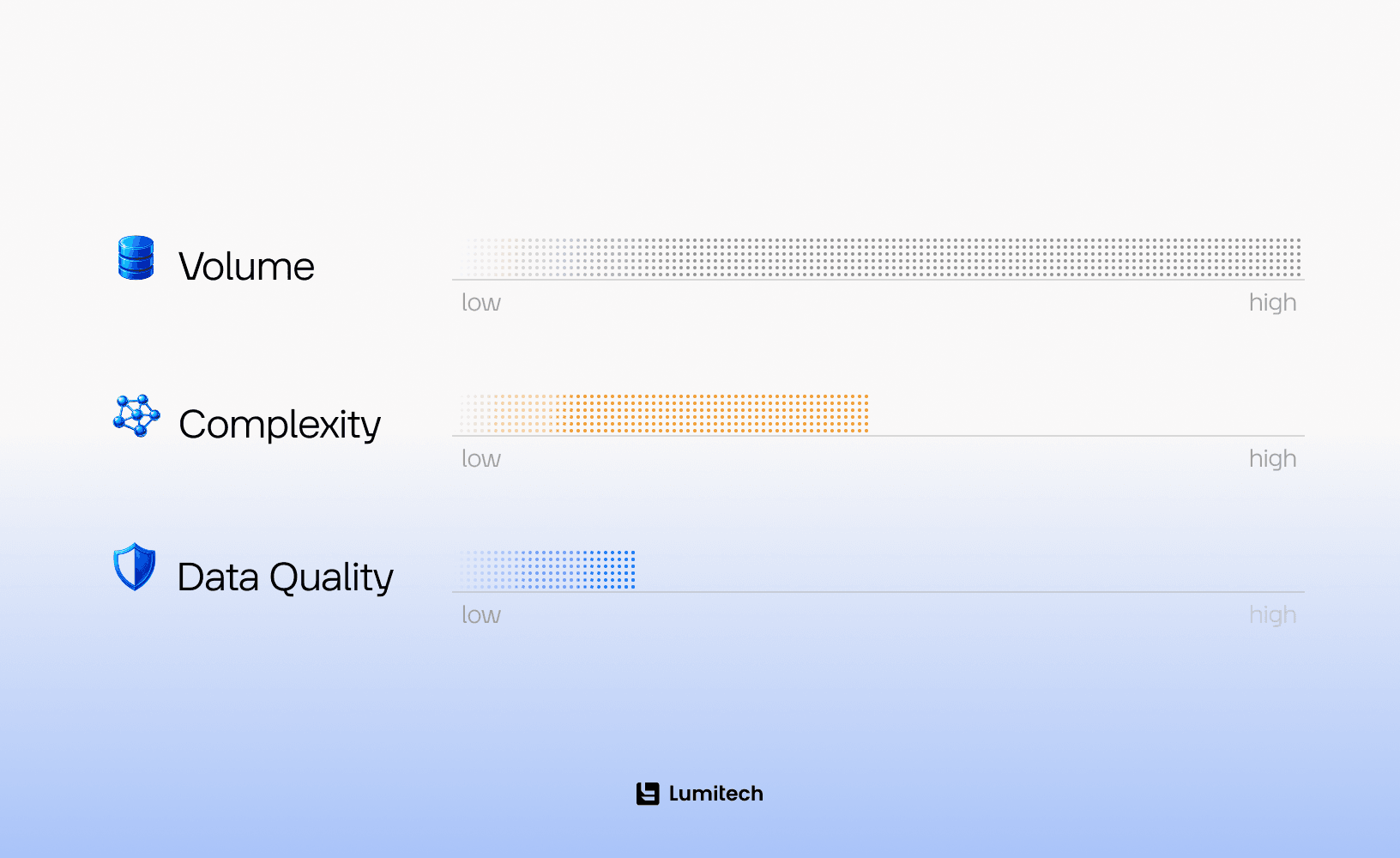
“How long is a piece of string?” In the IT world, a migration can take anywhere from two weeks to two years. Here is what determines the timeline of your data migration strategy:
Data Volume: Moving 10GB is an afternoon. Moving 10PB (Petabytes) is a logistical campaign involving specialized hardware like “AWS Snowmobile” trucks.
Data Complexity: Moving flat files (PDFs/Images) is easy. Moving relational databases with 1,000+ interconnected tables is like untangling a bowl of digital spaghetti.
The “Cleanliness” Factor: If your data is “dirty” (missing fields, inconsistent formatting), the Data Cleansing phase can take up 60% of your total project time.
Legacy Debt: The older the source system, the harder the extraction. Sometimes, you have to write custom “wrappers” just to talk to a database from 1988.
The Execution Phase: Data Migration Best Practices
You have your plan. You have your mapping. Now, it’s time fo data migration implementation: you need to move the data. In 2026, the “manual export” is dead; execution is driven by Automated ETL (Extract, Transform, Load) pipelines and AI-assisted mapping tools.
1. Extraction (The Gentle Pull)
The first step is pulling data out of the source system. The trick here is to do it without slowing down your production environment.
The Best Practice: Perform extractions during off-peak hours or use a CDC (Change Data Capture) tool. CDC essentially “shadows” your live database and copies changes as they happen, allowing for a near-zero-downtime transition.
2. Transformation (The Digital Carwash)
Raw data is rarely ready for its new home. During transformation, you apply the “Business Rules” we discussed in the data migration planning phase:
Cleaning: Stripping out special characters that the new system hates.
Deduplication: Identifying that “Ahmed Al-Maktoum” and “A. Al-Maktoum” are the same person.
Standardization: Converting all dates to a unified format (e.g., ISO 8601) and all currencies to AED (if that’s your base).
3. Loading (The Final Push)
This is the moment of truth. You push the transformed data into the target system.
Pro Tip: One of data migration best practices is to load your data in waves. Start with “Static Data” (locations, tax codes, employee lists) before moving “Transactional Data” (sales orders, ledger entries). It’s much easier to fix a broken tax code than a broken decade of sales history.
Common Challenges And How to Avoid Them
Data mapping misunderstandings
A field called “CustomerType” might mean “industry” in one system and “pricing tier” in another. If you map it blindly, the target will be wrong in ways that look valid.
Avoid it: require business owners to validate mapping and provide examples.
Duplicate and conflicting master data
Two systems can contain the same vendor with different IDs, addresses, and payment terms.
Avoid it: implement deduplication rules, survivorship logic, and business approval.
Missing mandatory data in the source
Your target may require a tax number, a country code, or a currency — fields the source didn’t enforce.
Avoid it: define defaulting rules early, and push cleansing upstream where possible.
Over-migrating
Migrating everything “just in case” increases complexity, cost, and validation workload.
Avoid it: migrate what you need operationally; archive what you need for reference/compliance.
Underestimating testing
Migration without rigorous validation is just a fancy way to break reporting.
Avoid it: plan test cycles and dry runs; automate as many checks as possible.
Data Migration Checklist: What Should You Do After a Successful Migration?
“Successful migration” doesn’t mean “data arrived.” It means “the business can run correctly.” Here’s the data migration checklist for after you go live, the steps that separate real success from a slow-motion relapse into spreadsheets.
1) Run post-migration reconciliation and sign-off
Confirm critical balances and counts:
financial balances (trial balance, AR/AP totals)
inventory valuations and quantities (if applicable)
active customer/vendor counts
HR headcount totals and key fields.
Establish an official sign-off so the organization stops questioning whether the new system is “trustworthy.”
2) Monitor production performance and data pipelines
Watch for slow queries, failing integration jobs, timeouts, stuck queues, and unusual error rates.
New environments behave differently under real workload. Observability isn’t optional.
3) Capture and triage issues fast
Create a structured process:
severity levels
owner assignment
expected response times
root cause analysis
fix deployment approach.
Without triage, everything becomes urgent, and urgency becomes normal. That’s how burnout is born.
4) Stabilize, then optimize
Don’t try to “perfect” the system during go-live. Stabilize first. Once operations are steady, optimize and improve transformation rules, refine dashboards, tune performance, clean remaining data, and add automation.
5) Train users based on real workflows
Post-go-live training is often more effective than pre-go-live training because users now have context. Train around real tasks and real scenarios, not generic features.
6) Lock down governance
Establish rules for:
master data creation and approval
data quality monitoring
change management
access controls.
A migration can fix data once. Governance prevents it from decaying again.
7) Decommission legacy systems responsibly
Turning off the old system is a milestone, but do it carefully:
confirm archival requirements
ensure read-only access if needed
migrate or store attachments
update integration endpoints
document the retirement.
If you keep legacy systems alive indefinitely “just in case,” you’ll pay for them forever.
A successful migration sets up decision making software development because decisions stop being debates and start being data-backed—assuming your definitions are consistent.
The Real TCO of Data Migration
If your migration budget only accounts for the “Migration Tool” subscription, you are in for a shock. Here is how the money actually disappears:
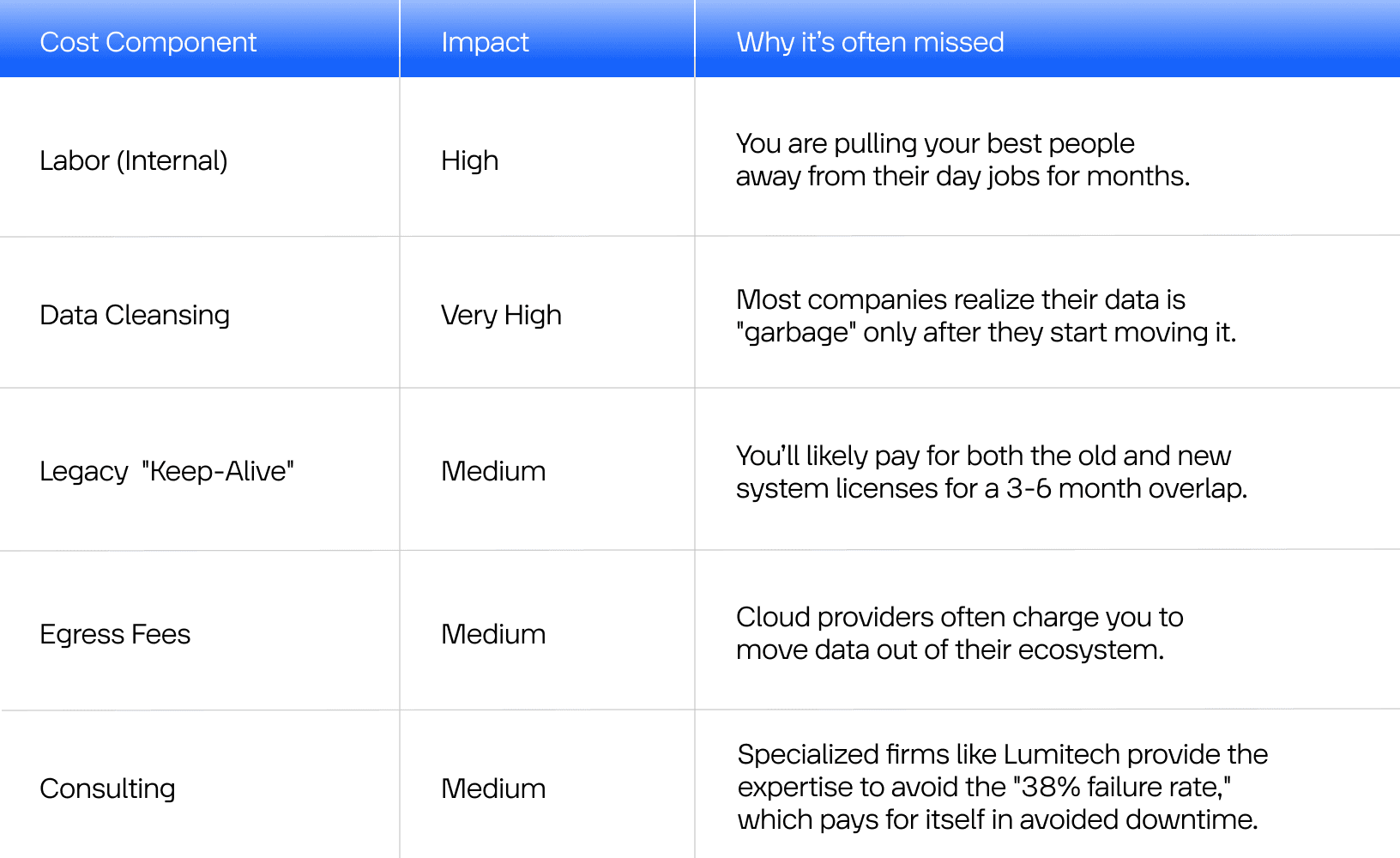
Closing Thought
To wrap this up, we need to address the elephant in the room: Data migration is never truly “finished.” It is the beginning of a new chapter in your company’s digital literacy.
If you’ve followed the data migration steps above — audited your “digital basement,” mapped your fields with the precision of a cartographer, and survived the “Go-Live” weekend without needing a silent retreat — congratulations. You’ve successfully performed the most difficult operation in the IT playbook.
But as we move further into 2026, the landscape is shifting. With the rise of Generative AI and Autonomous Data Warehousing, the quality of your migration dictates the quality of your future. If you migrated clean, structured data into a modern environment like those engineered by Lumitech, you aren't just “storing” information anymore; you are feeding an engine that can predict market trends, automate your supply chain, and identify customer churn before it happens.
The companies that thrive in the next decade won't be the ones with the most data, but the ones with the most mobile and trustworthy data. Don't rush the process. Respect the “Data Cleansing” phase like your business depends on it, because it does.
Whether you are a medium-sized company finally moving away from legacy spreadsheets or a multinational giant that requires large-scale enterprise data migration, the goal is the same: Zero Data Loss, Total Integrity, and Maximum Utility. Now, go check those row counts one last time.


