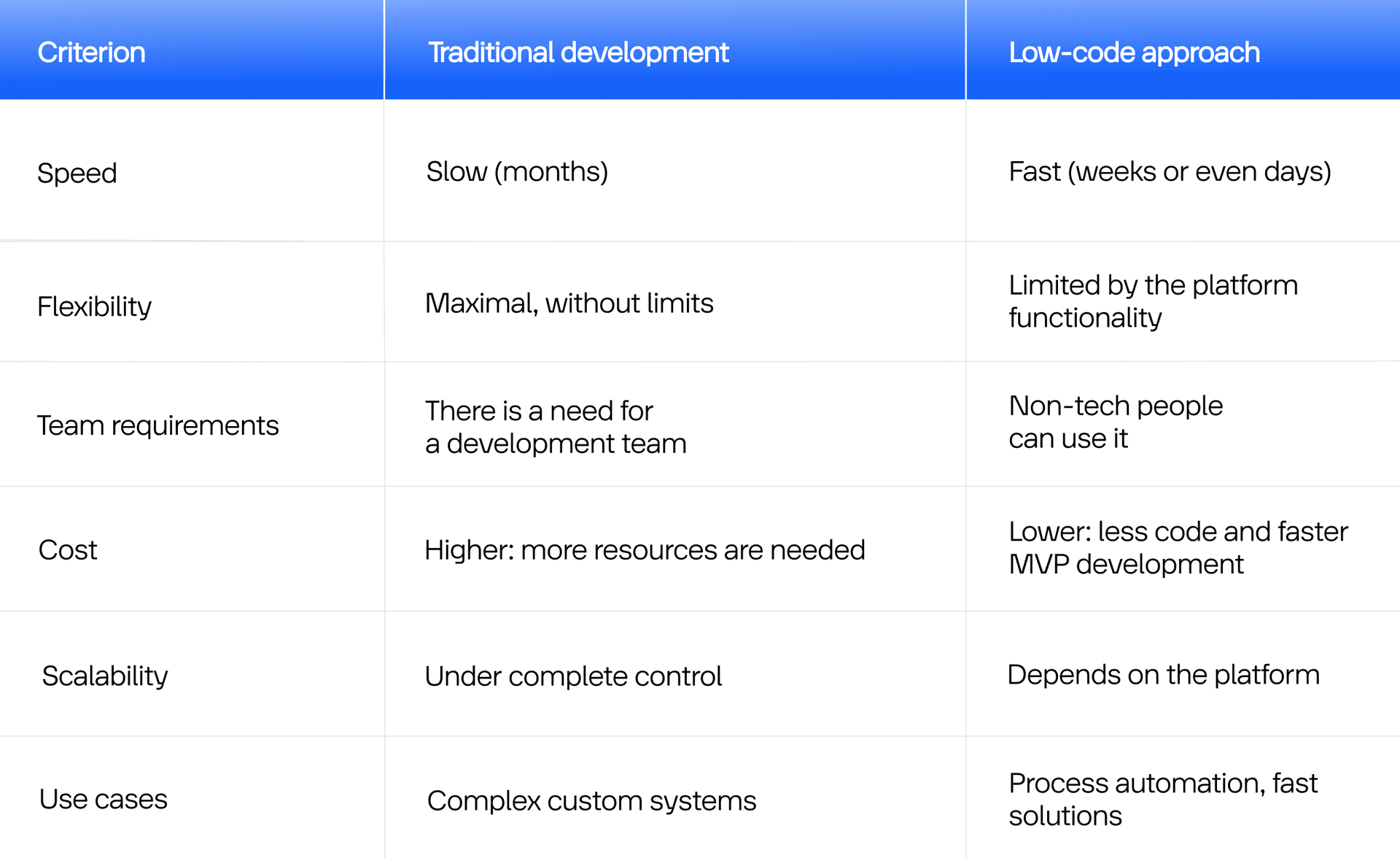
Low Code vs. Traditional Development: Choosing the Right Path for Your Business
Businesses no longer rely on traditional approaches. Businesses look for solutions that deliver fast profits and require minimal time and budget investment. This is where the fight between low-code and traditional approaches begins.
- For New Clients
- Software Development
November 28, 2025
 AI Overview
Speed and flexibility often pull software projects in different directions. Low-code platforms promise faster delivery, reduced development effort, and quicker experimentation, while traditional development offers greater control, customization, and scalability. The right choice depends on business goals, technical complexity, long-term growth plans, and integration requirements. Understanding the trade-offs between these approaches helps organizations make informed decisions and invest in solutions that fit both current needs and future ambitions.


Need to develop a product in three days? Not a problem anymore. What was once a dream is now a reality. Take Ensemble19, a Switzerland-based social startup. During the COVID-19 pandemic, they launched a platform in 3 days, choosing the first fighter in the low code vs. traditional programming battle, helping over 1,000 businesses raise CHF 600,000 in donations.
Not long ago, companies relied on a traditional development model that encompassed the full cycle of programming, including testing, deployment, and continuous technical maintenance. Such an approach provided complete control over the architecture. However, it had obvious drawbacks: long development cycles, high cost, and the need for dedicated development teams.
Today, companies compete not for ideas, but for the speed of their realization. This is why traditional development is giving way to low-code development. New products and digital solutions are created not by the hands of dozens of programmers, but with the help of visual platforms and automated processes.
In this article, we will mainly focus on the differences between traditional and low-code development, how these approaches co-live today, and what to expect in the future.
Shift from Traditional Development to Understanding the Benefits of Low-Code: When and How It Happened
When does this transition to Lego-like programming happen? It was a smooth, step-by-step process, accompanied by many factors. The first attempts to accelerate development emerged in 2010, and we subsequently observed what is known as a snowball effect.
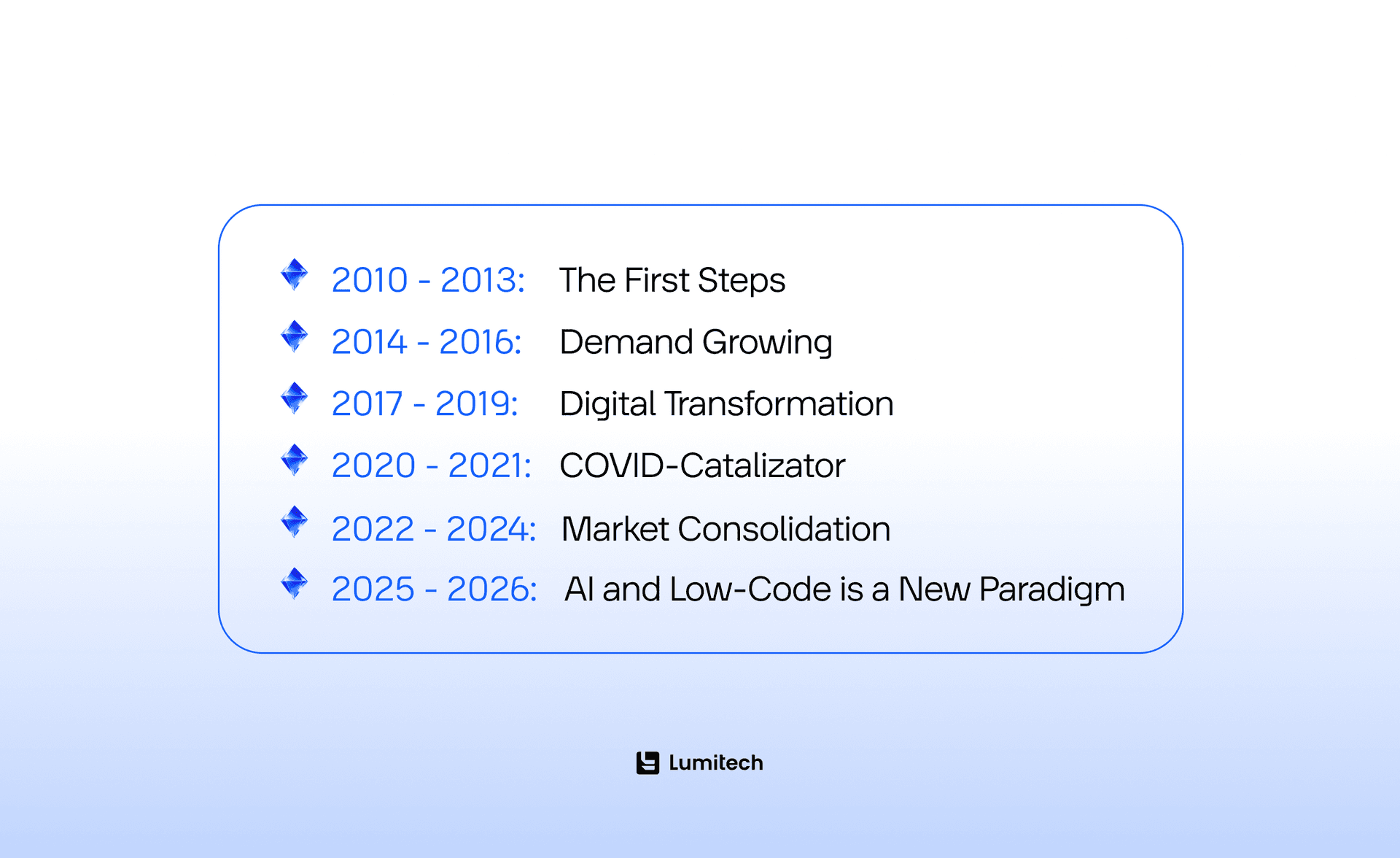
2010-2013: The First Steps
Companies start looking for ways to simplify business app development. The first low-code platform prototypes appear in the market. It’s OutSystems, Mendix, and Appian. The key idea is to accelerate the development through a visual interface and ready-made components.
2014-2016: Demand Growing
Cloud services and SaaS models lay the foundation for low-code scaling. Gartner uses the term “Low-Code Application Platform (LCAP)” for the first time in its publications. Businesses are beginning to view these solutions as a viable alternative to the traditional approach.
2017-2019: Digital Transformation
Companies strive to minimize time-to-market and involve citizen developers: non-technical experts who build internal instruments without coding. Low-code is becoming a part of corporate IT strategies.
2020-2021: COVID-Catalizator
The pandemic makes businesses go online. Low-code platforms allow launch solutions in weeks, not months. Demand growth in the blink of an eye: the market is projected to surpass $10 billion by 2023.
2022-2024: Market Consolidation
Microsoft, Salesforce, ServiceNow, and other companies integrate low-code into their ecosystems. Hybrid models, for example, emerge as a combination of pro-code and low-code. Platforms can integrate with AI models and CI/CD environments.
2025-2026: AI and Low-Code is a New Paradigm
In the low code vs. traditional programming competition, low-code is becoming a standard in corporate development. AI assistants such as Copilot or OutSystems AI Mentor automate logic creation, testing, and deployment. Garnter predicts that by 2028, 75% of developers will use AI assistants and a low-code approach for enterprise software development.
Low-Code Development vs. Traditional Approach: Major Differences Between Two Philosophies
When we talk about low code vs. traditional development, we do not mean one replaces the other. We suggest that they provide different approaches. Now, creating applications is an option available not only to IT departments but also to business teams. To understand how these two models differ, let’s take a look at each more deeply.
Traditional Development: Pros and Cons, Tools, and Architecture Approaches
Traditional, or pro-code, development means building software manually, using programming languages, frameworks, and databases. That’s clear. The typical development cycle includes writing code (frontend, backend, API), testing, deployment on a server or cloud, and further maintenance and updates. No ready-made templates.
Pros and Cons
In the low code vs. traditional development comparison, the second one provides solid advantages:
Unlimited flexibility. This is one of the biggest benefits of traditional development, as you can create any functionality and make updates without compromising the quality of other components.
Complete control over the architecture, security, and productivity.
Optimal productivity in complex systems, especially when it comes to large enterprise or high-load projects.
Do you have something unique in your mind? Is there something that requires an individual and dedicated approach in development? You’re lucky to appear on this page. Lumitech teams are eager to engage in the development of custom solutions from start to finish.

However, traditional coding is not only about advantages. And you should understand that the low code vs. traditional software development does not have winners. The process of custom development is still time-consuming, and each new component requires writing and adding new lines of code. A team comprising developers, DevOps engineers, QA specialists, and UI/UX experts is needed, which requires a significant investment of resources. Moreover, if the market changes the rules, the traditional approach sets numerous barriers to keeping up.
Imagine that a bank develops a new system for credit scoring. They need to consolidate data from various sources, build complex business logic, risk assessment algorithms, and reporting, among other tasks. Such a project is a typical example of traditional development, because it requires deep customization, security, and stability.
Core Languages, Tools, and Architecture Approaches
What’s the most essential difference between the low-code development vs. traditional approach? While low-code platforms do not require expertise in any programming language, traditional development necessitates a comprehensive system of knowledge encompassing all aspects of development.
Frontend development (interfaces)
HTML, CSS, JavaScript – the basis of any web application.
TypeScript – a typed add-on to JavaScript, popular in large-scale projects.
Frameworks: ReactJS for dynamic single-page applications; Angular with its robust structure and dependency injections; VueJS, which is convenient for small and medium-sized projects; or NextJS for dynamic interfaces.
Example. React or Angular is often used for building a corporate portal or CRM with a dynamic interface.
Backend development (logic and data processing)
Java is a classic programming language for enterprise app development, banking systems, and fintech solutions.
C# (.NET) is widely used for business applications and integrations.
Python is well-suited for analytics, machine learning, APIs, startups, and rapid development.
Node.js (a JavaScript runtime) works well with asynchronous web applications and APIs.
PHP is still used for CMS and web development services.
Go and Rust are modern programming languages for building microservices.
Example. Java Spring Boot or .NET Core are often used for developing an inventory management system or a billing platform.
Databases
SQL systems: MySQL, PostgreSQL, Microsoft SQL Server, Oracle DB.
NoSQL: MongoDB, Redis, Cassandra for massive unstructured data.
ORM frameworks: Hibernate (Java), Entity Framework (C#), Sequelize (Node.js).
Dev Tools
IDE (integrated development environments): IntelliJ IDEA, Visual Studio, VS Code, PyCharm, Eclipse.
Version control systems: Git (GitHub, GitLab, Bitbucket).
CI/CD: Jenkins, GitHub Actions, GitLab CI, CircleCI for automating build and deployment.
Containerization and orchestration: Docker, Kubernetes.
Testing: JUnit, Selenium, Cypress, Postman.
Cloud services: AWS, Azure, Google Cloud for deployment and scaling.
Example: Here is a typical DevOps process: Git → Jenkins → Docker → Kubernetes → AWS
Architecture approaches
Monolith Architecture. It is a substantial single program typical of legacy systems.
Micriservices. Separate modules that interact through APIs. Quite trendy today.
Event-driven / Serverless. These are systems built around events and functions (AWS Lambda, Azure Functions).
Why is the information mentioned above important? Traditional development involves creating everything manually, from the structure to databases and business logic. Software engineers select a technology stack, set up CI/CD, register APIs, and test. This includes the entire cycle. Using low-code platforms, all of this is hidden; you only see the interface, click “Connect API”, or choose the ready-made template, and the system performs the rest.
Traditional App Development Challenges: When Flexibility Becomes a Burden
In the low-code vs. standard development approaches comparison, traditional development is a powerful yet complex mechanism that provides complete control over architecture, security, and product logic. However, this control often comes along with high cost: time, budget, and organizational resources.
Slow development process. Developing a product from start to finish takes months or even years. In the modern tech-savvy world, this is too long. Companies often face situations where the market evolves faster than they update their code, and while the team prepares a new product version, customer needs change.
The need for qualified engineers. Each line of code needs the involvement of a software engineer. While a talent shortage is a global problem, it’s pretty challenging to hire a good specialist.
High cost. With traditional development, you pay for the team, infrastructure, product release, and maintenance. Moreover, the project’s cost may increase by 2-3 times after its start due to technical support difficulties.
Integration complexity. Products do not exist in isolation. They must integrate with CRM, ERM, marketing platforms, and databases. Every integration in traditional development is performed manually, which adds more complexity and risks.
Security and tech debt. Complex code is a huge responsibility. Large companies often accumulate technical debt – old code that is difficult to update or scale. As a result, companies face an increase in vulnerability risks and can’t integrate new technologies fast and seamlessly.
At this point, it’s time to go to low-code, as this approach helps fight the above challenges, bringing lots of benefits along the way.
Low Code vs. Traditional: What’s the Advantage of the First and How Businesses Use It
Low-code appeared as a response to the challenges of traditional development. Instead of building each feature manually, teams get an instrument where logic can be created visually and the processes can be easily automated.
Due to the benefits of low-code, you can simulate business processes in hours, set up APIs without programming, test functionality right after creating it, and make changes instantly without the risk of breaking the system.
It does not mean that when it comes to low code platform vs. traditional development, the second one will disappear. It implies that low-code has taken away everything routine, leaving developers with space for complex, creative, and strategic tasks.
Low-Code vs. Programming: How Apps Are Built without Coding
Creating project environment and structure
First, using any low-code platform (OutSystems, Mendix, Appian, Microsoft Power Apps, Zoho Creator, or others), you choose the type of solution you want to create: a web or mobile application, workflow automation, or an API hub.
After that, you gain access to the visual panel, where you can view the project structure, including pages, processes, databases, and integrations. With traditional development, there is a need for several files, a server, and an IDE setting. With low-code, all is created automatically.
Visual interface design (UI/UX)
Comparing low-code development and traditional coding, with the first approach, an engineer or a business user creates screens, forms, tables, buttons, or dashboards using a drag-and-drop editor. The options include dragging elements with a mouse, changing styles and colours, and adapting to mobile devices. There are also ready UI components, such as login screens, lists, cards, and validation forms.
For example, using Microsoft Power Apps, a sales manager can create an app for a field team simply by dragging fields such as “Client name”, “Order amount”, and “Next visit”, and receive a well-functioning mobile app without any line of code.
Building workflow and logic
Workflow builder is one of the key low-code elements. It is a visual diagram that illustrates the flow of a business process. For example, it may look like this:
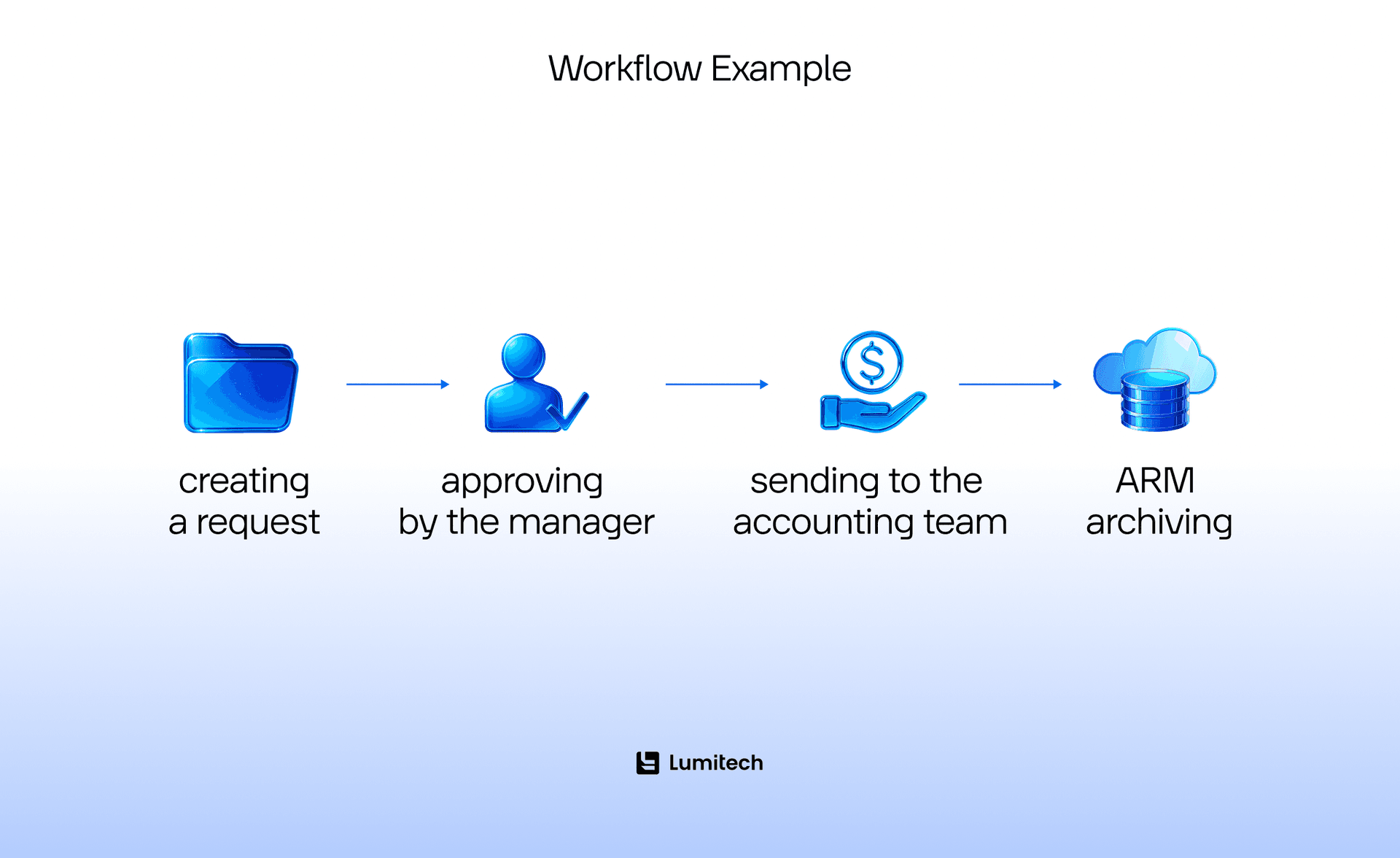
Each step is a block of logic that can be set up and adjusted according to specific conditions, delays, triggers, and other factors. For complex scenarios, the developer can add custom code (for example, a JavaScript or Python snippet) to implement a unique feature.
Real cases best illustrate how low-code development and traditional development differ. For example, with the help of Appian, WNS – a business process management company – has created an automated approval process for credit applications. Thus, the workflow checks all data, sends requests to the API scoring service, and returns to the system, all without requiring manual interaction.
API and connector integrations
Low-code platforms often feature built-in connectors to popular services, including Salesforce, SAP, Google Workspace, Slack, Stripe, Twilio, and others. Connecting takes a few clicks: the user only inputs the API key or selects a ready-made template.
You can create a custom connector through the REST API for non-standard integrations. What is also critical is that data is automatically synchronized between systems. And you have access to a visual integration map, which is very convenient.
For example, an e-commerce company builds an app for order processing. A low-code platform connects to the Shopify API, the client base in HubSpot, and the Stripe payment system. Again, all without coding.
Work with databases
Now, let’s see how databases can be created, taking into account the low-code vs. custom development differences. To make a database in a low-code environment, you do not need to use SQL requests. Instead, there is a visual dashboard. The user just adds necessary fields (name, email, date of birth, or other data), and the system automatically generates the scheme and SQL backend. After that, the data can be connected to the forms, workflow logic, or API.
There are also the following options available:
CRUD (Create, Read, Update, Delete) logic.
Built-in filters, validation, and reports.
Access to SQL code is open for complex scenarios.
Testing, deployment, and CI/CD
Low-code platforms automate processes that involve the DevOps team. Thus, you get:
Automated testing at the publishing stage.
Version control (allows you to revert to a previous version).
One-click deployment to the cloud or server.
Some platforms support CI/CD integration, such as GitHub or Azure DevOps, allowing the code and logic to be stored in a centralized repository.
For example, with OutSystems, the team can test changes, check performance metrics, and deploy a new program version just with a single button. With the traditional approach, this would require a separate DevOps pipeline.
Monitoring and scaling
After the launch, when comparing low code vs. programming, the low-code platform displays a monitoring dashboard. Here you can see statistics, user activity, errors, and productivity. Also, apps can scale automatically within cloud infrastructure (Azure, AWS, Google Cloud).
For example, Mendix provides the Application Insights feature, which allows analysts to see how users interact with the application, how long this process takes, and identify areas of weak UX that need improvement. All of this does not require log analysis or complex tools.
Low-Code vs. Custom Development: Where Low-Code Is Winning Today
The success of low-code platforms can be explained not only by simplicity and development speed of prototypes, AI-MVPs, and full-featured products. The reason is also that they have aptly addressed the needs of various industries and businesses. Where businesses struggled for years with a lack of IT resources, complex workflows, and constant changes, low-code has emerged as a means to create digital solutions quickly, cost-effectively, and without requiring coding. As a result, comparing low code platform vs. traditional development, low-code is widely used today across various industries and is shaping a new model of work.
Financial sector (banks, fintech, insurance)
Why low-code is popular:
Lots of processes require automation.
Complex workflows (crediting, KYC, compliance).
Strict regulations and the need for fast updates.
Constant need for new digital services for clients.
Typical solutions:
KYC/AML processes.
Clients onboarding.
Chatbots and client portals.
Workflow for credits.
Risk management.
Who uses:
Development services for startups in fintech, large banks, insurance companies, and credit organizations.
Healthcare (hospitals, labs, medical networks)
Why low-code is popular:
The need to build internal tools on tight deadlines.
Strict requirements for data security and auditing are in place.
High process and documentation complexity.
Typical solutions:
Patient management systems.
Schedule planning for doctors.
Lab workflow.
Telemedicine.
Who uses:
Networks of private clinics, medical insurance companies, and diagnostic centres rely on the advantages of low-code development.
Logistics, transportation, and warehouse operations
Why low-code is popular:
High level of operational complexity.
A lot of repeatable processes.
The need for mobile instruments for warehouse employees.
Typical solutions:
Package and transport tracking.
Mobile apps for couriers.
Warehouse management.
Document flow.
Who uses:
Logistics operators, transportation companies, and 3PL providers understand the benefits of low-code and integrate it into their operations.
Manufacturing
Why low-code is popular:
Digitalization of manufacturing processes.
The need for IoT, ERP (SAP), and MES system integration.
Lack of IT teams in factories.
Typical solutions:
Tracking the equipment status.
Quality control.
Renovation and change control.
Workflow management.
Who uses:
Factories and large manufacturing companies choose low-code when talking about low code vs. programming in general.
If you need to create an MVP, launch the product, and scale fast, you are in the right place. Lumitech has deep expertise in developing solutions with a low-code approach, while also being responsive to specific business needs.
Both low-code and traditional development are essential. However, low-code has become a key instrument for companies that need speed, flexibility, and the ability to scale digital solutions without large tech teams. Low-code is effective in areas where businesses face complex processes, extensive manual work, or a lack of IT resources. In such conditions, low-code enables businesses to create client-oriented and internal applications much faster, integrate them with existing systems, and quickly adjust logic according to market needs.
That is why this approach is widely used across various industries and sectors, from fintech to manufacturing. When making a comparison between low-code vs. full-code development, low-code reduces the workload on developers, accelerates digital transformation, and opens up a new way to drive innovation in each of the above-mentioned spheres.
Lumitech Case Study: Low-Code Development for a Client from the Healthcare Sector
Here is some information about our client to get started.
Reputable Health is a Toronto-based company in the health and wellness industry. Their platform helps brands prove the effectiveness of their products through real clinical investigations. Reputable Health is responsible for participant selection, investigations, data collection from devices, and AI analysis of the results. Brands gain an evidence base that they can use in their marketing strategies.
Working with the client, among others, Lumitech utilized low-code to ensure rapid prototype development and provide the ability to test new ideas quickly, keeping pace with the market. Our team has developed its own libraries, which enabled us to quickly convert low-code solutions into production-ready code.
Quote from the engineer involved in the project:
“Evidence-based medicine is something everyone is talking about today. Our team had an amazing opportunity to be part of a project that helps people globally avoid becoming victims of pseudo-therapeutic products, which unfortunately exist in the market. And not only that. We were not just tech experts. Lumitech, as well as the client, all wanted to bring value by developing this platform. And I think we did our best.”



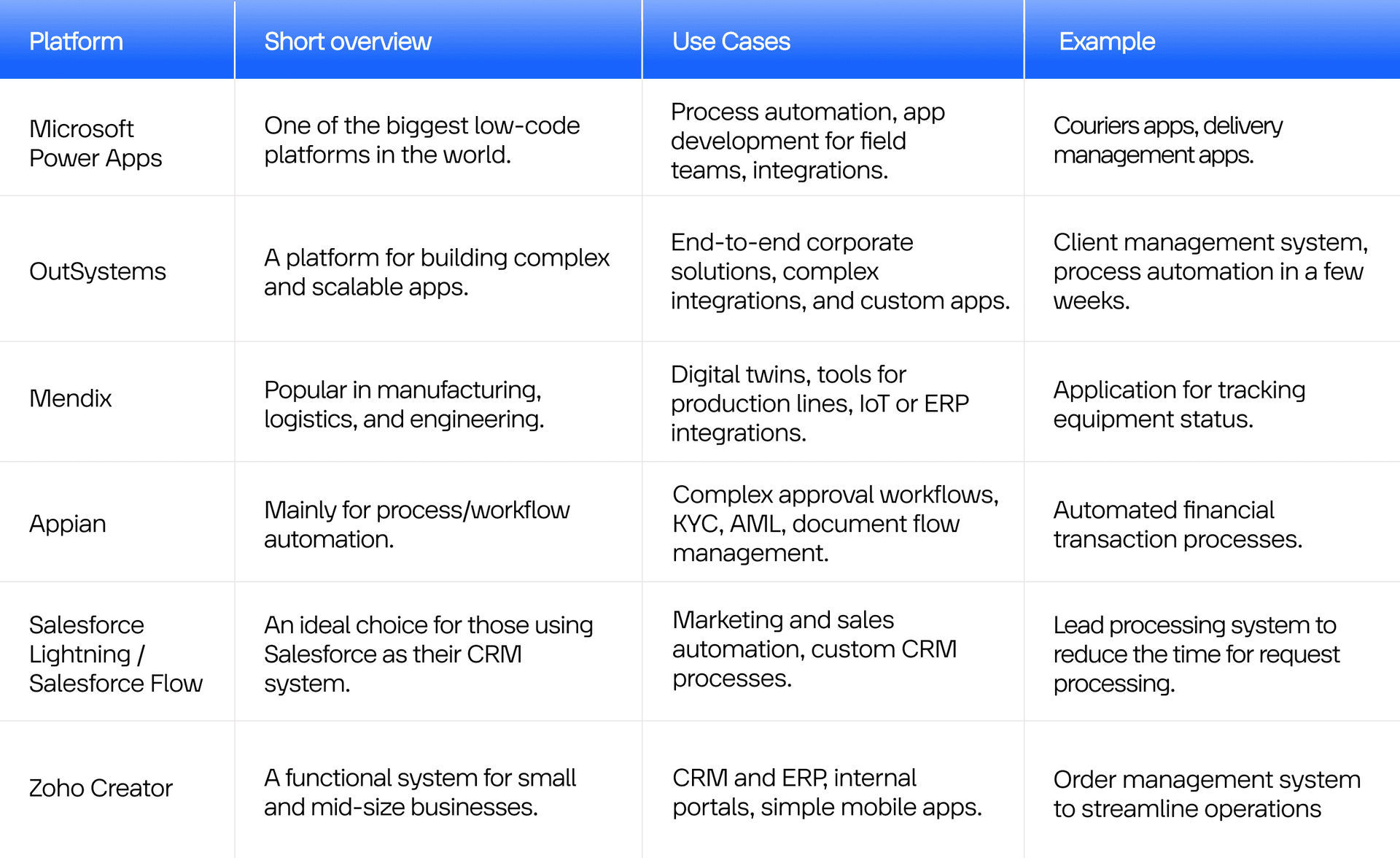
Low-Code Platforms for Your Choice
Even though all low-code platforms operate by the principle of visual modelling, each of them has its own unique features. Below, we collected the most popular platforms on the market, supported by examples and use cases.
Summing Up: Low-Code Development vs. Traditional Approach
Low code vs. traditional development processes are not mutually exclusive approaches. They complement each other in building digital solutions. Traditional development provides maximum control, flexibility, and scalability for complex, high-load, and unique systems. In return, low-code provides businesses with speed, accessibility, and the ability to launch solutions in a matter of days. Companies that understand the low-code development pros and cons, as well as the peculiarities of traditional coding, achieve the best results from digital transformation.