Multi-Tenant CMS: Platforms, Architecture, and Selection
A multi-tenant CMS with smart scalability is already transforming how businesses manage content today. Learn how agencies and brands are able to simplify their workflows, cut costs, and speed up their launches all through a single platform.
- Industrial
September 15, 2026
 AI Overview
Managing content across multiple brands, regions, products, or customer groups can quickly become difficult when each website requires its own system and workflows. A multi-tenant CMS addresses this challenge by allowing organizations to manage multiple digital properties from a shared platform while maintaining control over content, branding, permissions, and configurations. The right architecture can improve operational efficiency, simplify governance, reduce maintenance overhead, and support growth without creating unnecessary complexity.

Companies with several brands, client locations, or regional offices are often under pressure to expand their content operations without duplicating the associated overhead. A multi-tenant content management system (CMS) offers a strategic solution by letting businesses manage multiple websites from a single, integrated platform.
By adopting a multi-tenant CMS, organizations can maintain content autonomy, user segmentation, and branding across different tenants. At the same time, they benefit from centralized updates, cost efficiency, and simplified governance. This approach lets companies consolidate infrastructure, reduce operational complexity, and accelerate go-to-market timelines.
What Is a Multi-Tenant CMS?
A multi-tenant CMS is a content management system built to serve multiple independent tenants — business units, clients, or regional teams — from a single platform. Where a single-tenant setup needs its own CMS deployment per brand or client, one shared deployment carries them all, with logically isolated data, permissions, and workflows.
Shared tenancy is a general cloud-architecture pattern — one application instance serving many customers — and a CMS for multiple websites is where that pattern shows up in content management. The CMS-specific version layers tenant-aware content models, editorial permissions, and publishing workflows on top of whatever data isolation strategy sits underneath. Each tenant then operates as if it had its own CMS — its own themes, permissions, and editorial workflows — without separate infrastructure to maintain.
That centralizes control over updates, security, and integrations, which is why the model suits organizations running several digital experiences at once: multiple brand sites, regional storefronts, or client properties — including Lumitech's own solutions for industrial sector clients — where a separate instance per property would slow down every release.
Single Tenant vs Multi Tenant CMS: What’s the Difference
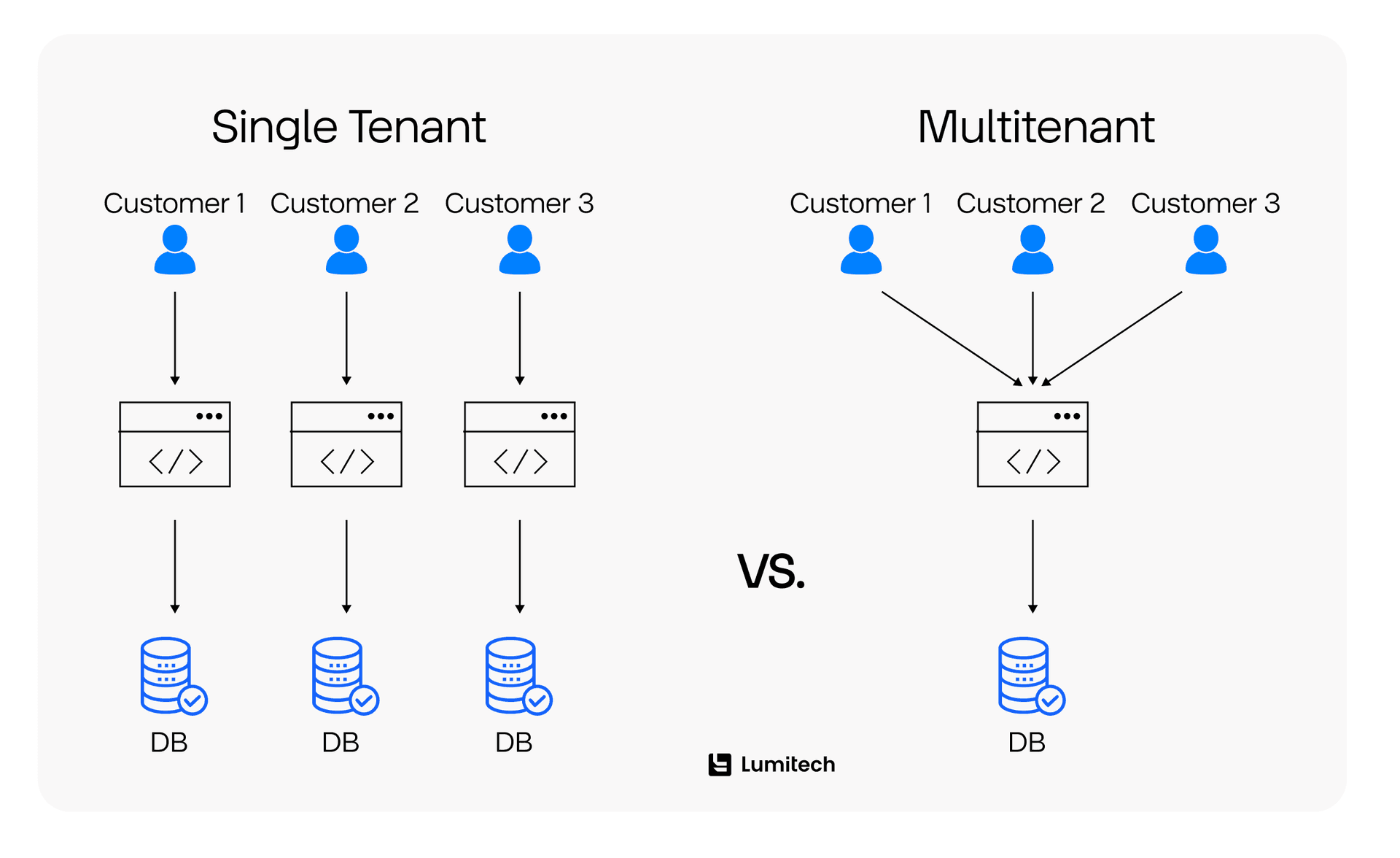
The largest source of confusion in CMS selection is that single tenant vs multi tenant describes deployment architecture, not features. A single-tenant CMS gives every customer or brand its own application instance and its own database; the shared model serves every tenant from one instance, with a partitioned or per-tenant database layer beneath it.
Dimension | Single-Tenant CMS | Multi-Tenant CMS |
|---|---|---|
Deployment | One application instance and one database per tenant | One shared application instance serving every tenant, with a partitioned or per-tenant database layer underneath |
Isolation | Physical — tenants cannot reach another tenant’s runtime or storage even if application logic fails | Logical — tenants are separated by tenant ID, schema, or access-control rules inside a shared system |
Updates and patching | Applied per instance; a fix or feature release rolls out tenant by tenant | Applied once and takes effect for every tenant simultaneously |
Cost and operations | Scales roughly linearly — each new tenant adds a full environment to run and maintain | Scales sub-linearly once the shared platform is built, since infrastructure and operations are amortized across tenants |
Time-to-market for a new tenant | Slower — provisioning a new environment is itself a deployment project | Faster — onboarding is usually a configuration or template step, not a new deployment |
Neither model is universally better, and single tenant vs multi tenant is rarely a close call once the constraints are written down. Single tenancy remains the right choice where regulation or contract terms require physically separate infrastructure per client. Shared tenancy wins when tenant count and the pace of onboarding new tenants make a per-tenant deployment untenable.
Multi-Tenant Architecture and Tenancy Models
How tenant data is stored has the most downstream effect on a platform’s scalability, performance, security, and maintenance burden. Microsoft’s Azure Architecture Center guidance on tenancy models for multitenant solutions groups multitenant designs into four comparable patterns — automated single-tenant, fully multitenant, vertically partitioned, and horizontally partitioned — and names the noisy neighbor problem, where one tenant’s load degrades another tenant’s performance, as a design consideration in its own right. AWS’s SaaS Lens guidance on tenant isolation treats the same boundary as a foundational security requirement rather than an extension of ordinary authentication and authorization. Multi tenant database design inside CMS platforms comes down to four practical variations on that trade-off.
1. Database per tenant. Each tenant gets its own database — the strongest data isolation, the simplest per-tenant backup and recovery, and the most direct route to compliance regimes requiring separate storage. It is also the most expensive to run, and the hardest to maintain past a few hundred tenants, and on its own sits closer to automated single tenancy than to a genuinely shared architecture.
2. Schema per tenant. Tenants share one database, each with its own schema. Resource usage is better than providing a separate database for each tenant, and the data isolation is sufficient to meet most compliance requirements except where physical separation is needed. The principal operational cost is coordinating migrations among hundreds of schemas.
3. Shared schema. Every tenant shares a database and schema, with rows partitioned by tenant ID — the cheapest and most scalable option, and the default for products with many small customers. The risk moves into the application layer: a missing tenant-ID filter breaks data isolation outright, and one tenant’s slow query can degrade performance for everyone else sharing the schema — the noisy-neighbor case Azure treats as an isolation-design criterion.
4. Hybrid. Large or compliance-sensitive tenants have their own dedicated database, while smaller tenants share a schema. This is the most flexible approach when scaling up, but it requires clear rules for which tenant type gets which storage strategy, plus a migration process for tenants that later grow beyond the shared level.
No single model fits every business. Teams starting out usually do well with shared or schema-per-tenant storage; as the tenant base grows and mixes small accounts with large, compliance-sensitive ones, hybrid becomes the more defensible choice. Hybrid also supports per-tenant restore most cleanly: a dedicated tier can be recovered without touching another tenant, while a shared-schema restore has to be scoped carefully to one tenant’s rows.
Best Multi Tenant CMS Platforms Compared
Vendors use “multi-tenant” loosely, and the differences matter when comparing multi-tenant CMS platforms, not just understanding the concept. At least five distinct implementations get marketed under the same term: native single-instance tenancy, where a tenant field, dataset, or access-control layer sits inside one application; multi-site, meaning one codebase with a separate database per site; multi-project, where the vendor’s own recommendation is one deployment per tenant; plugin-based tenancy added to a platform not originally built for it; and custom-built tenancy, where a team implements the isolation itself. The table below records what each platform actually does, sourced from vendor documentation rather than marketing copy.
Platform | Multi-tenancy approach | Open source | Self-hosted | Best for | Main limitation |
|---|---|---|---|---|---|
Payload CMS | Plugin-based single-instance tenancy — the official Payload multi-tenant plugin adds a tenant field to each specified collection | Yes, MIT-licensed | Yes | Code-first teams that want single-instance tenancy without building it | Opt-in per collection rather than on by default |
dotCMS | Native multi-site — dotCMS multi-site management gives each site “its own unique branding, users, permissions and content, while also enabling you to share and reuse content across sites” | Source-available under BSL 1.1 for versions released after February 14, 2025 | Yes | Multi-brand enterprises that want per-site branding built in | The BSL restricts production use, so production deployments need a commercial agreement |
Sanity | Native and dataset-based — Sanity’s multi-tenancy implementation guide separates tenants into distinct datasets | Studio is open source; the Content Lake backend is hosted | No | Configurable tenant boundaries with no infrastructure to operate | Sanity notes that “multi-tenancy can be interpreted differently,” so the boundary has to be designed deliberately |
Contentful | Multi-space — per Contentful’s Help Center, a space “has its own content model” and organizations “stand above spaces and contain them” | No | No | Per-tenant content models with organization-level administration | Spaces are administered independently rather than through one shared tenant layer |
Hygraph | Single project with tenant-scoped custom roles, as in Hygraph’s multi-tenant platform walkthrough | No | No | Standardizing similar brands on one shared schema | The custom roles that perform the tenant separation are “only available in enterprise plans” |
Strapi | Multi-project — Strapi’s knowledge base states “the recommended approach is one Strapi deployment per site” | Yes | Yes | Per-tenant isolation through separate deployments of one codebase | Strapi says the shared single-deployment pattern “is not multi-tenant” with “no built-in way to silo content by site” |
Drupal Multisite | Multi-site — Drupal’s multisite documentation: independent sites served from one codebase, where “each site has its own database, configuration, files and base domain or URL” | Yes | Yes | Per-site database isolation without maintaining separate codebases | No shared tenant layer at all; every site is a fully separate database |
WordPress Multisite | Multi-site — the WordPress Advanced Administration Handbook describes sites that “share the same WordPress installation core files” but “have separate tables in the database” | Yes | Yes | Agencies and publishers running many similar sites on familiar tooling | Isolation is by database table, not a purpose-built tenant model |
Two distinctions carry most of the decision. First, only Payload, dotCMS, Sanity, and Hygraph put tenant boundaries inside one running application; Contentful, Strapi, Drupal, and WordPress separate tenants by creating more of something — spaces, deployments, or databases. Second, Payload’s tenancy arrived as a plugin rather than a core primitive, which is why it applies per collection instead of across the whole schema — worth knowing before assuming an existing project is already scoped.
Open Source Multi Tenant CMS Options
Open source narrows that list considerably, and this is where evaluations most often go wrong. Payload is the strongest multi tenant CMS open source option: it is MIT-licensed, and its official plugin implements single-instance tenancy directly rather than approximating it. Drupal Multisite and WordPress Multisite carry no licensing cost, but both are multi-site architectures — each site keeps its own database or its own tables — so a team evaluating them as a single shared-tenant backend will not find one. Strapi is open source and configurable per project, but its documented pattern is one deployment per site. dotCMS is source-available rather than open source in the OSI sense, published under BSL 1.1, which restricts production use.
In practice: Payload for one running application serving every tenant; Drupal or WordPress Multisite where per-site database separation is acceptable, and the team knows the tooling; Strapi’s multi-project pattern where isolation matters more than running a single instance.
Multi Tenant Headless CMS: When It Makes Sense
Headless architecture and tenancy solve different problems, and a platform can have either without the other. A headless CMS separates content storage from presentation; tenancy separates one tenant’s content, users, and permissions from another’s. Neither implies the other, so a headless platform has to be configured to be tenant-aware before it functions as a multi tenant headless CMS.
Five layers have to carry that awareness: the data model, with content types scoped per tenant; access control, with API tokens and roles that cannot cross a tenant boundary; content queries, filtered by tenant on every fetch; admin permissions, so editors see only their own tenant; and frontend routing, so the right tenant’s content resolves for the right domain or path. Missing any one leaves tenant isolation partial — scoped content types behind unscoped API tokens still leak. Sanity, Contentful, and Strapi are the platforms above most often paired with a decoupled frontend, and Lumitech integrates Next.js with Contentful, Sanity, Strapi, or headless WordPress to build that presentation layer once the tenant-aware backend is in place.
Who Needs a Multi-Site CMS?
The case is clearest for three kinds of teams. Digital agencies managing dozens of client sites need one multi tenant platform to operate at scale rather than one deployment per client. Enterprises running multiple brands across regions need centralized governance without forcing every brand into an identical template — often as part of a broader enterprise software development program, though the tenancy decision remains a distinct architecture question within it. SaaS providers offering white label CMS capability to their own customers need a content layer those customers experience as their own, while the provider maintains one codebase.
Each of them is raising the same fundamental question — whatever they may say about the kind of system they need, a multisite CMS or a multi-tenant one — namely, how to achieve centralization of operations without giving up the individual tenant flexibility regarding branding, workflow, and access control.
Scaling from one site to fifty shouldn’t mean fifty deployments. See how Lumitech builds multi-tenant CMS platforms that grow with you.

How to Choose the Right Multi-Tenant CMS
The decision is based on six criteria, and these usually matter in the following order.
1. Isolation level actually required. Physical separation demanded by regulation or a client contract rules out most shared-instance options before any feature comparison starts.
2. Tenant count trajectory. A handful of large tenants favors schema-per-tenant or hybrid storage; hundreds of small ones favor a shared schema.
3. Depth of per-tenant customization. A genuinely different content model per tenant fits a multi-site architecture or Contentful’s per-space model better than a shared schema does.
4. Permission granularity. Enterprise CMS deployments with many editorial teams, and any multi tenant SaaS product reselling that CMS layer, need role-based access scoped by tenant at the API level, not only in the admin UI — the gap behind Hygraph’s Enterprise-gated custom roles.
5. Self-hosted versus managed. Payload, Strapi, Drupal, and WordPress trade operational responsibility for control; Sanity, Contentful, Hygraph, and dotCMS trade some control for less infrastructure to run.
6. Migration path. Teams consolidating several existing deployments rarely start from zero. Legacy modernization services applying a phased, domain-by-domain migration de-risk this more reliably than a single cutover.
Cost works on the same principle, being based on a pricing model rather than on a set figure: it can be based on a SaaS subscription or on usage, through per-project or per-space licensing, by means of self-hosted infrastructure and operations costs, or on a custom implementation cost when native tenancy has to be extended. The different plan tiers can be just as important as the choice of platform, as Hygraph's Enterprise-gated custom roles demonstrate.
Settling the isolation model and permission structure before writing code is what a discovery phase is for, and web development services then carry that blueprint into the tenant-aware build itself.
Business Value and Cost of a Multi-Site CMS
The case for shared tenancy is usually made on cost, and the mechanism holds up without a headline percentage attached. A single-tenant CMS means one isolated instance and one infrastructure footprint per tenant, so every additional brand, client, or region adds a proportional slice of hosting, licensing, and operational overhead. A multi tenant platform amortizes those costs instead: one codebase, one upgrade and security-patch path applied everywhere at once, and templated tenant onboarding in place of a deployment project per site. Each tenant keeps autonomy over content, users, permissions, and branding, while the platform owner runs one release process rather than many.
That mechanism is why total cost of ownership tends to improve as tenant count grows, though the size of the effect depends on tenant count, isolation model, and how much per-tenant customization is permitted. No verifiable industry-wide figure exists for the savings, and any percentage quoted without a named, checkable source should be treated with caution. Governance is the more consistent gain: centralized policy changes apply once instead of per deployment, which simplifies compliance for organizations operating across several regions or regulatory regimes.
Factor | Single-Tenant CMS | Multi-Tenant CMS |
|---|---|---|
Infrastructure costs | High — a separate environment per tenant | Lower — shared resources and services |
Maintenance and updates | Manual and repetitive per instance | Centralized and applied once |
Scalability | Linear — each new tenant adds complexity | More efficient at scale, with lower marginal overhead per tenant |
Security and isolation | Strong isolation by design | Requires deliberate access controls and data separation |
Time-to-market | Slower — setup required per tenant | Faster — onboarding is automated or templated |
Total cost of ownership | Increases with each new tenant | Direction depends on tenant count and isolation model, but typically improves as tenant count grows |
Development efficiency | Code duplicated across environments | Shared codebase with reusable components |
Common Pitfalls in Multi-Tenant CMS Projects
Four problems account for most of these projects stalling or needing costly rework.
1. Inadequate tenant isolation. Isolating tenant data and processes correctly is consistently underestimated. In shared-schema or schema-per-tenant models, weak boundaries can leak data across tenants, especially when you expose AI services or content APIs. Enforce tenant IDs at both the data and service layers, make every API tenant-aware by design, and reserve database-per-tenant for tenants whose compliance terms genuinely prohibit shared infrastructure.
2. Insufficient branding and workflow flexibility. Some platforms enforce rigid templates or workflows that limit tenant-specific branding and content logic, which drives tenant dissatisfaction and expensive workarounds. Custom themes, component overrides, tenant-specific content models, and isolated approval workflows per tenant give each tenant autonomy without losing centralized oversight.
3. Uncontrolled AI usage and governance. When content generation, summarization, or translation goes unmonitored, tenants can exceed usage thresholds, publish unreviewed AI-generated content, or breach compliance policies—a reputational and legal risk for the platform owner in any regulated industry. The controls that matter are usage quotas, audit logs, per-tenant reporting, and a human review step before AI-generated content is published.
4. Scalability limits and no future-proofing. Platforms not designed for shared tenancy from the start tend to hit architectural or performance ceilings as tenant count grows, because retrofitting multi-tenant architecture is consistently harder than planning it in. Checking for proven multi-tenant SaaS architecture — container orchestration, rate limiting, automated CI/CD, horizontal scaling — before onboarding the first handful of tenants avoids re-architecting at tenant 50 or tenant 200.
Developing an AI-Powered Multi-Tenant CMS
AI features raise the isolation stakes described above, because AI functionality must be scoped per tenant like content and permissions: usage metrics divided by tenant, per-tenant model or rules configuration, and controls that stop one tenant’s usage from affecting another tenant’s cost or output quality.
Architecturally, that means a tenant-aware middleware layer that routes generative requests to the right models, applies business rules before execution, and logs usage for monitoring or billing. This is where CMS multi-tenancy meets AI governance: each tenant needs APIs or dashboards to audit its own AI-generated content, review generation history, and constrain model behavior against its own policies — the same principle behind the turnaround scheduling platform Lumitech built for industrial maintenance teams, where per-tenant audit trails were a compliance requirement rather than a nice-to-have. A workable pattern is an editorial flow where drafts are generated automatically, but approval is still required before publishing, keeping each tenant in control of tone, quality, and compliance.
AI makes tenant isolation non-negotiable. The moment generative content touches a shared platform, every tenant needs its own audit trail — not as a compliance afterthought, but as part of the architecture from day one.



Making the Platform Decision
Tenancy is an architecture decision before it is a vendor decision. The tenancy model — database per tenant, schema per tenant, shared schema, or hybrid — determines isolation, cost, and how painful scaling will be, long before any feature list matters. These eight multi-tenant CMS platforms take genuinely different approaches to the same problem, so the honest answer to "which is best" depends on tenant count, compliance requirements, and how much per-tenant customization the business needs, whether that means evaluating multi-tenant CMS solutions for a handful of brands or consolidating hundreds of regional sites onto one platform.
Multi-tenant CMS isn’t just software, it’s your scalable content powerhouse.
Partner with us to effortlessly manage dozens of brands or clients. From setup to full-scale launch, we make content operations seamless!