
FoodTech UI Design that Converts: Secrets from Brizo’s Case
For foodtech founders, growth depends on more than features and data. If restaurant teams can’t use your product intuitively under real-world pressure, it won’t scale. UX design is what turns a powerful platform into a daily tool that teams rely on.
- UX/UI Design
January 06, 2026
 AI Overview
FoodTech UI/UX design directly drives adoption by making complex restaurant analytics and supply-chain data fast to read and act on, since cluttered interfaces cause operators to abandon platforms entirely. Key elements include simplified dashboards, mobile-first interaction, error-reducing workflows, and clear data visualization. Lumitech's Brizo FoodMetrics redesign addressed this gap, noting that only 13% of restaurant operators feel they lead in technology adoption.

In foodtech, conversion is not just about sales. It’s also about finding a supplier faster, assessing a location more accurately, compiling a report without errors, understanding what’s happening in a restaurant chain in 10 seconds, and pressing the right button at the right time. The foodtech UI UX design decides all of this.
At Lumitech, we saw this in action while working on Brizo FoodMetrics, an analytics platform for the restaurant industry. Our goal was to create a fast, intuitive, and easy-to-use admin platform for restaurant analytics that handles large volumes of market and supply chain data.
Below is a structured guide to making foodtech UX design that converts (into results, trust, decisions, and money), with examples, numbers, tools, and real-world cases from the industry.
Market & Industry Context: Why Products Win or Lose in the FoodTech UI Design Interface
Foodtech is growing, and with it, interface competition is growing.
The food technology market continues to grow: various analytical reports offer different estimates, but the general trend is a steady upward trajectory and active digitalization of the industry. For example, Grand View Research estimates the global food technology market and provides a growth forecast through 2030. Important: market estimates between providers may differ due to methodology, but for a product solution, the conclusion is the same – users are becoming more accustomed to digital tools, and foodtech UX design expectations are growing.
Restaurants are investing in technology, but those who do it conveniently win.
According to the National Restaurant Association, 76% of operators believe that technology provides a competitive advantage; however, only 13% feel they are at the forefront of technology use. This means there is demand, but also a huge convenience gap – many solutions are either too complex or poorly integrated into daily processes.
Mobile-first is already the norm, but mobility = new foodtech UI design requirements.
This is especially evident on the B2C side. For example:
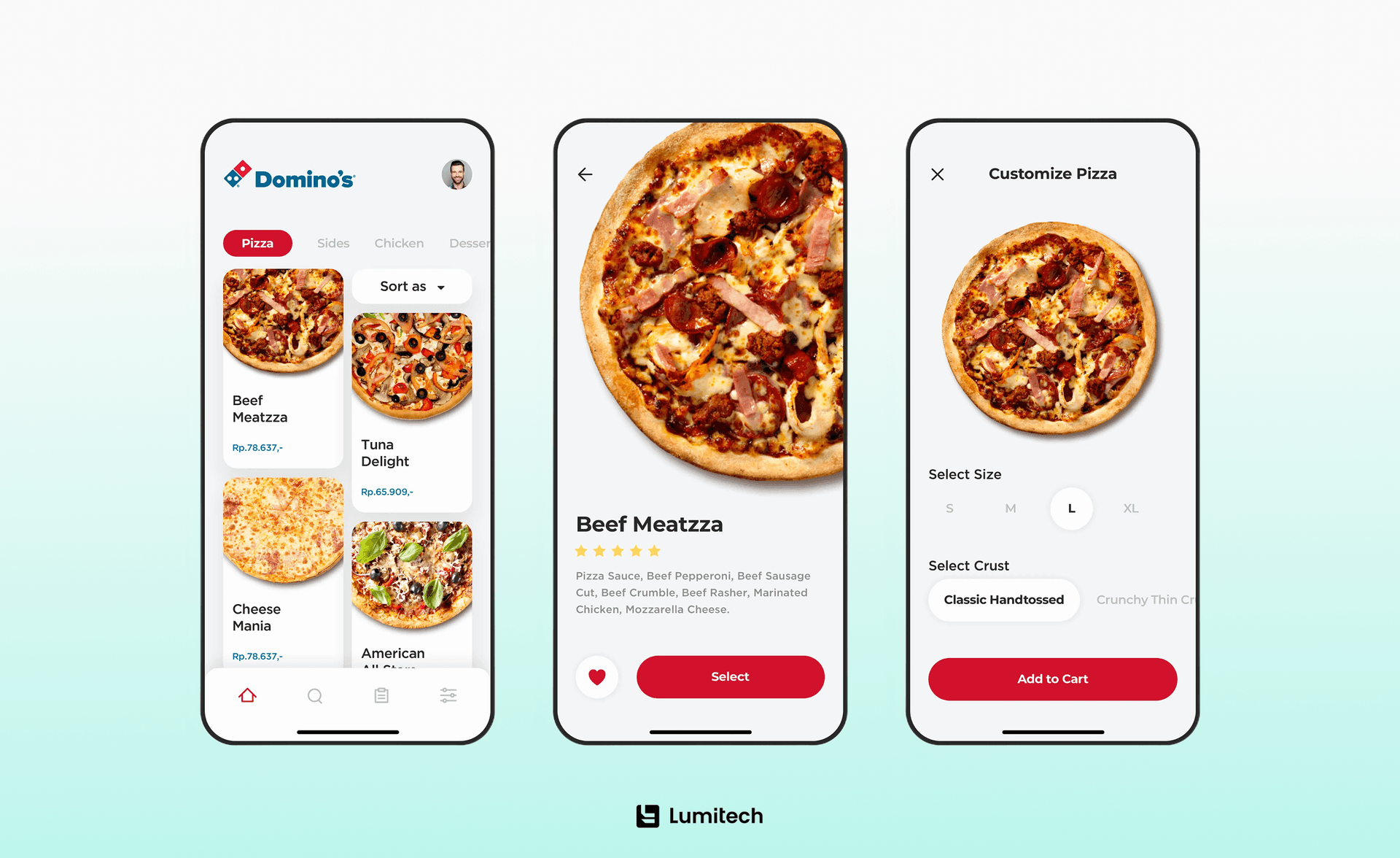
Domino’s reported that over 85% of U.S. retail sales in 2024 came from digital channels.
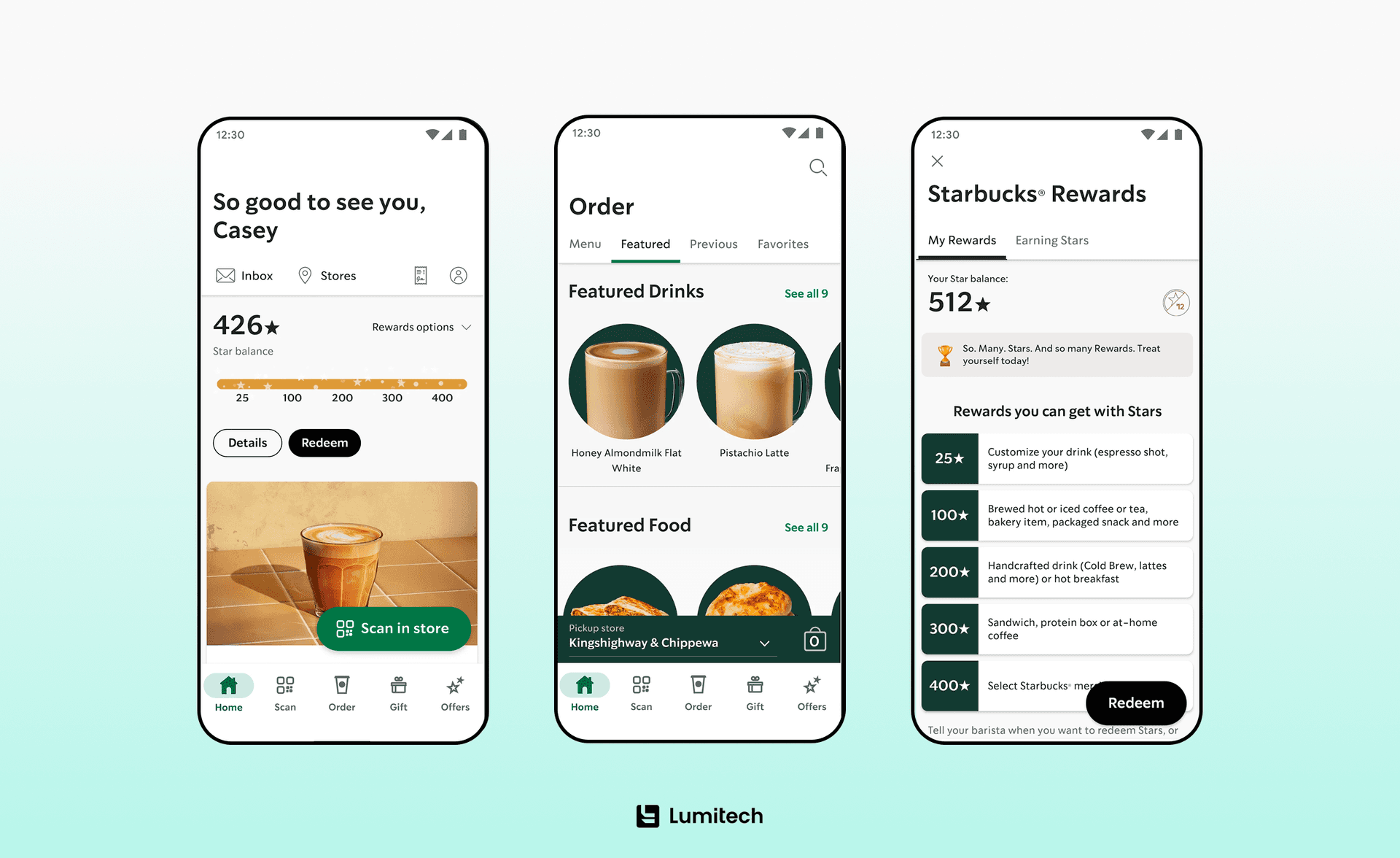
Starbucks publicly stated that mobile orders exceeded 30% of transactions in the U.S. (a record at the time).
Why is this important for B2B foodtech (analytics, supply chain, operational platforms)? Because even internal users already have expectations shaped by the best mobile app development services. They do not forgive extra clicks, overloaded tables without priorities, lags when filtering, and a lack of explanations and tips.
Providing Brizo with UI/UX design services, this was critical: the team worked with data every day, and the old tool was slow and inconvenient. That is why redesigning the UX and visual structure became one of the project’s key requirements.
From Orders to Decisions: Conversion in B2C vs. B2B UI/UX Design for FoodTech
There are two major product categories in foodtech, and their conversion rates differ. Let’s get deeper into this.
B2C/guests: orders, repeat purchases, loyalty.
Conversion = placed order/registration/return visit. The complex logic of e-commerce or, let’s say, UX design for loyalty and cashback platform, applies here: if it’s hard, the user leaves. Baymard reports a global average abandonment rate of ~70%. This is a reminder: any unnecessary friction in checkout or payments is a direct loss.
B2B/operations: speed of decisions, reduction of errors, trust in data.
Conversion = user took the right action quickly and confidently. For analytical and supply chain platforms, this could be:
found the right market segment in 30 seconds,
built a report without contacting the technical team,
discovered a supply problem before it hit sales,
went from data to solution without Excel export.
Brizo had a particular goal: outsource product discovery phase services and replace the legacy system with a modern, high-performance admin panel that makes working with data fast and intuitive.
FoodTech UI UX Design Best Practices: Designing with Domain Knowledge
Next, we will focus not on general trends or abstract foodtech UI design principles, but on practical UI solutions that directly affect conversion in foodtech products. We will analyze key approaches to designing interfaces for complex scenarios – data processing, analytics, search, filtering, and business decision-making – and show how these principles were implemented using the Brizo platform as an example. These secrets help transform the interface from a simple shell into a tool that delivers real results.
Secret #1: FoodTech UX Design does not Start with Beauty, but with the Context of the Tasks
Don Norman, the author of “The Design of Everyday Things” (MIT Press), describes his approach as focusing on designs that take human needs and psychology into account. He emphasizes that the problem is often not with the person but with the design that ignores human needs.

As a practical conclusion for UI/UX design for foodtech, before drawing screens, you need to record:
Who makes the decision (analyst, supply chain manager, sales, operations director)?
On what data is the decision based?
What is the cost of a mistake (money, reputation, downtime, product write-off)?
How often is the action performed (once a day or once a quarter)?
What are the conditions (on the go, in a warehouse, on a laptop in the office, under stress)?
How was it performed at Brizo? Lumitech worked side by side with Brizo’s internal team to design a solution for their real processes – with a focus on speed, credibility, and technical quality. We didn’t invent UI/UX design for foodtech out of thin air – we built on their existing design system and refined the UI based on feedback from analysts, sales, and leads.
Secret #2: Data-Driven Interface Design – Dashboards That Help Users Decide, Not Just Observe
Foodtech analytics and supply chain are always about dense tables, filters, dashboards, segmentations, and metrics that need to be read on the fly. The problem number one is that you have data that doesn’t speak. When the foodtech app design doesn’t tell you where the main thing is, users usually export to Excel, take screenshots, make decisions “by eye”, or even don’t trust the platform.
So, here are some principles that work in foodtech platform design (especially for dashboards) with a short set of “must-haves” for data interfaces:
Visual hierarchy: 1-2 main KPIs on the screen, the rest are support.
Progressive disclosure: first the answer, then the details (drill-down).
Clear names: not “GMV_7d”, but “Sales in 7 days”.
System status: what is being loaded, what is applied, which filters are active.
Comparison: trends, period-to-period, market vs. “you”.
Secret #3: Performance as UX – Why Speed Is a Core FoodTech App Design Feature
In foodtech, where large datasets are standard, performance is built into the design. If the filter takes 5 seconds to think, the user’s brain asks: “Is the data accurate?” Brizo is an excellent example of performance-first foodtech UI UX design best practices.
Brizo directly formulated the requirements: lightness, speed, low latency, and optimization of large amounts of data. Therefore, the project simultaneously worked on:
user experience design in foodtech solutions (less noise, more straightforward layout),
architectural solutions (how to process arrays),
approach to testing (to avoid breaking critical flows during changes).
Design techniques that really speed up the product in this case:
Skeleton screens and a sense of progress, instead of an empty spinner.
Optimistic updates where it is safe (for example, local filter settings).
Default smart presets (the most popular filters are already ready).
Caching results for repeated scenarios (frontend and backend).
Table virtualization and pagination when data density is high.
Secret #4: Navigation, Search & Filters as Core Conversion Drivers in UI Design for FoodTech
In most foodtech products, the key action is to find and narrow down. If search/filters are not obvious, the product does not fit into daily work.
What we see in successful B2B foodtech interfaces:
Filters are the first class of elements, not an additional menu.
There are visible active filters (chips/tags) + one-click reset.
There are saved segments (My saved views).
There is a comparison: market vs. chain, this period vs last period.
There is an explanation of metrics (tooltip/learn more) – this is trust.
Brizo’s core value was to transform complex market data into clear, strategic power for restaurant chain solutions. And it is the user interface design in foodtech that should make this power available in seconds.
Secret #5: Trust & Credibility – UX Patterns That Increase Confidence in Data
Foodtech platforms work with money-making decisions: where to open, what to sell, who to segment, and how to build a supply chain. If the foodtech UI/UX feels like an eternal beta, users intuitively devalue analytics.
Trust patterns that increase adoption:
System tone: clear messages, no “Oops”.
Audit trail: who made changes and when (for internal admins is a must).
Update date: “Data updated at …”
Correct empty states: “No data through filters X/Y. Try …”
Validations: it is better to prevent errors than to display them.
Brizo specifically emphasized credibility as a principle of cooperation and result.
Secret #6: UX Design for FoodTech as a Bridge Between Multiple Data Systems
In foodtech products, integrations are not just backend details; they are part of the user experience. Restaurant chains, suppliers, and analytical platforms work with dozens of data sources: POS systems, software solutions for restaurant management, inventory software, suppliers, third-party marketing, and market services. If the user does not understand where the data comes from and how much it can be trusted, even the most accurate analytics lose their value.
Why is a single source of truth critical for foodtech? Unlike many SaaS products, in foodtech, an error in data has a direct financial cost:
Incorrect market data can lead to an unsuccessful restaurant location.
Incorrect supply analytics – to overspending or product shortages.
Discrepancies between systems can erode trust among teams.
Therefore, foodtech platforms must not only aggregate data but also demonstrate their consistency. The user must see that the system is a single source of truth, not just another tool next to Excel.
What Leading Brands Teach Us About FoodTech UI/UX and Conversion
In foodtech, UX is not about aesthetics or a nice interface. It’s about measurable impact on business metrics: conversion rates, average check size, transaction speed, error reduction, and scalability. That’s why industry case studies from big players are especially valuable – they show how even minor foodtech UI/UX improvements can have a financial impact at scale.
Domino’s: UX as a Driver for Digital Sales
Domino’s has long positioned itself not only as a pizza brand, but also as a technology company. The company has publicly stated that over 85% of retail sales in the US are made through digital channels.
Behind this indicator is not a single feature, but years of investment in:
simplified order flow (minimum steps to checkout),
saved user preferences,
stable operation of mobile interfaces,
fast and predictable UX even during peak hours.
This case shows an important point for any foodtech product: when the interface reduces cognitive load, users return to you and use the service more often. The same rule works in B2B analytics – but instead of orders, the frequency of platform use increases.
Starbucks: When UX Creates Habit
Starbucks is another prime example of how a well-designed interface shapes user behavior. Mobile ordering in the US has exceeded 30% of all transactions, made possible by a simple, predictable, and fast UX.
But this case is also important from another perspective: Starbucks openly admitted that the growth of mobile UX creates operational challenges (staff workload, delivery queues). This is a key lesson for UI design for foodtech: an interface cannot exist in a vacuum. It must align with real processes – otherwise, the business impact will be short-term.
Olo and B2B FoodTech: Small UX Changes, Big Impact
In B2B foodtech, UX solutions rarely look “wow” on the surface, but they often have the most significant financial impact. For example, on platforms for restaurant chains (like Olo), even a 1-2% increase in conversion after changes to the order flow or admin interface can mean millions of dollars for a large chain.
Here, UX affects:
the speed of operations,
the number of staff errors,
the willingness of teams to use the system, rather than bypass it with third-party tools.
Brizo Case Study Focus
The Brizo FoodMetrics case is a good illustration of how UX in B2B foodtech is becoming a strategic asset. The client’s request was explicit: replace an outdated, slow tool with a modern, high-performance platform that allows working with large volumes of market and supply chain data without frustration.
The focus was on:
improved UX and visual hierarchy,
speed of working with data,
understandable dashboards and filtering,
UI design for foodtech consistency.
This led the platform to become a daily work tool, not “another report”. As a result, the product's maturity, including at the UI level, became one of the factors that strengthened Brizo’s position in the market and contributed to the company's further development and growth.
Want to make complex data intuitive and actionable through design? Discover the strategic UI decisions behind Brizo’s analytics platform.

How We Approached UI at Brizo: Practical Lessons for FoodTech Design
This block contains no secret details, but principles and solutions that can be seen from the case and are helpful for any foodtech product.
1. We started with a problem, not with mockups.
Brizo’s request was explicit: the old tool was slow and clunky, working with data was like a chore, and a modern admin panel was needed. That is, the UX design for foodtech was not beautiful; it was a pain point.
2. We used the design system as a basis and made it more operationally convenient.
We used their design system as a foundation and then refined the UI based on feedback from internal teams. This is super important for B2B conversion: a system without real UX design for foodtech tuning often turns into a beautiful shell for pain.
3. Worked in short cycles and constantly showed progress.
Agile with regular demos and rapid iterations = less risk of making the perfect interface for the wrong tasks.
4. Made the product ready for growth.
Brizo demanded scalability, and the result was a platform that became an essential factor in operational maturity before the acquisition.
Tools and Processes Behind High-Converting FoodTech UI
Below is a practical stack for the design team (and what it gives).
Research and validation
Interviews + observations (how people actually work with data/orders).
Jobs-to-be-Done to capture “what exactly the product is hired to do”.
Customer journey maps to identify friction points.
Short usability sessions on prototypes (especially on filters/dashboards).
Design and prototyping
Figma + components (foodtech digital design system, libraries, state variants).
FigJam / Miro for discovery artifacts.
Prototypes for complex scenarios: filtering, comparison, drill-down, export.
Conversion and behavior testing
Product analytics (events: filter application, report creation, export, “save view”).
Heatmaps/session recordings for B2C flows (order, checkout).
Performance monitoring (especially for data-heavy UI).
“Anti-chaos” in development
Design QA: pixel-perfect isn't the main thing here; the main things are states, errors, and speed.
Food app UX design writing: short explanations, system tone, hints to metrics.
Accessibility basics: contrast, focus, and readability are also conversion.
Checklist: 15 UI Patterns That Drive Conversion in FoodTech Products
Below are proven UI patterns that most often impact conversion, speed, and adoption in foodtech products. These techniques are especially effective for platforms with data, operational processes, and complex user scenarios, such as reward platform development for instant cashback.
1. One main CTA
A clearly defined key step on the screen helps the user make decisions faster and reduces confusion.
2. Visible active filters
The user immediately understands how the data or results were formed and is less skeptical of the analytics.
3. Quick filter reset
Enables frustration-free return to the baseline when working with large datasets.
4. Saved views or segments
Saves time for teams that regularly work with the same datasets or scenarios.
5. Metric explanations (tooltips)
Helps interpret metrics correctly and increases confidence in data-driven decisions.
6. Comparing periods and segments
Provides context and lets you see trends, deviations, and growth points more quickly.
7. Skeleton screens instead of blank screens
Creates a sense of speed and reduces stress during data loading.
8. Empty states with hints
Explains to the user what to do next if there is no data or restrictive filters are applied.
9. Search with auto-hints
Significantly speeds up navigation in large lists, databases, and catalogs.
10. Smart default settings
Allows you to get value from the product immediately, without complex initial configuration.
11. Validation before submission
Prevents errors before they occur, reducing the number of technical and operational failures.
12. Straightforward navigation: “Where am I now?”
Helps the user navigate complex admin interfaces and multi-level structures.
13. Data relevance indicators
Show when the information was last updated and build trust in analytics.
14. Quick actions and bulk actions
Increase efficiency with large amounts of data and repetitive operations.
15. Performance optimization as part of UX
The speed of the interface directly affects the perception of product quality and the desire to use it regularly.
Summing Up
Foodtech products operate in a complex environment: large volumes of data, high operational risks, fierce competition, and users who expect fast, understandable solutions. In such a context, the interface ceases to be just a visual shell – it becomes a key tool for conversion, trust, and business scaling.
Industry examples and the Brizo FoodMetrics case study show that UI, designed with real-world scenarios, productivity, and data transparency in mind, directly affects financial results. A clear hierarchy, speed, understandable filters, visible integrations, and a single source of truth help teams make decisions faster and more confidently, and the product becomes part of daily processes rather than an additional tool.
The main conclusion is simple: foodtech UI that converts is a design that delivers results. It reduces friction, strengthens trust in data, and transforms complex systems into intuitive working tools. It is this approach that allows products to grow, scale, and create long-term business value in the competitive foodtech industry.


